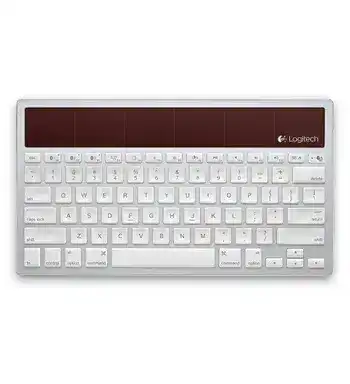
When a Mac, iPad, or iPhone stops finding the keyboard, the Logitech Wireless Solar Keyboard K760 Driver page provides the software and setup guidance needed to restore its Bluetooth connection. The K760 does not use a USB receiver or charging cable. It connects through Bluetooth, stores three paired Apple devices, and draws power from indoor or natural light.
Many typing failures come from an expired Bluetooth pairing, a nearly empty internal battery, or the wrong device key being active. Software matters mainly for supported Mac shortcuts and special key behavior. Normal letters, numbers, volume controls, and media commands rely on the operating system’s Bluetooth keyboard support rather than a separate receiver utility.
Logitech Wireless Solar Keyboard K760 Windows Driver Download
| Driver Name | Description | Supported OS | File Size | Download |
|---|---|---|---|---|
| Logitech Options | Customizes keyboard shortcuts, function keys, and device-specific settings. | Windows 11, Windows 10 32-bit/64-bit | 245.76 MB |
Logitech Wireless Solar Keyboard K760 Mac OS Driver Download
| Driver Name | Description | Supported OS | File Size | Download |
|---|---|---|---|---|
| Logitech Options | Manages keyboard shortcuts, key behavior, and supported device preferences. | macOS 15, macOS 14, macOS 13, macOS 12, macOS 11 | 238.52 MB | |
| Logitech Options Driver | Provides keyboard customization controls and device settings for compatible macOS releases. | macOS 11.0, macOS 10.15, macOS 10.14 | 239.23 MB | |
| Logitech Options Driver | Enables shortcut configuration and device-specific keyboard preferences on older macOS versions. | macOS 10.14, macOS 10.13, macOS 10.12, macOS 10.11 | 62.34 MB |
Choose the download that matches the Mac
Use only software listed for the installed macOS version. The original Logitech software for this model was created for older Mac releases, so a current system may reject it or run only part of its control panel. Do not install Unifying Software, Logi Bolt software, SetPoint, or a receiver pairing utility because the K760 has no USB dongle.
The Logitech Wireless Solar Keyboard K760 Driver package is most relevant when Launchpad or another supported Mac function does not react as expected. If ordinary typing also fails, repair the Bluetooth connection first. Additional software cannot communicate with a keyboard that the computer has not paired successfully.
Rebuild a Bluetooth Pairing That No Longer Connects
Remove the saved K760 entry before pairing again
A keyboard may appear in Bluetooth settings while refusing to type. Delete the existing Logitech K760 record from the Mac or iOS Bluetooth list, turn the keyboard off, and restart the Apple device. Turn the keyboard on again only after Bluetooth has fully restarted. This clears an old security record that can block a new connection even though the product name remains visible.
Press the Bluetooth connect button on the back of the keyboard. The three Bluetooth-key lights should flash rapidly. Press key 1, 2, or 3 to select the slot that will hold the new pairing. The chosen light continues flashing, and the keyboard remains discoverable for about three minutes. Select Logitech K760 from the Apple device’s Bluetooth menu before that period ends.
Enter the pairing code on the physical keyboard
Some systems display a numerical code during setup. Type that code on the K760 itself and press Return or Enter. Do not enter it through an on-screen keyboard unless the system specifically asks for that method. A connection can look incomplete when the code was typed but never confirmed with the final key press.
If the pairing screen closes too quickly, start the process again rather than repeatedly clicking the saved device name. Press the rear connect button, choose the intended Bluetooth slot, and wait for the selected light to blink. The Logitech Wireless Solar Keyboard K760 Driver cannot complete this hardware pairing step on its own.
Use a different Bluetooth slot when one will not reset
Each of the three numbered keys remembers a separate Apple device. A slot may still contain an earlier Mac, iPad, or iPhone assignment. Pair the current device to another numbered key to check whether the first slot holds stale information. Once the keyboard works through the new slot, reassign the old one later by repeating the rear-button pairing process.
Only one paired device can receive typing at a time. Pressing a numbered key changes the active connection. Its light first blinks slowly while reconnecting, then stays solid briefly after the link succeeds. When the keyboard suddenly stops responding after a device switch, press the key assigned to the computer currently in use.
Logitech Wireless Solar Keyboard K760 Software and Apple Key Behavior
Mission Control does not open
The Mission Control key was designed around specific versions of Mac OS X. On a compatible older system, open the Keyboard Shortcuts area in System Preferences, locate Mission Control, and restore its default shortcuts. Another application or a custom shortcut may have taken the same key assignment, leaving the physical key functional but attached to no usable command.
On Mac OS X Leopard or Snow Leopard, the dedicated Mission Control action is not supported because that feature belongs to later system software. The key can instead be assigned to Exposé through the Keyboard Shortcuts controls. Modern macOS releases use different shortcut menus, and the original K760 control software may not expose every historical assignment.
Launchpad and the multifunction key act differently
The multifunction key changes purpose according to the connected device. On a Mac it can open Launchpad when the required Logitech software and operating-system support are present. On an iPad or iPhone, the same position may perform a Home-related function instead. A key that behaves correctly on one device may therefore produce a different action after switching Bluetooth channels.
Check which numbered Bluetooth key is active before diagnosing a missing shortcut. The keyboard may have reconnected to an iPad sitting nearby while the user expects commands to reach the Mac. Select the Mac’s assigned channel, wait for the solid confirmation light, and test the shortcut again.
Brightness keys change nothing
The screen-brightness controls were intended for compatible Mac computers and Apple displays. They may not control third-party monitors, televisions, remote-desktop sessions, or displays whose brightness is managed through separate hardware buttons. Test the keys on the Mac’s built-in display before treating the keyboard as faulty.
Open the Mac keyboard preferences when the top row produces standard F-key commands rather than media or brightness actions. The setting that changes whether F1 through F12 behave as normal function keys can reverse the expected result. Hold the Fn key where appropriate, or change the system preference to match the way those controls are used most often.
Restore Power Without a Cable or Replaceable AA Batteries
Read the battery-status light correctly
Press the battery-check key after turning the keyboard on. A green flash means the internal batteries have enough charge. A red flash indicates a low level, while no flash can mean the charge has fallen too far for a clear response. The K760 uses internal rechargeable batteries fed by its solar cells, not ordinary AA or AAA cells.
Place the keyboard in bright room light or sunlight for at least an hour when the status light is red or silent. Logitech recommends several hours of normal room light each day for ongoing charging. The keyboard can remain in use while it receives light, although a deeply discharged unit may need time before Bluetooth pairing becomes dependable again.
Clean the solar strip without soaking the keyboard
Dust, fingerprints, or objects resting across the solar cells reduce the light reaching them. Turn the keyboard off and wipe the solar area with a soft, lightly dampened cloth. Dry the surface before switching the unit on. Do not spray cleaner directly onto the panel or let moisture run between the keys.
Desk position also matters. A keyboard stored under a shelf, monitor stand, cover, or closed desk can slowly lose charge even when the room seems bright. Move it into open light during the day. Direct sunlight can provide a faster recovery, but avoid leaving the keyboard where excessive heat builds behind glass.
The keyboard powers on but disconnects after sleep
First press the numbered Bluetooth key assigned to the active Apple device and allow a few seconds for reconnection. If nothing happens, cycle the power switch off and on. Restart Bluetooth on the Mac, iPad, or iPhone only when the keyboard still fails to wake. Re-pairing should come after these quicker checks, not before them.
A low internal charge can resemble a sleep problem because the status lights briefly respond while the radio cannot maintain a connection. Check the battery light immediately after a failed wake attempt. Recharge in stronger light when the indicator turns red or remains dark, then test the same Bluetooth slot again.
When Typing Is Incomplete, Delayed, or Sent to the Wrong Device
Letters repeat or appear several seconds late
Turn off nearby Bluetooth devices that are not needed during the test and move the Mac or iOS device within a normal desk distance. Heavy wireless activity, a crowded Bluetooth list, or a system that is still reconnecting several peripherals can delay keystrokes. Restart the Apple device if the lag continues across every application.
Test in a local document rather than through screen sharing, remote access, or a browser-based workspace. Network delay can resemble keyboard lag. When local typing responds immediately but a remote session does not, the K760 connection is probably working and the delay lies in the application or network path.
A few keys fail while the rest still type
Compare the affected keys in more than one program and on another paired Apple device. A shortcut conflict, keyboard layout, accessibility option, or application command can disable a key without indicating hardware damage. Check the selected input language as well, particularly when punctuation produces unexpected characters.
Turn the keyboard off before removing loose debris around a key. Use gentle air and a soft brush rather than liquid or sharp tools. If the same physical key fails on every Bluetooth channel and every device, software replacement is unlikely to repair it. That pattern points to a worn key mechanism or an internal contact problem.
Typing suddenly goes to an iPad or iPhone
The three device keys make switching fast, but an accidental press can redirect all input. Select the key assigned to the Mac and watch its light. Slow blinking means the keyboard is trying to reconnect; a short solid light confirms the active link. Avoid pressing another numbered key until that connection finishes.
Rename paired devices in the operating system when several Logitech keyboards appear with similar names. Remove entries that no longer belong to equipment in use. Keeping a clear Bluetooth list makes it easier to identify the K760 during recovery and reduces the chance of rebuilding the wrong pairing.
Finish With the Correct Channel, Charge, and Shortcut Assignment
After installing the Logitech Wireless Solar Keyboard K760 Driver or compatible Mac software, confirm ordinary typing before testing Launchpad, Mission Control, brightness, media, and eject functions. Special keys depend on the active Apple device, its operating system, and the shortcut assignments stored there. A successful Bluetooth connection does not guarantee that every historical Mac command remains supported.
Leave the keyboard where its solar cells receive regular room light, remember which Apple device belongs to each numbered key, and remove stale Bluetooth records when reconnection fails. Those three checks solve more K760 problems than installing unrelated Logitech utilities. The keyboard requires Bluetooth pairing and light-powered charging, so receiver tools, disposable-battery advice, and USB connection fixes do not apply.