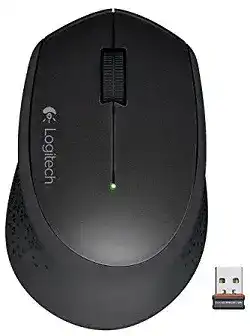
A quiet office mouse can look completely dead when its small receiver is loose, hidden in a bad USB spot, or paired with the wrong device, so the Logitech WIRELESS MOUSE M320 Driver page should start with the wireless path before software. This model is a 2.4 GHz USB receiver mouse with a regular vertical scroll wheel, left and right buttons, a scroll-wheel button, optical tracking, and one replaceable AA battery. It does not need Bluetooth setup, gaming software, tilt-wheel settings, or charging tools.
Logitech Wireless Mouse M320 Windows Driver Download
| Driver Name | Description | Supported OS | File Size | Download |
|---|---|---|---|---|
| Logitech Options 64-bit | Customize mouse buttons, pointer behavior, scrolling, shortcuts, and device settings for supported Logitech mice. | Windows 10 64-bit, Windows 8 64-bit, Windows 7 64-bit | 187.71 MB |
Logitech WIRELESS MOUSE M320 Driver When the Nano Receiver Is the Problem
The M320 uses a small USB nano receiver, and that receiver is part of the working pair. Windows, macOS, Linux, and ChromeOS can usually read the mouse without a large installer, but the computer still needs a stable receiver connection. If the pointer does not move, do not begin with Bluetooth menus because this mouse does not connect that way.
Plug the receiver directly into a USB port, switch the mouse on from the bottom, and wait a few seconds before moving it. A port that works for a flash drive can still be a poor place for a wireless mouse receiver if the port sits behind a monitor, beside a hard drive cable, or inside a loose hub.
Receiver is missing or mixed with another Logitech mouse
A lost receiver is one of the hardest M320 problems because the mouse cannot simply connect to any small Logitech dongle. Check the receiver type and the markings on the mouse before buying a replacement. If the receiver does not match the product family, the computer may detect a USB device while the mouse still stays silent.
For this model, avoid guessing from size alone. Many Logitech receivers look similar from the outside. Use the model number inside the battery compartment and the receiver marking to decide whether a replacement receiver can work with your exact unit. If the mouse came with a non-reprogrammable receiver, a random spare receiver will not fix it.
Receiver works for a moment and then drops
When the pointer appears for a few seconds and then stops, remove the receiver, turn the mouse off, and take out the AA battery for a short reset. Put the battery back in, switch the mouse on, and plug the receiver into a different direct USB port. This clears a simple wake or handshake failure without changing system files.
If the drop happens mostly on a desktop PC, test a front USB port or a short USB extension cable. The goal is to bring the receiver into open space, not to add a complicated hub. A clearer receiver position often fixes hesitation, missing clicks, and slow wake behavior.
M320 Power Checks Before Reinstalling Anything
The M320 runs on one AA alkaline battery and has an on/off switch. A low battery can create symptoms that look like a driver failure: the pointer freezes, the scroll wheel misses movement, or the device wakes only after several attempts. Replace the battery first when the mouse has been stored, dropped, or used for many months.
Battery direction matters on this design because the compartment is compact. Open the cover, check the plus and minus ends, and press the battery into place firmly. If the spring or contact looks dirty, wipe it gently with a dry cloth. Do not use liquid cleaner inside the compartment.
Battery was changed but the mouse still will not turn on
A new battery does not always mean a good connection. The contact spring can sit slightly flat after long use, or the battery can fail to touch both ends cleanly. Remove the battery, inspect the ends, and reseat it. Then move the power switch off and on again instead of only shaking the mouse.
If the power light behavior changes after you press the battery cover, the problem is mechanical contact rather than software. Keep testing with a known good battery before downloading another utility. A receiver-based mouse cannot respond if the mouse itself is not powered consistently.
Mouse sleeps and does not wake quickly
The M320 saves power when idle. A small pause after sleep can be normal, but a long delay usually points to weak battery power or a poor receiver position. Replace the AA battery, move the receiver into a clearer USB port, and test the mouse on a plain desk surface or mouse pad.
Do not judge the wake issue while several wireless devices sit beside the receiver. Move phones, external drives, and thick metal stands away during testing. If the pointer wakes normally after that, the mouse did not need a new driver package.
Logitech WIRELESS MOUSE M320 Software and Detection Limits
The Logitech WIRELESS MOUSE M320 Driver is different from a large customization suite for advanced buttons. This model has standard left and right buttons, a regular scroll wheel, and a wheel click. Some units were listed with Logitech Options support at release, while another hardware version did not require extra software. That means the best download choice depends on whether the software actually recognizes your unit.
If your operating system already moves the pointer and registers clicks, the core connection is working. Install Logitech software only when you need device detection help, receiver checking, or available basic mouse controls. Reinstalling several Logitech apps on top of each other can make a simple receiver mouse harder to diagnose.
Logitech software opens but does not show the M320
When the control app does not show the mouse, check whether the receiver appears in the operating system first. If the receiver is not seen at all, software cannot add the mouse. Change the USB port, restart the computer, and test again before removing drivers.
If the receiver appears but the mouse does not respond, remove older Logitech utilities you no longer use and restart. Then connect only the M320 receiver while testing. This prevents another saved Logitech device from confusing the setup screen.
Windows detects it as a normal HID mouse
That is not automatically wrong. The M320 can work through standard mouse support for pointer movement, left click, right click, wheel scroll, and wheel click. A plain HID listing becomes a problem only if the mouse does not respond, the receiver keeps dropping, or the wheel and clicks fail in every program.
For a plain HID listing with no movement, remove the receiver from Device Manager only after trying the simple hardware checks. Restart, plug the receiver back in, and let Windows load the device again. Avoid registry edits or unofficial patches for this kind of mouse.
Wheel, Click, and Pointer Symptoms That Look Like Driver Faults
The regular scroll wheel on the M320 has vertical scrolling and a wheel button. It does not have left-right tilt, so missing horizontal wheel control is not a driver error for this model. If an app expects tilt scrolling, use the app’s scrollbar or keyboard shortcut instead of trying to enable a feature the hardware does not provide.
Scrolling jumps or misses lines
Scroll trouble can come from dust around the wheel, app-specific scroll settings, or the system line-scroll value. Turn the mouse off and blow gently around the wheel gap. Roll the wheel several times while the mouse is off, then turn it back on and test in more than one program.
If the wheel scrolls too many lines at once, adjust the operating system mouse wheel setting. If it scrolls unevenly only in one program, check that program’s own scroll behavior. The Logitech WIRELESS MOUSE M320 Driver should not be treated as the only cause when the wheel works normally elsewhere.
Wheel click does not open links
The wheel button should act as a middle click in many browsers and applications. Press straight down on the wheel instead of pressing while rolling it. If links still do not open, test middle click in a second browser or another program that uses wheel-click panning.
A failed wheel click in every program may be physical wear. A failed wheel click in only one app usually comes from that app’s shortcut handling. Keep those two cases separate so you do not uninstall working software for a worn switch or a browser setting.
Single clicks become double clicks
Double-click behavior can be caused by Windows click-speed settings or by wear in the switch. Slow the double-click speed in the operating system settings and test again. If the mouse still double-clicks when you press once slowly, the switch may be bouncing and software will not fully repair it.
Before calling it hardware failure, test the M320 on another computer with the same receiver and battery. If the double-click follows the mouse, the issue is inside the device. If it disappears, the first computer had a setting, app, or device profile problem.
Pointer Movement on Desks, Mats, and Busy USB Areas
The M320 uses optical tracking with a maximum 1000 DPI level and does not offer hardware DPI switching. If the pointer feels too fast, too slow, or shaky, adjust the operating system pointer speed and test the surface. Glossy glass, reflective tables, and patterned fabric can make optical movement uneven.
Use a matte mouse pad or plain paper for a quick tracking test. If movement becomes steady there, the desk surface was the issue. If it still jumps, check the receiver position and battery power again because both can make tracking feel unstable even when the sensor is clean.
Pointer pauses while typing or using other USB devices
A small wireless receiver can struggle when it sits close to several active USB devices. External drives, USB 3 adapters, and crowded hubs can add noise or physical blocking. Move the receiver away from those items and test the pointer with slow diagonal movement.
The most useful fix is often boring: a direct USB port with open space around it. Once the pointer moves evenly, keep that receiver position and avoid swapping it between ports every day. Constant port changes can make the computer reload the device more often than needed.
Finish the M320 Setup Around Its Simple Hardware
The M320 works best when the setup stays matched to its design: one AA battery, one small USB receiver, standard clicks, regular wheel scrolling, and optical tracking. Do not chase Bluetooth pairing, tilt-wheel controls, rechargeable battery tools, or gaming profiles because those do not belong to this model.
Use the Logitech WIRELESS MOUSE M320 Driver only after the receiver, battery, USB port, and surface checks are done. If the mouse moves but only one program behaves badly, fix that program’s mouse settings. If the mouse fails on every computer with a good battery and the correct receiver, the fault is more likely receiver loss, receiver mismatch, or worn hardware than a missing download.