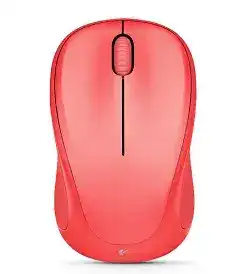
A silent receiver can make this compact mouse look dead even when the power switch and battery are fine, so the Logitech WIRELESS MOUSE M317 Driver page should focus first on the USB wireless path. The M317 uses a small USB receiver connection, not a cable, and the computer usually loads normal mouse control as soon as the receiver and mouse can talk to each other.
This Logitech model is a simple travel-size wireless mouse with left and right buttons, a scroll wheel with middle-click behavior, an on and off slider, a low-battery light, and one AA battery. Its main software need is not heavy customization. The useful part is receiver recognition, Unifying pairing recovery, and fixing cases where the pointer does not respond after the dongle has been moved, lost, replaced, or plugged into a poor USB position.
When Windows or macOS detects the receiver but the pointer stays still, start with the physical link before changing software. Turn the mouse off, wait a few seconds, switch it back on, and watch whether the battery light gives any sign of power. Then place the receiver directly in the computer instead of a dock, monitor hub, keyboard port, or extension block.
Logitech Wireless Mouse M317 Windows Driver Download
| Driver Name | Description | Supported OS | File Size | Download |
|---|---|---|---|---|
| Logi Bolt App Smart Installer | Smart installer for managing compatible Logitech wireless devices; internet access is required during installation. | Windows 11, Windows 10 32-bit/64-bit | 33.11 MB | |
| Logitech Unifying Software | Utility for pairing and managing Logitech Unifying receivers used with compatible wireless mice and keyboards. | Windows 11, Windows 10 32-bit/64-bit | 3.96 MB | |
| SetPoint 32-bit | Full offline SetPoint package for mouse button settings, tracking speed, hot-keys, and device-specific controls. | Windows 11, Windows 10 32-bit, Windows 8 32-bit, Windows 7 32-bit | 78.04 MB | |
| SetPoint 64-bit | Complete offline SetPoint installer for battery status, Caps Lock, Num Lock, and advanced mouse configuration. | Windows 11, Windows 10 64-bit, Windows 8 64-bit, Windows 7 64-bit | 80.45 MB | |
| SetPoint Smart Installer | Small SetPoint web installer for device-specific settings and mouse controls; internet is required during setup. | Windows 11, Windows 10 32-bit/64-bit, Windows 8 32-bit/64-bit, Windows 7 32-bit/64-bit | 4.61 MB |
Logitech Wireless Mouse M317 Mac OS Driver Download
| Driver Name | Description | Supported OS | File Size | Download |
|---|---|---|---|---|
| Logi Bolt App | Mac software for managing supported Logitech wireless devices and checking device connection settings. | macOS 12, macOS 11, macOS 10.15 | 54.96 MB |
Receiver shows up but the mouse does nothing
The M317 can fail at the handoff between receiver detection and device pairing. In that situation, the operating system may see a USB input receiver while the mouse itself remains unpaired. The fix is to run the Logitech Unifying pairing utility or the matching Logitech software, start the pairing screen, then power-cycle the mouse only when the utility asks for it.
Do not assume every small Logitech dongle will work. The M317 belongs with a compatible Unifying receiver, and a non-matching nano receiver can fit into the USB port while still refusing to pair. Check for the Unifying mark on the receiver and keep the mouse close to the computer during the pairing attempt.
Repair the Receiver Link Before Reinstalling Everything
Many M317 failures come from the receiver path, not from a missing Windows or Mac system file. The Logitech WIRELESS MOUSE M317 Driver should be treated as a recovery aid after the simple connection checks are done. Reinstalling software first can waste time when the receiver sits in a low-power hub or the AA cell is not making firm contact.
If the pointer works for a moment and then freezes, change the USB position before you remove software. A front or side port on a laptop or desktop often gives the receiver a clearer line to the mouse. Metal desk frames, crowded ports, external drives, and thick monitor docks can also make a short-range wireless mouse behave like it has a failing driver.
When a replacement receiver will not pair
A lost receiver is a common problem with the M317 because the dongle is small and often travels with a laptop. A replacement must be compatible with Logitech Unifying pairing. After inserting the receiver, open the pairing tool, remove any failed pairing attempt if the utility shows one, and pair the mouse again from an off-and-on restart.
If the utility can see the receiver but never catches the mouse, check power next. Slide the battery door open, make sure the AA cell touches both contacts cleanly, and wipe light dust from the compartment with a dry cloth. Corrosion, weak pressure on the spring contact, or a nearly drained cell can interrupt pairing at the exact moment the utility is listening.
Mac Keyboard Assistant appears after plugging in the receiver
On some Mac systems, a keyboard identification window can appear when the receiver is inserted. The M317 is still a mouse. Close that window and test pointer movement instead of following keyboard setup prompts. If the cursor does not move afterward, unplug the receiver, restart the Mac, and insert the receiver again without opening unrelated input setup screens.
Logitech WIRELESS MOUSE M317 Software for Pairing, Wheel Clicks, and Basic Control
The M317 does not need gaming software, profile memory, lighting control, or a special wired-device package. Its control path is simple: the system handles normal movement and clicks, while Logitech software is useful when the receiver must be paired again or when the wheel click behaves differently in one program than it does in another.
The Logitech WIRELESS MOUSE M317 Driver can also help separate a software issue from a physical one. If the mouse moves normally but the wheel press does not act as expected, try the middle-click in two different programs. Some apps use the wheel button for scrolling, tab actions, or application-specific commands, so one bad result does not prove the mouse has failed.
Scroll wheel moves the page badly or stops responding
Start with the wheel area. Dust around the wheel slot can make scrolling jump, reverse briefly, or stop in one direction. Turn the mouse off, remove the AA cell, and roll the wheel several times while blowing loose dust away. Avoid liquid cleaner near the wheel because residue can make the encoder worse.
After cleaning, test scrolling in a plain document and a web page. If one app scrolls normally and another does not, adjust that program’s scrolling behavior or mouse preference instead of changing the receiver pairing. If both apps fail, restart the computer with the receiver already inserted so the operating system rebuilds the input session from a cold start.
Middle click does not match what you expect
The scroll wheel can be pressed as a middle button, but the result depends on the application. In a browser it may open or close tabs, while in another program it may pan, auto-scroll, or do nothing. Use the Logitech utility only if the system sees the mouse and you need to confirm the wheel button rather than repair the receiver.
Pointer Movement Problems on a Small Wireless Mouse
The M317 is often used on compact desks, laptop trays, fabric surfaces, and shared work tables. That makes pointer trouble easy to misread. A cursor that drifts, jumps, or slows down may come from the surface below the optical sensor, the receiver position, or a speed setting that changed after an operating system update.
Try a plain mouse pad or a matte sheet of paper before changing the driver package. Shiny tabletops, glass, patterned fabric, and uneven desk grain can confuse optical tracking. If the pointer improves on a dull surface, keep the software as it is and fix the work surface instead.
Pointer delay after waking the computer
The M317 uses power saving behavior, so a short pause after sleep is not always a fault. Click once or move the mouse for a second, then wait briefly before removing the receiver. If the delay grows longer over time, turn the mouse off when storing it in a bag and install a new AA cell before testing again.
A wake problem that appears only after laptop sleep may clear after the receiver moves to another USB port. Some computers reduce power to certain ports during sleep. Leaving the receiver in a port that wakes correctly can stop the daily unplug-and-plug habit that eventually loosens the dongle or the port.
Clicking works but the pointer still feels wrong
Open the system mouse settings and check pointer speed before blaming the Logitech package. A Windows update, a new user profile, or accessibility setting can change tracking speed without touching the receiver. Set the speed to the middle range first, test the mouse on a normal surface, then fine-tune only after the motion feels steady.
Power, Storage, and Receiver Habits That Keep the M317 Usable
Because the M317 is a small portable device, the receiver and battery are the two parts most likely to cause repeat problems. Keep the receiver with the mouse when it travels, use the internal storage space when available, and avoid mixing it with other Logitech dongles that belong to different devices.
The low-battery light gives an early warning, but it does not catch every weak contact. If the mouse cuts out when it is tapped or lifted, open the compartment and check that the AA cell sits firmly. A clean contact and a solid battery fit can solve a dropout that looks exactly like a receiver or software issue.
Use the Logitech WIRELESS MOUSE M317 Driver only after the receiver, power switch, AA battery, and surface checks make sense. For this model, the best setup is usually a direct USB receiver connection, a compatible Unifying pairing path, clean battery contacts, and a wheel that has been checked in more than one program.
Leave the receiver matched and the setup stays simple
The M317 works best when the same compatible receiver stays paired with it. If the mouse is moved between computers, move the receiver with it instead of trying different spare dongles. That habit prevents most repeated pairing failures and keeps the device acting like the simple travel mouse it was meant to be.