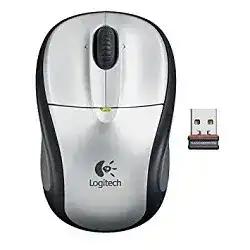
A laptop may notice the tiny USB receiver while the cursor stays frozen, which is why the Logitech Wireless Mouse M305 Driver page should start with the radio link, not with Bluetooth menus. The M305 is a compact 2.4 GHz wireless optical mouse for notebooks, powered by one AA battery and used with its small USB receiver.
This model is not a Bluetooth mouse, not a Logi Bolt device, and not a gaming mouse. It does not need G HUB, USB-C charging tools, RGB software, or profile memory. The useful software path stays with SetPoint, Logitech Control Center on older Mac systems, and the connection utility for supported non-Unifying receiver recovery.
The M305 has a simple three-button layout with left click, right click, and a pressable scroll wheel. Some packages and software may expose extra wheel assignments or movement settings, but the repair should stay grounded: receiver detection, battery contact, optical tracking, scroll-wheel response, and basic button behavior.
Logitech Wireless Mouse M305 Windows Driver Download
| Driver Name | Description | Supported OS | File Size | Download |
|---|---|---|---|---|
| SetPoint 64-bit Software | Full offline SetPoint package for configuring mouse buttons, tracking speed, hot-keys, and device-specific settings. | Windows 11, Windows 10 64-bit, Windows 8 64-bit, Windows 7 64-bit | 80.45 MB | |
| SetPoint 32-bit Software | Offline SetPoint installer for adjusting mouse controls, pointer behavior, battery status, Caps Lock, and Num Lock alerts. | Windows 11, Windows 10 32-bit, Windows 8 32-bit, Windows 7 32-bit | 78.04 MB | |
| SetPoint Smart Installer | Compact SetPoint installer for mouse button settings and device controls, with internet required during installation. | Windows 11, Windows 10 32-bit/64-bit, Windows 8 32-bit/64-bit, Windows 7 32-bit/64-bit | 4.61 MB | |
| Logitech Connection Utility | Utility for restoring the wireless receiver connection when the mouse is not pairing or responding correctly. | Windows 11, Windows 10 32-bit/64-bit, Windows 8 32-bit/64-bit, Windows 7 32-bit/64-bit | 1.04 MB |
Logitech Wireless Mouse M305 Mac OS Driver Download
| Driver Name | Description | Supported OS | File Size | Download |
|---|---|---|---|---|
| Logitech Control Center Software | Mac customization software for managing mouse controls, scrolling behavior, shortcuts, and connected Logitech device settings. | macOS 11.0, macOS 10.15, macOS 10.14, macOS 10.13 | 17.76 MB | |
| Logitech Control Center Software | Control Center package for older Mac systems, allowing mouse button customization and device preference management. | Mac OS X 10.13, Mac OS X 10.12, Mac OS X 10.11 | 17.15 MB | |
| Logitech Control Center Software | Legacy Mac software for setting mouse functions, scroll actions, and Logitech device options on supported OS X versions. | Mac OS X 10.11, Mac OS X 10.10, Mac OS X 10.9, Mac OS X 10.8 | 17.06 MB |
Start Where the M305 Usually Fails First
Many M305 problems begin after storage, travel, a battery swap, or moving the receiver between computers. The mouse may look fine from the outside, yet the receiver can lose its handshake or Windows may label the USB part incorrectly. That is a different problem from pointer speed or scrolling preference.
USB receiver appears as an unknown device
When Windows calls the receiver an unknown device, changing pointer settings will not help. Unplug the receiver, restart the computer, and use another direct USB port before reinstalling any Logitech utility. A bad hub, loose port, or incomplete USB detection can make the mouse look broken when the receiver is the only failing part.
If the same warning returns on more than one port, remove the failed USB entry from Device Manager, restart again, and let Windows rebuild the input device entry. Install the Logitech Wireless Mouse M305 Driver software only after the receiver appears as a usable USB input device.
Pairing fails after the battery has been changed
The M305 uses a small receiver, and some versions belong to the non-Unifying receiver group. Do not assume that any Logitech receiver will pair with it. If the utility says pairing failed, check that the receiver belongs to this model family before trying the same pairing screen again and again.
Turn the mouse off, insert a known-good AA battery with the correct polarity, place the receiver in a direct USB port, then run the connection utility if your download package includes it. The utility usually asks for a power cycle because the mouse announces itself during that moment.
Lost receiver confusion
A missing M305 receiver is not the same as a missing cable. The mouse needs a compatible receiver, and a random Logitech nano receiver may not accept it. If the receiver has no matching support for this mouse, the computer can still detect the dongle while the M305 never moves the pointer.
Before buying a replacement, check the receiver type carefully. Some older Logitech mice used non-Unifying nano receivers, while other nearby models used Unifying receivers. The M305 page should not be treated like every newer Logitech mouse page because receiver compatibility is the first practical filter.
Battery Light, Sleep Wake, and Power Contact Checks
The small top light can mislead people. A brief light when switching on does not prove the battery stays strong under use. If the pointer stops after a few seconds, starts only when the mouse is shaken, or disappears after sleep, test power before you reinstall SetPoint.
Open the battery compartment and reseat the AA cell. Look for a loose spring, dull contact surface, or old battery residue. A portable mouse spends time in bags and drawers, so a battery that works in a remote control may still be weak for a wireless mouse receiver link.
The automatic sleep behavior can also feel like a connection fault. Move the mouse after the computer wakes, then click once and wait briefly. If the receiver responds only after unplugging and reconnecting, the USB wake path needs attention. If it responds only after a new battery, the power side was the real issue.
SetPoint can show battery information on supported Windows installs, but it cannot fix damaged contacts. Use the software reading as a warning, not as the only test. A clean battery bay and a direct receiver connection give better results than several repeated driver installs.
SetPoint and Control Software Without Adding the Wrong App
For this older model, software choice matters. The Logitech Wireless Mouse M305 Driver should not point users toward modern gaming software or Bluetooth tools. SetPoint is the relevant Windows control software for older Logitech mouse settings, while older Mac setups used Logitech Control Center where supported.
SetPoint is installed but the mouse still acts plain
If the M305 moves normally but the wheel button assignment does not change, open the Logitech control panel and check whether the M305 appears by name. When software shows no matching device, focus on the receiver link first. Button assignments depend on the utility seeing the mouse, not merely on Windows accepting a generic pointer.
Do not install several Logitech control programs at the same time while testing this model. One older utility can hold settings while another fails to recognize the hardware. Remove unused Logitech mouse utilities, restart, then install the package that matches the M305 and the operating system.
Mac control panel opens but does not reconnect the mouse
On older Mac systems, the connection tool may sit inside the Logitech Control Center utilities folder rather than on the desktop. Open the utility directly and follow the off-on prompt for the mouse. If the receiver is not detected there, switch USB ports before changing any button setting.
Newer macOS versions may not behave well with older control software. In that case, basic left click, right click, scrolling, and pointer movement may still work through system input support, while deeper Logitech assignments remain limited. Keep the page honest and do not promise current app support for every old M305 setup.
Scroll Wheel, Middle Click, and Pointer Movement That Feels Wrong
The scroll wheel is one of the few controls people notice immediately when the M305 starts acting strange. A wheel that scrolls too many lines, misses clicks, or opens nothing in the browser may need cleaning, a settings change, or a software assignment check. These are separate problems.
Middle click does not open links
The wheel press should be tested in a browser by clicking a normal link. If the link does not open in a new tab, check the SetPoint wheel-button assignment first. If the assignment is present but the click feels weak, stiff, or inconsistent, the switch may be worn rather than misconfigured.
Do not confuse middle click with horizontal tilt or side-button behavior. The M305 is a compact simple mouse, so the wheel press is the main extra control most people try to customize. Keep browser extensions and app-specific mouse shortcuts in mind when the same click works in one program but not another.
Scrolling jumps, reverses, or misses lines
Dust around the wheel can create jumpy scrolling, especially on a mouse carried in a laptop bag. Turn the mouse off and clear the wheel gap carefully with air or a soft brush. Avoid spraying liquid into the opening, because the encoder area can become worse after wet cleaning.
If the wheel feels physically normal, adjust the operating system scroll-line setting and test in a plain document. Browser add-ons, smooth-scrolling flags, and PDF viewers can change scroll behavior on their own. A driver reinstall should come after the simple wheel and app tests, not before them.
Pointer jumps on glossy or uneven surfaces
The M305 uses optical tracking. It may work on many travel surfaces, but glossy tables, glass, very dark fabric, and patterned material can still disturb the sensor. Test on a plain matte surface before changing pointer speed. If tracking improves immediately, the surface caused the jump.
Clean the sensor window gently and check the pads under the mouse. Dirt on the bottom can lift one side slightly and make a small notebook mouse feel inaccurate. Pointer acceleration and speed settings can fine-tune movement only after the optical sensor gets a clean surface.
When the Download Is the Last Step, Not the First One
The Logitech Wireless Mouse M305 Driver belongs after the receiver, AA battery, power switch, and surface checks. That order saves time because this model often fails through a small hardware or wireless link issue before any software setting becomes relevant.
Use the connection utility when the receiver needs to be recovered, SetPoint when Windows button or movement settings need control, and Logitech Control Center only for older Mac setups that still support it. Avoid Bluetooth pairing advice, Unifying-only assumptions, Bolt software, and charging instructions because they do not match the M305 repair path.
Leave the M305 with one working path
After the mouse responds, test it in a simple order: left click, right click, wheel scroll, wheel press, pointer movement on a matte surface, and wake after a short pause. Then stop changing software. A compact receiver mouse becomes harder to diagnose when several utilities and mixed receivers are introduced later.
If the cursor still does not move after a good AA battery, a direct USB port, a compatible receiver, and the proper connection utility, the remaining fault is likely physical. At that point, the best evidence comes from testing the receiver and mouse on another computer, not from adding another driver package.