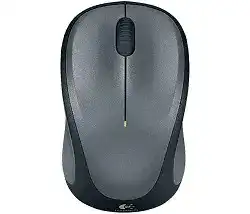
The Logitech Wireless M235 Mouse is a compact USB wireless mouse made for everyday laptop and desktop use. It connects through a small USB receiver, so it does not pair through Bluetooth and does not need a cable after setup.
Windows, macOS, Linux, and Chromebook systems can use the basic pointer, click, and scrolling functions after the receiver connects. Logitech software adds extra control only where the operating system and the mouse version support it, such as switching left and right click behavior through Logitech Options.
This model uses a contoured shape with rubber side grips, line-by-line scrolling, optical tracking, and a wireless receiver connection. For most users, the right download is not a heavy driver package but the matching Logitech utility for button control, receiver connection checks, and simple mouse settings.
Logitech Wireless Mouse M235 Windows Driver Download
| Driver Name | Description | Supported OS | File Size | Download |
|---|---|---|---|---|
| Logi Options+ Software | Utility for customizing mouse buttons, pointer behavior, scrolling, shortcuts, and device settings on Windows. | Windows 11, Windows 10 32-bit/64-bit | 43.09 MB |
Logitech Wireless Mouse M235 Mac OS Driver Download
| Driver Name | Description | Supported OS | File Size | Download |
|---|---|---|---|---|
| Logi Options+ Software | Software for adjusting mouse buttons, scrolling actions, pointer behavior, and supported device controls on macOS 11. | macOS 11 | 17.51 MB | |
| Logi Options+ Software | Logitech utility for managing mouse shortcuts, scroll direction, pointer settings, and app-specific button assignments. | macOS 13, macOS 12, macOS 11, macOS 10.15 | 19.44 MB | |
| Logi Options+ Software | Updated Logitech software for configuring mouse gestures, scrolling preferences, button functions, and device options. | macOS 26, macOS 15, macOS 14 | 19.44 MB | |
| Logi Options Software | Classic Logitech Options package for setting mouse shortcuts, pointer response, scrolling behavior, and device preferences. | macOS 12.0 | 18.65 MB | |
| Logi Options Software | Mac configuration tool for changing mouse button actions, scroll settings, pointer movement, and supported Logitech controls. | macOS 13 | 19 MB |
Getting the M235 Ready Without Overcomplicating the Install
Start with the receiver and battery before changing software. The M235 is a plug-and-play wireless mouse, so a computer should detect the USB receiver first. If the receiver does not respond, no Logitech setting screen can fix the connection until the USB link works.
Check the receiver before installing anything
Plug the receiver directly into the computer instead of a loose hub or monitor port. Wait a few seconds, then turn the mouse on and move it near the receiver. If the pointer appears, Windows or the other system has already loaded the basic mouse support.
If the pointer does not move, try another USB port. On desktop computers, a front USB port or a short USB extension can work better than a rear port hidden behind metal, cables, and wireless interference.
Use Logitech software only for the right job
Install Logitech Options when you need supported customization, such as changing left and right button behavior. Do not install random gaming tools or Bluetooth pairing tools for this model, because the M235 uses its USB receiver, not Bluetooth.
Some older Windows packages may include a connection utility for older Logitech wireless receivers. Use that only when the receiver and mouse need to reconnect. If the mouse already moves normally, focus on mouse settings, battery condition, and USB placement instead of repeatedly reinstalling the package.
Clean up old Logitech utilities when detection fails
If Logitech software opens but does not show the M235, remove older Logitech utilities that no longer match the system. Restart the computer, connect the receiver directly, then install one suitable Logitech package instead of keeping several tools active together.
After setup, test basic movement, left click, right click, and wheel scrolling in a browser or document. A simple test avoids confusion, because some apps change scrolling behavior or ignore wheel input in certain panels.
M235 Receiver, Pointer, Wheel, Click, and Battery Faults
The M235 usually fails in a few clear ways: the receiver does not wake up, the pointer jumps, scrolling becomes unreliable, clicks misbehave, or the battery connection drops. Match the symptom first, then apply the fix that fits that behavior.
The receiver is plugged in but the pointer does not move
Remove the receiver and battery for a short time, then insert the battery again and plug the receiver back into a direct USB port. Turn the mouse on and keep it close to the computer while it reconnects.
If nothing changes, test the receiver on another computer. When it fails on every system, the receiver or mouse hardware may have a fault. When it works elsewhere, the first computer likely has a USB, driver, or software conflict.
The M235 works only on one USB port
A weak or noisy USB port can make the receiver look dead. Try a different port and avoid unpowered hubs during testing. Laptop ports usually work best when the receiver sits close to the mouse and away from large metal surfaces.
On a desktop tower, rear USB ports can sit beside many cables and metal panels. Move the receiver to a front port, or use a short extension cable to bring it above the desk. This small change often fixes stutter and missed movement.
The mouse stops after the computer sleeps
Windows power saving can shut down USB devices after idle time. Open the USB controller and power management settings, then stop Windows from turning off the USB device to save power. Restart the computer after changing the setting.
This fix fits cases where the M235 works after a fresh plug-in but fails after sleep, lid close, or long idle time. If it also fails during normal active use, check battery strength and receiver placement next.
Pointer movement is jumpy or slow
Wireless interference often feels like a bad driver, but the receiver position causes many pointer pauses. Keep the receiver away from Wi-Fi routers, external hard drives, docking stations, USB 3.0 devices, and thick metal desk parts.
Also replace the battery before changing settings. A weak AA battery can still allow short movement, then create skips, delay, and random freezing. Use a fresh battery from a reliable pack and check the direction inside the battery bay.
The scroll wheel does not scroll
First test scrolling in several places, such as a browser page, a long document, and system settings. If scrolling fails everywhere, dust around the wheel or low battery power can stop the wheel from reading movement cleanly.
Turn the mouse off and clean around the wheel with dry air or a soft brush. Do not pour oil or liquid into the wheel area. After cleaning, replace the battery and test again before deciding that the wheel mechanism has worn out.
Scrolling jumps up and down
Jumpy scrolling often comes from dirt around the wheel sensor or from a wheel that no longer turns evenly. Clean the wheel gap carefully, then roll the wheel several times while the mouse is off to loosen dust from the narrow opening.
If the jump happens only in one app, reset that app’s scrolling options. Some programs handle wheel input differently, especially spreadsheets, browsers, and document viewers. If every app jumps, the wheel or battery connection needs closer checking.
Left and right click feel reversed
The M235 suits left-handed and right-handed use, and Logitech Options can switch the main click button where supported. Windows and macOS can also change primary button behavior. Check these settings before assuming the buttons have failed.
If the buttons changed after another person used the computer, the system setting probably changed. Set the primary button back to the preferred side, then test both buttons in a simple folder window or web page.
Single clicks turn into double clicks
Start with the operating system’s double-click speed setting. Set it slower, apply the change, and test the click again. A too-fast setting can make normal clicking feel broken, especially when opening files or selecting text.
If one button still double-clicks on another computer, the switch may have physical wear. If the problem stays only on the first computer, remove conflicting mouse utilities and reset the button settings in the system control panel.
The pointer tracks badly on a glossy desk
The M235 uses optical tracking and works well on many normal surfaces, but glossy glass, shiny plastic, mirrors, and heavy texture can confuse the sensor. Test the mouse on plain paper or a simple mouse pad.
If tracking improves on the paper, the surface caused the fault. Wipe the sensor window gently with a dry cloth and keep the bottom of the mouse clean. Software changes will not fix a surface that the sensor cannot read properly.
Logitech software does not detect the M235
Make sure the receiver works before opening the Logitech utility. If the pointer does not move, close the software and fix the receiver connection first. The utility can only detect the mouse after the computer sees the receiver properly.
If basic movement works but the software stays empty, uninstall older Logitech packages, restart, and install only the package that matches the operating system. On Linux and Chromebook, use the built-in mouse controls when Logitech customization is not available.
A replacement receiver will not connect
A Logitech wireless mouse does not always connect to any spare receiver. Check the receiver type and the marking on the mouse or receiver before buying a replacement. Some M235 packages use receiver pairing tools, while others depend on the receiver supplied with the unit.
When a compatible receiver needs pairing, use the proper Logitech connection utility and follow the off-and-on prompt exactly. If the utility does not recognize the receiver, do not force unrelated software. Test with the original receiver if you still have it.
The battery light or power response seems wrong
If the mouse shows no sign of power, remove the AA battery and check the positive and negative ends. Clean the battery contacts with a dry cloth, then insert a new battery and close the cover firmly.
A loose battery cover or weak contact can make the mouse cut out when moved. If the M235 works only when held at an angle, the battery contact area needs attention, and another fresh battery helps confirm whether the cell or the contact caused it.