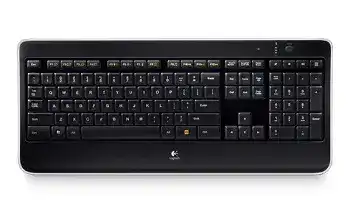
A dark keyboard, delayed typing, or missing function-key controls can make the Logitech Wireless Illuminated Keyboard K800 Driver seem more complicated than it is. This model uses a Logitech Unifying receiver, rechargeable batteries, automatic illumination, a proximity sensor, and configurable enhanced F-keys. Each part can fail separately, so the visible symptom often points to a specific power, wireless, lighting, or software problem.
The charging cable supplies power to the keyboard but does not replace its wireless data connection. Typing still travels through the Unifying receiver while the cable is attached. This detail matters because a K800 may continue charging even when Windows cannot detect the receiver, and it may stop typing even though the charging plug looks secure.
Logitech Wireless Illuminated Keyboard K800 Windows Driver Download
| Driver Name | Description | Supported OS | File Size | Download |
|---|---|---|---|---|
| Logi Options+ Software | Customizes supported device settings, shortcuts, button actions, scrolling, and pointer behavior. | Windows 11, Windows 10 32-bit/64-bit | 43.21 MB | |
| Logitech Options Software | Manages keyboard functions, application shortcuts, gestures, and other device-specific customization options. | Windows 11, Windows 10 32-bit/64-bit | 245.76 MB | |
| SetPoint 64-bit Software | Full offline package for configuring keyboard hot-keys, device-specific settings, battery status, and lock-key indicators. | Windows 11, Windows 10 64-bit, Windows 8 64-bit, Windows 7 64-bit | 80.45 MB | |
| SetPoint 32-bit Software | Complete offline installer for adjusting hot-keys, battery information, Caps Lock alerts, and Num Lock notifications. | Windows 11, Windows 10 32-bit, Windows 8 32-bit, Windows 7 32-bit | 78.04 MB | |
| SetPoint Smart Installer | Small universal installer that downloads the required SetPoint components and requires an internet connection during setup. | Windows 11, Windows 10 32-bit/64-bit, Windows 8 32-bit/64-bit, Windows 7 32-bit/64-bit | 4.61 MB | |
| Logitech Unifying Software | Pairs compatible Logitech wireless devices with a Unifying receiver and removes devices that are no longer used. | Windows 11, Windows 10 32-bit/64-bit | 3.96 MB |
Backlight stays off even though typing works
Press FN and F6 to raise the illumination level. The K800 provides five levels from off to full brightness, and FN with F5 lowers the level. A previous adjustment may have left the backlight at zero, while the keys and wireless connection continue working normally.
Very low battery power also turns the illumination off to preserve enough charge for typing. Check the battery indicator with FN and F7, then charge the keyboard before changing software. A red lower battery light points to depleted power rather than a failed lighting control.
Keys light only after being pressed
The keyboard normally reacts when a hand approaches the key area. Its proximity sensor wakes the illumination before contact, while the automatic light sensor adjusts brightness for the room. Dust, objects resting along the upper keyboard edge, or an obstructed sensor area can alter this behavior.
Clear the surface around the sensor and wipe it gently with a dry cloth. Switch the keyboard off for several seconds, turn it on again, and move a hand slowly over the keys. All keys should illuminate at full strength for about five seconds after startup before automatic adjustment resumes.
Lighting turns on without anyone near the desk
Constant illumination can come from movement, vibration, reflections, or nearby objects crossing the sensor area. Remove papers, cables, sleeves, and reflective items from the top edge. A moving fan, loose desk surface, or frequent vibration may also trigger the proximity system even when nobody touches the keyboard.
Restarting the K800 returns the illumination to automatic adjustment. If the lights remain active while the charging cable is connected, that can be normal behavior because the keyboard keeps its backlight on during charging. Disconnect the cable after the battery has recovered before judging the sensor response.
Separate Charging Trouble from Wireless Trouble
Keyboard charges but produces no keystrokes
The USB charging lead does not carry normal keyboard input. Confirm that the Unifying receiver remains connected to the computer. Move it to a direct USB port, wait for Windows to recognize it, and cycle the keyboard’s power switch. Testing only with the charging lead attached will not restore a lost receiver link.
Run the Logitech Unifying software when the receiver appears but the K800 remains inactive. Follow the pairing prompts and turn the keyboard off and on when requested. The Logitech Wireless Illuminated Keyboard K800 Driver works alongside the pairing utility, but standard Windows keyboard support alone cannot rebuild a broken Unifying connection.
Battery indicator remains red after charging
A complete recharge takes about five hours with the keyboard running and roughly three hours while switched off. Use a known working USB charging cable and a powered computer port. Some hubs, monitor ports, and sleeping computers provide too little power or stop supplying power before charging finishes.
Leave the keyboard off during one full charging attempt. Then disconnect the cable, turn the unit on, and press FN with F7. A battery reading that remains low after a confirmed charging period may indicate worn rechargeable cells, cable damage, or an internal charging fault rather than a Windows driver issue.
Battery life drops within a few hours
Full illumination consumes far more energy than automatic or reduced brightness. At maximum intensity, the expected operating time can fall to about 15 hours, while lighter use with automatic adjustment may last considerably longer. Lower the backlight with FN and F5 before assuming that the rechargeable batteries have failed.
Observe the keyboard with the computer idle. If the lights stay active because the charging cable remains attached or the sensor keeps reacting, the battery will drain faster after disconnection. Remove the cable when charging ends, clear the sensor area, and let the automatic lighting system turn the keys down between typing sessions.
Keyboard works only while the cable is attached
This symptom often indicates weak rechargeable cells rather than a receiver problem. The cable supplies enough power for the electronics, but the battery cannot maintain operation after disconnection. Charge with the keyboard switched off, verify the battery status, and test again without changing the receiver pairing.
If the K800 shuts down immediately after a full charging attempt, try another suitable USB cable and another powered port. Repeated failure points toward battery wear or an internal power problem. Reinstalling SetPoint or the receiver utility will not restore a battery that no longer holds charge.
Repair Unifying Receiver Dropouts and Typing Delay
Keystrokes arrive late or appear in bursts
Move the Unifying receiver away from crowded USB areas, external drives, wireless adapters, and metal surfaces. The original setup guide includes a receiver extension cable for bringing the receiver nearer to the keyboard. That placement can improve reception without moving the keyboard or computer.
Typing while the charging lead is attached does not bypass the wireless link, so lag may continue until receiver placement improves. Test with the receiver in another USB port and with the cable removed after charging. Also confirm that the battery has enough power, because low charge can add missed or delayed responses.
Characters repeat or one key responds intermittently
Open a plain document and test the affected key beside several neighboring keys. If only one key repeats on multiple computers, use short bursts of compressed air around its edges while the keyboard is off. Debris beneath a key can hold the mechanism down or prevent a complete release.
When many keys repeat together, focus on wireless reception, battery charge, and Windows accessibility options instead. Disable Filter Keys if it changes normal typing behavior, then retest. A broad timing problem usually differs from one damaged or contaminated key mechanism.
The receiver works after every second restart
Change to a different direct USB port and leave the receiver there for several restarts. Avoid a switch, passive hub, or dock while testing. Windows may initialize one USB controller differently from another, especially after sleep, a chipset update, or a change in power-management behavior.
If another computer detects the same receiver and keyboard consistently, examine the original computer’s USB chipset drivers and power settings. When neither computer maintains the link, re-pair the K800 through the Unifying utility. Do not substitute a Logi Bolt receiver; the K800 requires Unifying compatibility.
Unifying software cannot locate the K800
Close SetPoint and any other Logitech control software before starting the pairing process. Connect the Unifying receiver directly, keep the keyboard nearby, and begin with the power switch off. Turn it on only when the utility requests that action. Starting with the keyboard already awake can cause some pairing attempts to time out.
A receiver from another Logitech device can work only when it carries the Unifying logo and remains functional. A similar-looking nano receiver without Unifying support will not pair with the K800. Confirm receiver type before removing software or repeating the connection process.
Restore Function Keys and Media Commands
The Logitech Wireless Illuminated Keyboard K800 Driver package adds control beyond ordinary typing. The upper row includes browser, email, search, application switching, brightness, battery check, sleep, media navigation, volume, and calculator functions. SetPoint controls several enhanced actions and can reverse how the FN key behaves.
F1 through F12 launch the wrong action
By default, hold FN while pressing an F-key to use the yellow enhanced function. SetPoint can invert this arrangement, making the enhanced command occur without FN. Check the FN preference when familiar shortcuts suddenly perform browser, media, lighting, or sleep commands instead of standard F1 through F12 actions.
A profile reset or new Windows installation may return the keyboard to its original mode. Set the preference once, close SetPoint, and test both an ordinary F-key and an enhanced command. Changing the mode repeatedly while testing can make the result appear inconsistent.
Browser, email, or search shortcuts open the wrong app
The application keys may follow Windows defaults or a saved SetPoint assignment. Confirm the default browser and mail application first. Then open the K800 keyboard controls and replace any path that points to software removed from the computer.
Search and application-switching functions also depend on Windows behavior. A shortcut that worked under an older Windows release may now open a different interface or do nothing. Test the physical key with another supported assignment before treating it as a hardware fault.
Play, pause, or track keys fail in one program
Try the media keys with another playback application. When they work elsewhere, the original program may ignore system media commands, reserve the shortcut, or require focus on its active window. Reinstalling the Logitech Wireless Illuminated Keyboard K800 Driver will not change an application that does not accept those commands.
Volume and mute controls provide a useful comparison because Windows usually handles them globally. If volume works but play and track navigation do not, the wireless link and physical media area are probably functioning. Concentrate on the selected player and its shortcut behavior.
Match the Fix to What the K800 Is Actually Doing
A K800 that types normally but stays dark needs lighting, sensor, or battery checks. A unit that charges yet cannot type needs attention at the Unifying receiver. Delayed characters point toward reception or power, while one unreliable key suggests debris or mechanical wear. Treating every symptom as a driver failure wastes time and may remove a working configuration.
Keep SetPoint for the enhanced F-key preferences when the installed version recognizes the keyboard, and use the Unifying utility for receiver pairing. These tools perform different jobs. Current Logitech software may not expose every control from this older model, so verify device recognition before replacing a functioning legacy package.
After repairs, test the keyboard without the charging cable. Check ordinary typing, FN with F5 and F6, FN with F7, volume, calculator, and one media key. Then allow the keyboard to sit untouched and confirm that the lighting dims as expected. This sequence checks power, wireless communication, sensors, and software without repeating the same installation.
The Logitech Wireless Illuminated Keyboard K800 Driver is most useful when Windows recognizes the receiver but enhanced controls remain unavailable. For complete failure, begin with charge level, the power switch, receiver position, and Unifying pairing. For lighting trouble, use the brightness keys and inspect the sensor area before changing any Windows component.