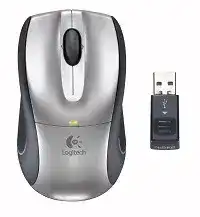
A missing pointer, inactive tilt wheel, or unresponsive receiver can make this compact notebook mouse appear defective. The Logitech V320 Cordless Optical Mouse Driver adds the original SetPoint controls and access to the reconnection utility, while the computer handles ordinary pointer movement through standard mouse support. This model connects through its dedicated wireless USB receiver rather than Bluetooth.
Begin with the physical connection before changing software. Slide the receiver out of its storage position on the mouse, connect it directly to an active USB port, and place the power switch underneath in the ON position. The mouse automatically shuts down while the receiver remains attached for travel, so it cannot operate with the receiver still stored on its body.
Logitech V320 Cordless Mouse Windows Driver Download
| Driver Name | Description | Supported OS | File Size | Download |
|---|---|---|---|---|
| SetPoint Full Installer (64-bit) | Full offline package for configuring mouse buttons, tracking speed, device settings, and battery status. | Windows 64-bit | 77.85 MB | |
| SetPoint Full Installer (32-bit) | Complete offline installer providing button assignments, pointer controls, hot-keys, and device-specific options. | Windows 32-bit | 75.81 MB | |
| SetPoint Smart Installer | Compact installer for mouse customization and status features; an internet connection is required during installation. | Windows | 3.5 MB | |
| Connection Utility | Reconnects the cordless mouse with its compatible Logitech receiver on supported modern Windows releases. | Windows 10 32-bit/64-bit, Windows 8 32-bit/64-bit, Windows 7 32-bit/64-bit | 1.06 MB | |
| Connection Utility for XP and Vista | Restores communication between the mouse and receiver on older Windows XP and Vista computers. | Windows XP, Windows Vista | 2.08 MB | |
| Flow Scroll Full Installer | Provides the complete Flow Scroll package for smoother webpage scrolling without downloading components during setup. | Windows | 17.38 MB | |
| Flow Scroll Smart Installer | Downloads and installs the required Flow Scroll components for improved browser scrolling behavior. | Windows | 3.91 MB |
Logitech V320 Cordless Mouse Mac OS Driver Download
| Driver Name | Description | Supported OS | File Size | Download |
|---|---|---|---|---|
| Logitech Control Center | Manages mouse buttons, scrolling behavior, pointer controls, and model-specific settings on compatible Mac systems. | Mac OS X 10.13.x | 16.63 MB | |
| Logitech Control Center | Enables button reassignment, scrolling adjustments, and device configuration under Mac OS X 10.11.x. | Mac OS X 10.11.x | 17.06 MB | |
| Logitech Control Center | Supplies mouse control options and application-specific button functions for Mac OS X 10.7.x. | Mac OS X 10.7.x | 17.73 MB | |
| Logitech Control Center | Provides legacy mouse configuration, button mapping, and scrolling controls for Mac OS X 10.5.x. | Mac OS X 10.5.x | 18.7 MB | |
| Cordless Connect Utility | Pairs the Logitech V320 cordless mouse with its receiver on Mac OS X 10.4.x. | Mac OS X 10.4.x | 160.36 KiB |
The USB receiver appears connected but nothing moves
Remove the receiver, pause briefly, and insert it into another direct USB port. Avoid an unpowered hub during this test because the hub may not initialise an older wireless receiver consistently. Restarting the computer with the receiver already attached can also restore detection when the operating system failed to complete its first device registration.
Check that the receiver belongs to this mouse. The V320 predates Logitech Unifying technology, and its original receiver does not become interchangeable simply because another Logitech dongle fits the USB port. A receiver from an unrelated model may appear in the computer’s hardware list without communicating with the V320.
Use the reset control when movement becomes intermittent
The underside includes a reset button for recovering the wireless link. When pointer movement becomes slow or cuts in and out, hold that button for about four seconds. Keep the receiver connected during the reset and wait for movement to return before opening any Logitech utility. This procedure is especially relevant when another wireless device or network equipment operates nearby.
If the reset makes no difference, temporarily change the receiver’s position. A front or side USB connection may give the radio path fewer obstacles than a port hidden behind a metal computer case. Keep the dongle away from tightly grouped wireless adapters, external drives, and bundled cables while testing.
Restore the V320 Receiver Link with Logitech Software
The Logitech V320 Cordless Optical Mouse Driver package is most useful when the receiver has power but no longer recognises the mouse. SetPoint supplied the original control interface, and the accompanying Logitech Reconnection Utility could rebuild communication between this device and its matching receiver. Installing unrelated modern Logitech applications will not necessarily provide those older recovery functions.
Run the Reconnection Utility after hardware checks
Open the Logitech mouse software folder from the Windows program menu and look for the Reconnection Utility. Follow its prompts while leaving the receiver attached and the mouse switched on. Do not remove the dongle halfway through the process. When the pointer becomes active, complete the utility rather than closing it immediately, allowing the new connection to finish saving.
A computer without a working touchpad can still reach the utility from the keyboard. Open the Start menu with the Windows key, move through the entries with the arrow keys, and press Enter on the required item. This avoids attaching a second pointing device merely to begin the recovery process.
Remove conflicting Logitech packages only when necessary
Several generations of Logitech software can coexist poorly on an older computer. If SetPoint opens but cannot find the V320, uninstall duplicate mouse-control packages that were added for different devices, restart, and install the package intended for this model. Keep any software required by another Logitech keyboard or mouse unless you have confirmed that it creates the conflict.
Standard clicking and pointer movement may return without SetPoint, yet horizontal scrolling, zoom assignments, and access to the reconnection tool can remain unavailable. That difference does not always indicate another hardware fault. It usually means the operating system has loaded basic mouse functions without the model-specific control layer.
Logitech V320 Software for Tilt Scrolling and Zoom
The wheel on this model does more than vertical scrolling. It tilts left and right for horizontal movement, and SetPoint can assign wheel and button actions. The zoom function also depends on the Logitech software. When vertical scrolling works but sideways movement does nothing, check the installed control package before assuming that the wheel mechanism has failed.
Horizontal scrolling does not react
Open SetPoint and inspect the wheel assignment. Set the left and right tilt actions to horizontal scrolling, apply the change, and test in a wide spreadsheet, image window, or webpage that genuinely extends beyond the screen. A narrow document provides no horizontal area to move, which can make a working tilt command look inactive.
Some applications ignore horizontal wheel messages or use their own navigation shortcuts. Compare the result in more than one program. When tilt scrolling works elsewhere, leave the Logitech assignment unchanged and inspect the affected application’s scrolling preferences instead of reinstalling the entire mouse package.
Wheel zoom works differently between programs
The original instructions describe clicking and rolling the wheel for zoom after the software is installed. Applications do not all interpret that command in the same way. Confirm the wheel assignment inside SetPoint, then test it in software that supports zoom input. A program that reserves the middle button for another action may not follow the Logitech command.
Scrolling jumps or reverses unexpectedly
Dust around the wheel can interrupt its encoder and produce uneven movement. Switch the mouse off, remove the battery, and clear loose debris with a soft brush or short bursts of air. Do not pour cleaner into the wheel opening. After cleaning, reinstall the battery and compare scrolling in several windows before changing operating-system scroll speed.
If the wheel still jumps in the same direction on another computer, the problem may involve internal wear rather than a software assignment. Driver installation cannot repair a damaged wheel encoder. Continue using the mouse only if scrolling remains controllable, or replace the hardware when erratic movement disrupts normal navigation.
Battery, Wake, and Pointer Behaviour
The V320 uses a replaceable AA alkaline battery and includes a warning light. A brief green light after power-on indicates usable battery power, while a flashing red light signals a low battery. An exhausted cell may still illuminate the mouse momentarily but fail when the radio begins transmitting, creating repeated wake failures or short bursts of movement.
The mouse does not wake after travel
First confirm that the receiver has been removed from its storage rail. Attaching the receiver to the mouse turns the device off automatically for transport. Once the receiver slides away, the mouse should power on automatically, although the underside switch must also remain in the ON position. Reconnect the dongle to the computer and move the mouse for several seconds.
When storing the receiver separately while the computer stays on, use the power switch to prevent unnecessary battery use. This matters because the automatic shutdown feature depends on the receiver being attached to the mouse. Leaving both items apart with the switch on may consume power even though the computer is not using the device.
The warning light flashes red
Install a known-good AA alkaline battery and confirm that its positive and negative ends follow the markings inside the compartment. Inspect the metal contacts for dust or residue, then wipe them gently with a dry lint-free material. A contact that does not press firmly against the battery can interrupt power whenever the mouse moves across the desk.
After changing the battery, turn the power off and back on. Look for the brief green indication, reconnect the receiver, and test ordinary movement before running software. Pairing attempts made with unstable battery power often fail or stop partway through, making a simple power issue resemble receiver damage.
The pointer drifts, stalls, or feels unusually slow
Try a plain, opaque surface before adjusting pointer speed. Optical tracking can become inconsistent on glass, glossy patterns, reflective coatings, or surfaces with very little visible texture. A basic mouse pad provides a useful comparison. Clean the sensor opening carefully and remove any hair or dust that crosses the lens.
Next, compare movement with nearby wireless equipment temporarily disabled or moved farther away. Use the four-second reset control if the cursor remains intermittent around wireless network devices. Once movement stays continuous, adjust pointer speed through the operating system or SetPoint in small increments rather than making several changes at once.
Keep the Original Travel Features Working
The receiver-storage mechanism, automatic shutdown, battery warning light, reset control, tilt wheel, and SetPoint assignments define how this notebook mouse was intended to operate. The Logitech V320 Cordless Optical Mouse Driver should therefore match the older hardware instead of being replaced automatically with software intended for newer Bluetooth, Unifying, or Bolt products.
For a receiver failure, verify power and USB detection before using the reconnection tool. For missing sideways scrolling or zoom, inspect SetPoint assignments and application behaviour. When movement breaks up, change the wireless position, reset the link, check the AA battery, and test a different surface. These separate checks prevent a battery, wheel, receiver, or tracking fault from being mistaken for the wrong problem.