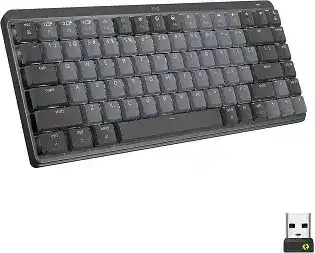
When the function row produces the wrong commands, backlighting refuses to stay on, or a saved shortcut disappears after sleep, the Logitech MX Mechanical Mini Wireless Keyboard Driver gives Logi Options+ access to the controls that ordinary keyboard support does not manage. This compact mechanical model can pair through Bluetooth Low Energy or a Logi Bolt USB receiver, store three Easy-Switch connections, and adapt its illuminated keys to the surrounding light.
Logitech MX Mechanical Mini Wireless Keyboard Windows Driver Download
| Driver Name | Description | Supported OS | File Size | Download |
|---|---|---|---|---|
| Logi Options+ Driver | Customizes keyboard shortcuts, function keys, device settings, and application-specific controls. | Windows 11, Windows 10 32-bit/64-bit | 23.67 MB |
Logitech MX Mechanical Mini Wireless Keyboard Mac OS Driver Download
| Driver Name | Description | Supported OS | File Size | Download |
|---|---|---|---|---|
| Logi Options+ Driver | Manages keyboard shortcuts, function-row behavior, app-specific actions, and connected device preferences. | macOS 12, macOS 11, macOS 10.15 | 14.86 MB |
Logitech MX Mechanical Mini Wireless Keyboard Driver for Function Keys That Behave Differently
The top row can operate as media and system controls or as standard F1 through F12 keys. Press Fn and Esc together to swap between those modes. A notification from Logi Options+ may confirm the change. This is the first setting to check when F5 changes the backlight instead of refreshing a page, or when a media key sends an ordinary function-key command.
Function-key preference changes after moving to another computer
The Fn-row preference may not feel identical across Windows, macOS, Linux, and mobile devices because each operating system interprets several top-row commands differently. Check the mode after switching Easy-Switch channels rather than assuming the keyboard carried every software preference to the next machine. Logi Options+ manages extended functions only on supported Windows and macOS computers.
When one application requires standard function keys but other programs need media controls, leave the normal mode that suits most work and hold Fn for the alternate command. This avoids repeatedly changing the full keyboard mode. Also inspect application-specific assignments in Logi Options+ if a single program responds differently from the rest of the system.
Custom shortcuts stop working after the computer wakes
A shortcut that sends only its final letter or loses modifier keys usually points to the Logitech background process rather than a failed mechanical switch. Quit Logi Options+ completely and reopen it. If the command still fails, sign out of the operating system or restart the computer, then test the original shortcut before deleting its assignment.
Recreate the affected action when ordinary typing remains accurate but only customized keys misbehave. On macOS, verify that Logi Options+ still has Accessibility and Input Monitoring permission. A system update can leave the switches visible while the running process lacks effective access. Toggle the permission off and on, then reopen the control app when necessary.
Separate Logi Bolt Pairing From Bluetooth Reconnection
The keyboard supports two wireless methods, but the charging cable does not send keystrokes. Use the included Logi Bolt receiver or pair directly through Bluetooth Low Energy. A cable-connected keyboard that charges without typing is therefore behaving as intended. Restore its wireless connection instead of replacing USB-C cables in search of a wired mode.
The receiver is present but no keys respond
Confirm that the USB device is a Logi Bolt receiver. MX Mechanical Mini does not pair with an older Unifying receiver merely because both products carry Logitech branding. Open the Logi Bolt pairing function, choose the receiver, and hold the required Easy-Switch key for about three seconds until its light flashes quickly. Complete the pairing while that channel remains selected.
If the receiver vanishes or reconnects repeatedly, plug it directly into another USB-A port. A dock, KVM switch, monitor hub, or adapter can interrupt detection during pairing. Once the connection works from the computer, test the original accessory again. Keep only the valid keyboard pairing on the receiver if previous attempts created duplicate records.
Bluetooth asks for a code but pairing never finishes
Remove the old MX Mechanical Mini entry from the computer’s Bluetooth list. Hold an Easy-Switch key until it flashes rapidly, select the keyboard from the new-device screen, and type the displayed pairing code on the physical keyboard. Press Enter after the code. Clicking the numbers on screen does not complete keyboard authentication on systems that expect physical input.
When the device never appears, switch Bluetooth off briefly, turn it back on, and repeat the long press on the chosen channel. Do not use a short press because that only selects an existing connection. Use another Easy-Switch position when the current channel may still contain a pairing for a different computer.
Letters pause and then repeat several times
Intermittent Bluetooth communication can hold a keystroke long enough for the operating system to repeat it. Charge the keyboard, remove its Bluetooth record, and create the connection again. On Windows, update the computer manufacturer’s Bluetooth driver and check whether the adapter enters a power-saving state after inactivity. Testing through Logi Bolt can reveal whether the fault belongs to Bluetooth rather than the key switch.
For a Bolt connection, remove wireless congestion around the receiver. USB hubs, external storage, dense cabling, and metal desk equipment can affect its position. A direct port or short USB extension can give the receiver a clearer location. If repeated characters occur through Bluetooth and Bolt on several computers, inspect key-repeat settings and test the individual switch for sticking.
Fix Easy-Switch and Logi Options+ Detection Before Rebuilding Profiles
The three Easy-Switch keys hold separate host connections. A short press moves to a stored device; a long press places that channel into discovery mode and can replace its existing pairing. Accidental long presses explain why a channel light may begin flashing and no longer return to its usual computer. Pair that channel again rather than reinstalling every software component.
Install the current Logitech MX Mechanical Mini Wireless Keyboard Driver package on the Windows or macOS computer where customization is needed. Logi Options+ should identify the keyboard, display its battery condition, and expose supported key assignments and illumination controls. The keyboard can still type without the app, so normal letters working does not prove that the customization service has detected it.
Logi Options+ displays an inactive keyboard
Press the Easy-Switch key assigned to the current computer and type a few characters before opening the app again. Logi Options+ may show an inactive image when the keyboard is awake but communicating with another host. Switching to the proper channel often restores detection immediately without changing the Bluetooth or Bolt pairing.
If the selected channel is correct, close all Logitech processes and restart Logi Options+. Power the keyboard off, wait several seconds, and switch it on again. Reinstall the package only after those steps fail. During reinstallation, remove obsolete versions of Logitech Options that may leave competing background components on the computer.
Switching channels changes the keyboard but not the mouse
Easy-Switch on the keyboard normally changes only the keyboard’s own host. A compatible Logitech mouse needs its own connection to each computer unless an enhanced switching or Flow arrangement has been configured in Logi Options+. Verify that both devices appear in the app on every host before linking their switching behavior.
Network-based Flow features also depend on both computers being reachable on the same local network. Firewall restrictions, guest-network isolation, or a sleeping second machine can prevent coordinated movement even when the keyboard’s three direct wireless pairings work. Repair each device connection first, then return to the linked-computer feature.
The keyboard uses the wrong symbols on Windows or Mac
MX Mechanical Mini carries markings for more than one operating-system layout. The label position does not change the language chosen by the computer. When quotation marks, brackets, currency symbols, or modifier keys produce unexpected results, inspect the operating system’s keyboard language and physical-layout selection. Remove unused layouts that activate through an accidental language shortcut.
Windows, Linux, and Android users generally follow the PC-side legends, while macOS and iOS use the Mac-side legends. Do not remap every affected key in Logi Options+ to correct a system layout mismatch. Select the matching regional layout first, then reserve custom assignments for genuine workflow changes.
Why Smart Illumination Turns Off While the Keyboard Still Types
The ambient light sensor adjusts the illuminated keys automatically. In a bright room, the keyboard may refuse to turn the backlight on because extra lighting is unnecessary. Move it away from direct light and test the brightness controls again. Covering the sensor briefly can also show whether room lighting, rather than software, is suppressing illumination.
Low battery creates a second limit. At about ten percent charge, the keyboard disables backlighting to preserve typing time. Connect USB-C power and allow the battery level to rise before retesting. The keys can continue operating for a long period without illumination, so a dark keyboard does not by itself indicate that charging or wireless communication has failed.
The backlight effect or level keeps changing
MX Mechanical Mini offers multiple illumination levels and six effects. Use the dedicated brightness controls for intensity, and press Fn with the lightbulb key to move between effects. A mistaken key combination can change static lighting into a reactive pattern that appears to fade, pulse, or follow each keystroke.
Open Logi Options+ and choose the intended effect when the keyboard commands become confusing. The Logitech MX Mechanical Mini Wireless Keyboard Driver can also display notifications for brightness and function-row changes. Return illumination to its default behavior before deciding that the sensor has developed a fault.
Backlighting wakes repeatedly and drains the battery
The proximity system can react to hand movement or nearby activity, even when no key is pressed. Clear objects resting close to the sensor area and wipe the top edge with a dry, soft cloth. A moving cable, reflective object, or frequent hand movement beside the keyboard can keep waking the lights and shorten the time between charges.
Reduce the illumination level or turn it off temporarily to compare battery behavior. The keyboard is rated for far longer operation without backlighting than with it, so lighting use has a major effect on charge intervals. If the lights activate continuously in an empty, stable workspace after a restart, reset the software configuration and test the keyboard on another host.
The battery indicator stays low while charging
Use a known working USB-C cable and a powered computer port or suitable USB power source. The keyboard can type over its existing wireless connection while it charges, but the cable itself remains power-only. Check the battery value again after a charging period rather than expecting the percentage to jump immediately when the cable enters the port.
Turn the keyboard off and charge it separately when the level continues falling during heavy backlight use. If several cables and power sources produce no improvement, inspect the USB-C opening for lint without inserting metal tools or liquid. A loose port, swelling battery, unusual heat, or persistent failure requires hardware service rather than repeated software installation.
Retest Typing Across All Three Channels
Use the Logitech MX Mechanical Mini Wireless Keyboard Driver near the end of troubleshooting to restore only the assignments that are genuinely needed. First confirm ordinary typing, Fn and Esc switching, brightness control, and Easy-Switch response with default preferences. Add custom shortcuts one at a time so a broken application profile does not hide a healthy wireless connection.
Check each stored host separately. Bluetooth trouble on one laptop does not require deleting a working Bolt connection on another desktop, and a backlight limit caused by room brightness does not call for fresh pairing. When one key repeats or misses input on every channel and operating system, the evidence points toward that mechanical switch. When the fault remains with one computer, concentrate on its layout, Bluetooth adapter, USB path, permissions, or Logitech background process.