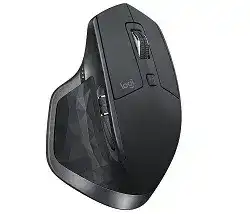
Logitech MX Master 2S Driver software gives this wireless productivity mouse its full set of controls on Windows and macOS. The computer can move the pointer with a basic system driver, but the Logitech utility unlocks button mapping, gesture control, thumb wheel options, scroll behavior, battery alerts, and multi-computer features.
The MX Master 2S connects by Bluetooth or the provided Unifying receiver. It also has an Easy-Switch button for up to three paired computers, a speed-adaptive scroll wheel, a manual shift button, a gesture button, back and forward buttons, a thumb wheel, a Darkfield high precision sensor, and a rechargeable battery with a Micro USB charging port.
Use this page when you want the right Logitech package, a clean setup, or a practical fix for connection and button problems. Many issues come from weak pairing, the wrong receiver state, old Logitech utilities, Bluetooth conflicts, or scroll settings that need a small change.
Logitech MX Master 2S Windows Driver Download
| Driver Name | Description | Supported OS | File Size | Download |
|---|---|---|---|---|
| Logi Options+ Software | Options+ package for customizing mouse buttons, pointer behavior, scrolling, shortcuts, gestures, and device settings. | Windows 11, Windows 10 32-bit/64-bit | 43.09 MB |
Logitech MX Master 2S Mac OS Driver Download
| Driver Name | Description | Supported OS | File Size | Download |
|---|---|---|---|---|
| Logi Options+ for macOS 11 | Mac Options+ software for adjusting MX Master 2S button actions, scrolling feel, pointer control, and app shortcuts. | macOS 11 | 17.51 MB | |
| Logi Options+ for macOS 12.0 | Options+ installer for macOS 12.0 with settings for mouse buttons, gesture actions, device behavior, and scrolling. | macOS 12.0 | 18.65 MB | |
| Logi Options+ for macOS 13 to 10.15 | Multi-version Mac package for managing shortcuts, pointer movement, scroll direction, button mapping, and mouse preferences. | macOS 13, macOS 12, macOS 11, macOS 10.15 | 19.44 MB | |
| Logi Options+ for macOS 13 | Dedicated macOS 13 Options+ download for tuning button assignments, scrolling response, pointer settings, and workflow controls. | macOS 13 | 19 MB | |
| Logi Options+ for macOS 26 to 14 | Newer macOS Options+ build for configuring MX Master 2S shortcuts, gestures, scroll options, and connected device settings. | macOS 26, macOS 15, macOS 14 | 19.44 MB |
Set Up MX Master 2S Without Losing the Extra Controls
Before installing the software, choose how you want to connect the device. Bluetooth keeps one USB port free, while the Unifying receiver often gives a steadier connection on desktops. If the pointer works but the extra controls do not, install the Logitech package that matches your operating system and this model.
Start With the Right Connection Mode
Turn on the mouse and choose one Easy-Switch channel. Then hold the Easy-Switch button for about three seconds until the channel light blinks quickly. That fast blinking means the device waits for pairing. After that, pair through Bluetooth settings or add it through the Unifying receiver option inside the Logitech utility.
When you use the Unifying receiver, plug it directly into a USB port first. Avoid a loose hub during the first setup. If the receiver does not find the mouse, turn the mouse off and on during the pairing screen. Also check that you did not leave the same channel paired to another computer.
Install the Logitech Utility Cleanly
Install the Logitech software after the basic connection works. On newer systems, the current Logitech utility may handle customization, receiver pairing, and device settings. On older systems, the older Logitech Options package may appear in the download area. Use the package shown for your operating system rather than mixing several older utilities.
If you already tried several Logitech tools, remove the older unused ones before installing again. Then restart the computer. This simple cleanup fixes many cases where the mouse moves normally, but the app cannot see it or the side buttons keep their default behavior.
Test Before Customizing Everything
After setup, test the pointer, left click, right click, wheel click, thumb wheel, and back and forward buttons in a browser or file window. Then open the Logitech utility and change one control at a time. This makes it easier to find whether a problem comes from pairing, software detection, or one custom assignment.
Charge the device before long setup work. The MX Master 2S uses a Micro USB charging port, and the battery LEDs show charge level. A low battery can make Bluetooth pairing unstable or make the device drop during receiver pairing. Also move the receiver away from crowded rear USB ports if the pointer skips.
MX Master 2S Problems That Usually Need a Specific Fix
The fixes below focus on common MX Master 2S connection, scrolling, button, and software problems. Start with the section that matches your symptom, because reinstalling everything is not always the best first move.
Windows Cannot Find the Mouse Over Bluetooth
First make sure the selected Easy-Switch channel blinks quickly. If it blinks slowly or stays solid, hold the Easy-Switch button again until it enters pairing mode. Then remove any old MX Master 2S entry from Bluetooth settings and pair it again from the beginning.
If Windows still does not show it, turn Bluetooth off and on, then run the Bluetooth troubleshooter. Also update the computer’s Bluetooth driver when the laptop uses an older wireless adapter. For desktop PCs with weak Bluetooth, the Unifying receiver often gives a quicker fix.
The Unifying Receiver Does Not Pair
Receiver pairing fails most often when the receiver and mouse do not meet in the same pairing screen. Plug the receiver directly into the computer, open the Logitech utility, choose the Unifying receiver option, and then switch the mouse off and on when the screen asks for it.
If nothing changes, try another USB port. Front ports or a short USB extension can help when the desktop case blocks the signal. Also remove and re-add the device in the Logitech utility when the receiver already has an old pairing record.
Logitech Software Does Not Detect the Mouse
Sometimes the pointer works, but the Logitech utility stays empty. This often happens after an app update, an old Options install, or a receiver connection that the app did not read correctly. Restart the computer first, because the background service may not start after installation.
Next, disconnect Bluetooth temporarily and test with the Unifying receiver, or test Bluetooth if the receiver path fails. Remove duplicate Logitech software, install the current package for the model, and open the app only after the mouse works as a normal pointing device.
Back and Forward Buttons Do Not Work on Mac
On macOS, the back and forward buttons may need the Logitech utility before they work properly in browsers and document windows. Install the matching package, open the button settings, and confirm that each side button has the expected browser navigation action.
If the app still cannot control the buttons, check the macOS permission prompts for input access and automation-style control when they appear. Then quit the Logitech app, reopen it, and test the buttons in a simple browser window before trying app-specific assignments.
Scroll Wheel Changes Mode at the Wrong Time
The main wheel can switch between click-to-click scrolling and hyper-fast scrolling. If it feels too loose, too fast, or suddenly changes behavior, check the SmartShift setting in the Logitech utility. Turn SmartShift off when you want one fixed wheel feel all the time.
You can also press the manual shift button near the wheel to change modes. If that button no longer changes the wheel mode, check whether you reassigned it to another action. Put the button back to mode shift or choose a fixed wheel mode inside the scroll settings.
Thumb Wheel Does Not Scroll Horizontally
The thumb wheel works best after the Logitech software loads its custom settings. If it does nothing in a spreadsheet, browser, or editor, open the utility and check the thumb wheel assignment. Set it to horizontal scrolling first, then test in a window that actually has side-to-side content.
Some apps ignore horizontal scrolling or use it only when the cursor sits over a scrollable panel. Test in a wide spreadsheet or a large image view. If the wheel works there, the problem comes from the app, not the mouse hardware.
Pointer Lag, Freezing, or Random Dropouts
Lag often comes from weak wireless signal, not from the driver itself. Move the Unifying receiver away from rear USB ports, metal cases, external drives, and crowded hubs. A front USB port or short extension cable can improve the signal a lot on desktop computers.
For Bluetooth dropouts, remove the old pairing and add the mouse again. Also make sure the battery has enough charge. If the problem appears only on one computer, test the mouse on another system to separate a local Bluetooth or USB issue from the mouse.
Easy-Switch Opens the Wrong Computer
The MX Master 2S can keep three computer channels. If the pointer appears on the wrong computer or pairing seems lost, you may be using a channel that already belongs to another device. Press Easy-Switch briefly to choose the channel you want before pairing.
For a clean setup, assign one channel per computer and write down which number goes with each system. Then hold the button for pairing only on that chosen number. This avoids overwriting a working connection on another laptop or desktop.
Flow Does Not Move Between Computers
Flow needs the Logitech utility on each computer and a working connection for the mouse on separate Easy-Switch channels. Pair the mouse to each computer first, then enable Flow in the app. Both computers also need the same local network path, either Wi-Fi or Ethernet.
If Flow stops at the screen edge, check that both computers appear inside the Logitech utility. Disable VPN or strict firewall rules for a quick test when the devices cannot find each other. After the connection works, adjust the screen layout inside the Flow settings.
Battery Warning or Charging Problem
If the battery LED shows red or the mouse disconnects during use, charge it with a Micro USB cable and a stable USB power source. A few minutes can give enough power for short use, but a full charge works better before pairing or troubleshooting.
When charging does not start, try another Micro USB cable because many old cables carry power poorly. Check the port gently for dust, but do not scrape it with metal tools. If the mouse works only while plugged in, test it on another computer before assuming the battery has failed.
Double Clicks or Pointer Speed Feels Wrong
A double-click problem does not always come from the Logitech software. First test the left button in a plain folder window or browser. Then adjust the double-click speed in the operating system mouse settings. A very fast setting can make normal clicks feel unreliable.
For pointer speed, check both the operating system pointer setting and the Logitech sensitivity setting. Change only one setting at a time. If movement still feels uneven, clean the sensor area with a dry soft cloth and test on a plain surface before changing more software options.