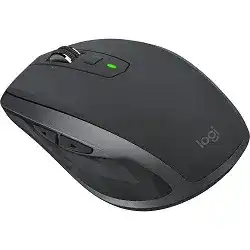
The Logitech MX Anywhere 2S Driver Download page is for users who need the right Logitech software package for this compact wireless mouse. Windows and macOS can usually move the pointer with a basic system driver, but the Logitech utility gives access to button mapping, gesture control, pointer adjustment, scroll behavior, battery status, and device management.
This model works through Bluetooth Low Energy or a Logitech Unifying receiver. It also includes Easy-Switch for multiple computers, a Darkfield high precision sensor, hyper-fast scrolling, a mode shift button, back and forward side buttons, a gesture button, and a rechargeable Li-Po battery. The software matters most when those extra controls do not behave like normal mouse buttons.
Use the matching Logitech package when you want to customize the wheel, change button actions, check the battery, or set up Flow between supported computers. If you only need basic pointer movement on a supported system, the mouse may work before the extra software opens.
Logitech MX Anywhere 2S Windows Driver Download
| Driver Name | Description | Supported OS | File Size | Download |
|---|---|---|---|---|
| Logi Options+ Software | Customizes mouse buttons, pointer behavior, scrolling, shortcuts, gestures, and device settings. | Windows 11, Windows 10 32-bit/64-bit | 43.09 MB | |
| Logitech Options Software | Manages button assignments, scrolling actions, pointer controls, and application-specific mouse settings. | Windows 11, Windows 10 32-bit/64-bit | 245.76 MB |
Logitech MX Anywhere 2S Mac OS Driver Download
| Driver Name | Description | Supported OS | File Size | Download |
|---|---|---|---|---|
| Logi Options+ Installer | Installs Logitech software for configuring mouse buttons, scrolling, pointer behavior, and gesture shortcuts. | macOS 26, macOS 15, macOS 14 | 19.44 MB | |
| Logi Options+ Software | Adjusts device settings, button actions, scroll behavior, gestures, and workflow shortcuts on macOS. | macOS 12.0 | 18.65 MB | |
| Logi Options+ Software | Provides mouse customization for pointer response, button mapping, scrolling preferences, and gesture controls. | macOS 13 | 19 MB | |
| Logitech Options Software | Controls MX Anywhere 2S shortcuts, button functions, scrolling setup, and device-specific preferences. | macOS 15, macOS 14, macOS 13, macOS 12.0, macOS 11 | 238.52 MB |
Setting Up Logitech MX Anywhere 2S with the Right Utility
Start by choosing the Logitech software that matches your operating system and the support offered for this model. Logitech Options and Logi Options+ handle most customization tasks for this mouse. Avoid installing several old Logitech utilities together unless you need them for another device, because duplicate background services can confuse detection.
Connect by Unifying Receiver or Bluetooth
For the Unifying receiver, plug the receiver into a direct USB port first. Then open the Logitech utility and pair the mouse with that receiver. If the device does not appear, turn the mouse off and on, choose another Easy-Switch channel, and pair again. A restart after pairing can clear a stuck receiver profile.
For Bluetooth, turn on Bluetooth in the operating system before pairing. Use the Easy-Switch button on the bottom of the mouse to choose a channel, then hold it until the channel indicator starts pairing. If the computer still remembers an old pairing, remove the old mouse entry first, then pair it again as a fresh device.
Install Cleanly on Windows and macOS
On Windows 10 and Windows 11, install the Logitech utility after the mouse already moves normally. This makes it easier to tell whether the problem comes from the wireless link or from the customization software. After installation, restart Windows if the app cannot see the device or if the side buttons keep acting like plain browser buttons.
On macOS, the app needs permission for background control, accessibility access, and sometimes input monitoring. Open the privacy settings and allow the Logitech items that appear there. If you clicked ignore during a permission prompt, unplug the receiver, change the accessory permission setting, plug it in again, and allow the prompt when macOS asks.
Check the Mouse Before Customizing Buttons
Charge the built-in battery before a long setup session. A low battery can create random disconnects, delayed clicks, or odd scrolling, even when the software looks fine. Also test the pointer, left click, right click, wheel, and side buttons in a browser or simple text editor before adding app-specific profiles.
If the pointer lags when the receiver sits behind a desktop tower, dock, monitor hub, or USB 3.0 device, move the receiver closer to the mouse. A short USB extension cable often works better than a rear port. After the connection becomes stable, open the software and adjust the controls one at a time.
Fixes for Logitech MX Anywhere 2S Connection and Button Problems
Most MX Anywhere 2S problems come from pairing records, software permissions, weak wireless signal, old Logitech services, or changed button assignments. The fixes below focus on issues that commonly affect this model and closely related Logitech wireless mice with the same receiver and customization features.
Logitech Software Does Not Detect the Mouse
When the pointer moves but the Logitech app shows no device, the mouse often works through the operating system while the utility cannot read the receiver or Bluetooth profile. First, update the Logitech utility. Then unplug the receiver for a few seconds, plug it into a direct USB port, and reopen the app.
If detection still fails, remove older Logitech utilities that control the same device, restart the computer, and pair the mouse again. On macOS, also check background items and privacy permissions. The utility needs those permissions before it can show battery status, button assignments, and gesture settings.
Unifying Receiver Pairing Stops Working
A receiver can keep an old pairing record after the mouse switches to another computer or channel. Open the Logitech pairing utility, remove the old MX Anywhere 2S entry if it appears, and pair it again. Then turn the mouse off, wait a moment, and turn it back on during the pairing process.
Also check the Easy-Switch channel. If the mouse sits on the wrong channel, the receiver may look fine but the cursor will not move. Pick the channel you want for that computer, pair it with the receiver, and leave that channel saved for future use.
Bluetooth Connects and Disconnects Repeatedly
Bluetooth trouble often starts after an operating system update, a failed pairing, or a move from one computer to another. Remove the saved MX Anywhere 2S entry from Bluetooth settings. Then turn Bluetooth off and on, restart the computer, and pair the mouse again on a clean Easy-Switch channel.
If Windows does not show Bluetooth controls, check whether the computer actually has a working Bluetooth adapter. For laptops, also check any wireless switch or airplane mode setting. When Bluetooth remains unstable, use the Unifying receiver as a practical fallback.
Pointer Lag, Freezing, or Jumping
Lag usually points to wireless interference rather than a bad driver. Rear USB ports, metal cases, USB hubs, docks, external drives, and USB 3.0 cables can reduce the receiver signal. Move the Unifying receiver to a front port or place it on a short extension cable near the mouse.
Also charge the battery and test the mouse on a plain desk surface. The Darkfield sensor works on many surfaces, but dust, glass coatings, and uneven material can still create poor tracking. If another computer works better, the first computer likely has a receiver placement, Bluetooth, or software issue.
Side Buttons Do Not Work in Apps or Games
The side buttons normally work as back and forward in browsers. If they fail only inside one program, open the Logitech utility and check the app-specific profile for that program. Delete the broken custom profile and create it again while the target app remains open.
Some programs and games read mouse buttons directly and do not like remapped actions from the Logitech app. In that case, test the side buttons with default back and forward behavior. If they work after removing the custom mapping, the problem comes from the profile, not the hardware.
Gesture Button or Middle Button Does Not Respond
The gesture button depends on Logitech software. If it stops responding, open the utility and confirm that the chosen button still has a gesture action. Then restart the Logitech app or its background process. A full computer restart also clears many stuck gesture problems.
On macOS, privacy permissions matter more after system updates. Open Accessibility and Input Monitoring, remove the old Logitech entries if needed, add them again, and restart. Then test a simple gesture before adding custom actions for window control, media control, or desktop switching.
Scroll Wheel Feels Wrong or Changes Mode Unexpectedly
The MX Anywhere 2S has hyper-fast scrolling and click-to-click scrolling. If the wheel suddenly spins too freely or feels too slow, press the mode shift button below the wheel. That button changes the physical scroll mode, so software changes alone may not fix the feel.
If the Logitech utility controls SmartShift or fixed wheel mode, check those settings too. A mode shift assignment can stop some fixed scroll options from taking effect. Set the wheel mode again, close the app, and test scrolling in a browser page before changing more controls.
Scrolling Stops After a macOS Update
After a macOS update, the pointer may still move while the wheel or custom controls stop. First, open privacy settings and allow the Logitech items again. Then unplug and replug the receiver, or remove and pair the Bluetooth entry again if you use Bluetooth.
If the wheel works in one app but not another, check app-specific settings inside the Logitech utility. If it fails everywhere, clean around the wheel gently with compressed air and test after a full charge. Avoid opening the mouse unless warranty and repair options no longer matter.
Flow Does Not Move Between Computers
Flow needs the mouse paired to both computers and the Logitech utility active on each one. If the pointer refuses to cross screens, check that both computers use the same local network. VPN tools, firewall rules, guest Wi-Fi, or separated network bands can block the connection.
After that, open the utility on both computers and turn Flow off and on again. Keep the mouse paired on separate Easy-Switch channels, then test normal clicking on each computer before testing screen crossing. This avoids confusing a pairing issue with a Flow issue.
Clicks Feel Too Fast, Too Slow, or Accidental
Double-click problems can come from software timing, hand pressure, or a worn switch. First, adjust the double-click speed in the operating system mouse settings. Then test left click and right click in a simple folder window, not inside a game or browser extension.
If the click repeats even on another computer, the switch may have a hardware problem. Before deciding that, charge the battery fully, remove custom button assignments, and test the mouse with both Bluetooth and the receiver. A problem that follows the mouse across computers usually needs service or replacement.
Battery Warning or Random Shutdowns
A low charge can make the mouse look like it has a driver problem. Charge the MX Anywhere 2S with a reliable cable and leave it connected long enough before testing again. The top LED warns when the battery runs low, so do not ignore repeated red or low battery behavior.
If the mouse shuts down soon after charging, test another cable and USB power source. Also check whether the power switch on the bottom feels loose or half-engaged. When the battery still drains unusually fast after a clean charge, the issue is more likely battery wear than software.