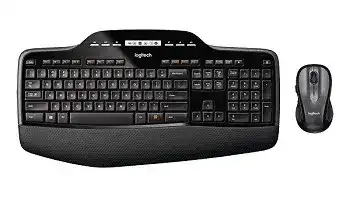
When the keyboard responds but the mouse remains still, or the mouse works while keystrokes disappear, the Logitech MK735 Performance Keyboard and mouse combo Driver needs more than a routine reinstall. This wireless set combines an MK710-style full-size keyboard and an M510 mouse through one Logitech Unifying receiver. Windows can load standard input support automatically, while Logitech software handles receiver pairing, programmable controls, and several model-specific functions.
Logitech MK735 Performance Keyboard and Mouse Combo Windows Driver Download
| Driver Name | Description | Supported OS | File Size | Download |
|---|---|---|---|---|
| SetPoint 64-bit | Full offline package for configuring mouse buttons, tracking speed, keyboard hot-keys, device settings, and battery status on 64-bit systems. | Windows 10 64-bit, Windows 8 64-bit, Windows 7 64-bit | 82.78 MB | |
| SetPoint 32-bit | Complete offline installer for adjusting mouse controls, pointer tracking, keyboard shortcuts, Caps Lock alerts, and Num Lock notifications on 32-bit systems. | Windows 10 32-bit, Windows 8 32-bit, Windows 7 32-bit | 80.35 MB | |
| SetPoint Smart Installer | Small universal installer that downloads the required SetPoint components during setup and requires an active internet connection. | Windows 10 32-bit/64-bit, Windows 8 32-bit/64-bit, Windows 7 32-bit/64-bit | 4.61 MB |
Logitech MK735 Performance Keyboard and mouse combo Driver When Only Half the Set Works
The keyboard and mouse share one Unifying receiver, yet the receiver stores each device as a separate pairing. One part of the combo can therefore keep working after the other loses its connection. This often looks like a battery fault or a failed USB port, but re-pairing the missing device may restore it without disturbing the working one.
Keyboard works, but the mouse does not move
Turn the mouse off, wait several seconds, and switch it on again. Check both AA batteries and inspect the metal contacts for dust or corrosion. If the power light appears but the pointer stays still, open the Logitech Unifying utility and add the mouse again. Follow the on-screen request to cycle its power during discovery.
Test the mouse on a plain, non-glass surface after pairing. The M510 optical sensor may struggle on transparent glass, polished stone, or a highly reflective desk. A sheet of ordinary paper can quickly show whether the surface causes the problem. When movement returns on paper, change the work surface rather than reinstalling software.
Mouse works, but the keyboard stops typing
Check the keyboard power switch and replace its two AA batteries as a pair. Mixing an old cell with a newer one may produce an indicator light while still causing missed keystrokes. After fitting the batteries, switch the keyboard off and on. Run the Unifying utility if it remains absent while the mouse continues working.
A paired keyboard can also appear inactive when Windows changes the input language or enables an unexpected layout. Open a basic text field and test letters, numbers, arrow keys, and the numeric keypad. Wrong characters point to a language setting. No response from any key points back to power, pairing, or the wireless connection.
Neither device responds through the receiver
Move the receiver to another direct USB port and wait for Windows to detect it. Avoid a monitor port, unpowered hub, docking station, or KVM switch during diagnosis. If Device Manager refreshes but both devices remain inactive, restart the computer with the receiver attached. Then open the pairing utility and check whether it sees the Unifying hardware.
Do not substitute a similar-looking Logitech nano receiver unless it carries the Unifying symbol. The MK735 components require a compatible Unifying receiver. A receiver from another product may fit the USB socket and appear in Windows, yet it may not accept either part of this combo.
Separate Pairing Software from Control Software
The Logitech MK735 Performance Keyboard and mouse combo Driver page may contain more than one utility because each program serves a different purpose. Logitech Unifying Software pairs the hardware with the USB receiver. SetPoint manages supported keyboard shortcuts, mouse buttons, pointer behaviour, and wheel functions. Installing SetPoint alone will not repair a pairing record that the receiver has lost.
SetPoint opens without showing the keyboard or mouse
Confirm that both devices work as standard input hardware before changing SetPoint. Close the program, unplug the receiver, reconnect it, and reopen the control panel. If the utility still shows an empty screen, remove the incomplete SetPoint installation, restart Windows, and install it again with the receiver connected directly to the computer.
Older SetPoint releases may leave background components after an upgrade. Running several Logitech control packages at the same time can also create duplicate tray icons or missing device tabs. Keep the software that recognizes this combo and remove unrelated packages only when they conflict. Do not remove the working receiver entry from Windows merely because a configuration panel fails to open.
The Unifying utility cannot find a device
Place the device near the receiver while pairing and turn off other unused Unifying products nearby. Begin the add-device process first, then cycle the keyboard or mouse power when requested. The utility looks for the power-on signal, so switching too early may cause the search to finish without finding anything.
If the receiver already contains an old record for the same device, remove that entry through the utility and repeat the pairing. Use this step only after battery and power checks. Repeated pairing attempts will not revive a keyboard with exhausted cells or a mouse whose power switch remains off.
Restore the Keyboard Display, Media Keys, and Shortcuts
The keyboard includes an LCD status display, media controls, a numeric keypad, and programmable function keys. Ordinary typing may continue even when these extra controls stop responding. That split usually means Windows has loaded its normal keyboard service, but SetPoint has not loaded the additional profile used by the MK735 keyboard.
The LCD display appears blank
Replace the keyboard batteries before treating the blank display as a software failure. The keyboard can become intermittent as the batteries weaken, and the LCD may fade or disappear first. Fit two matching AA cells, confirm their orientation, and cycle the power. The display should return without a new pairing when the existing receiver connection remains intact.
If typing works but the screen stays blank after a battery change, restart SetPoint and inspect its keyboard section. A missing device tab suggests that the control software has not recognized the full keyboard profile. Reconnect the receiver and restart Windows before reinstalling anything. This preserves the existing pairing while giving the software another detection attempt.
Volume, media, or calculator keys do nothing
Test the media controls in a local application that accepts standard media commands. Some browser tabs, streaming services, remote sessions, and corporate programs intercept these keys differently. When every media key fails across several applications, open SetPoint and restore the default assignments. Apply the changes, close the utility, and test again.
Function keys can also change roles when the software switches between standard F-key commands and enhanced shortcuts. Check the selected function-key mode before assuming that an individual key has failed. A key that opens an application instead of sending F5 or F12 usually reflects the active assignment rather than a damaged switch.
Caps Lock or Num Lock status looks wrong
The LCD indicators depend on the keyboard state reported through the receiver. Switch the affected lock key several times and compare the display with actual typing. If the indicator freezes while the key still changes behaviour, restart SetPoint. When the key state itself fails to change, reconnect the keyboard through the Unifying utility and test it outside the original application.
Correct Mouse Scrolling, Side Buttons, and Click Problems
The included M510 mouse has Back and Forward controls, a scroll wheel with horizontal tilt, and programmable functions through SetPoint. Windows may recognize left click, right click, and pointer movement while leaving extra controls unavailable. Install the Logitech MK735 Performance Keyboard and mouse combo Driver package when these additional mouse functions disappear after a system update or migration.
The wheel scrolls too quickly or in the wrong direction
First compare the problem in several programs. Spreadsheet, browser, document, and remote-access software can interpret wheel movement differently. Open Windows mouse settings and reduce the number of lines moved per wheel notch when every application scrolls too far. Reverse scrolling usually comes from an operating-system or application preference, not from receiver pairing.
Erratic jumps in both directions often point to debris around the wheel or a worn wheel encoder. Turn the mouse off and clear loose dust around the wheel with gentle air. Do not pour liquid into the opening. When scrolling remains inconsistent on another computer, software changes are unlikely to repair the internal mechanism.
Back, Forward, or horizontal scrolling does not work
Open SetPoint and confirm the assignments for the side buttons and wheel tilt. Restore the default commands before creating new shortcuts. Then test Back and Forward in a normal browser window and horizontal movement in a wide spreadsheet. Some programs ignore these controls, so one failed application does not prove that the mouse profile is broken.
Security software or workplace policies may prevent SetPoint from controlling selected applications. Standard clicks can still work in that situation. Run the same test in an unrestricted local program. If the controls work there, review the affected application or company policy rather than repeatedly pairing the mouse.
Single clicks become double clicks or dragging breaks
Open Windows mouse properties and adjust the double-click speed before judging the button hardware. A setting that is too slow can turn two separate clicks into a double-click, while an extreme setting may reject deliberate double-clicks. Test the folder icon in the settings panel after each change.
When a held left button releases during dragging, test the right button and try the mouse on another computer. Failure on only one button usually indicates wear or contamination inside that switch. Reinstalling SetPoint will not repair a mechanical contact. Replace or service the mouse if the drag test fails across different systems.
Reduce Lag Without Resetting the Whole Combo
Typing pauses while the pointer stutters
Simultaneous keyboard and mouse lag usually points to the receiver path rather than two separate hardware failures. Move the Unifying receiver away from external drives, wireless adapters, routers, and busy USB 3 equipment. The USB extension supplied with some packages can place the receiver on the desk, where the keyboard and mouse have a clearer wireless path.
Remove the receiver from Windows device settings only when ordinary port changes and a restart do not help. Reconnect it afterward so Windows rebuilds the USB input entry. This can clear a damaged device record, but it may also require the operating system to detect the combo again. Preserve the Unifying pairing unless the Logitech utility shows that it has been lost.
The devices wake slowly after sitting idle
Both parts of the combo conserve battery power during inactivity. A brief wake delay can occur, but repeated pauses or lost input suggest weak batteries or USB power management. Replace the cells first. Then inspect the USB hub power-saving options in Windows and stop the computer from turning off the receiver to save power when that option causes repeated disconnects.
Laptops may apply more aggressive power rules while running on battery. Compare behaviour while connected to the charger. If the combo becomes responsive on external power, adjust the laptop’s USB power plan rather than changing mouse assignments or re-pairing both devices.
Leave the Keyboard and Mouse Working as One Set
Use the Logitech MK735 Performance Keyboard and mouse combo Driver utilities according to the symptom. Pair missing hardware with the Unifying program, manage enhanced controls through SetPoint, and use Windows settings for general pointer speed, scrolling, keyboard layout, and repeat rate. This division prevents one small problem from turning into a complete software removal.
Before finishing, test each component separately. Type a full line, use the numeric keypad, check the LCD indicators, adjust volume, move the pointer, drag a window, scroll vertically, tilt the wheel, and try both side controls. A failed individual test reveals which part still needs attention without hiding the fault behind the other working device.
Keep the compatible Unifying receiver in a direct, dependable USB connection once both devices respond. Matching batteries, a clear receiver position, and the correct Logitech utility solve more MK735 faults than repeated driver installations. When one component continues failing on another computer after fresh batteries and new pairing, investigate that keyboard or mouse as a separate hardware problem.