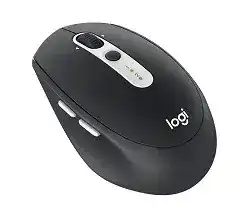
The Logitech M585 Driver Download page is mainly for the software that lets this wireless mouse use its extra controls properly. Windows, macOS, ChromeOS, Linux, Android, and iPadOS can detect the basic pointer through system support, but Logitech software gives better control over buttons, Flow, battery status, and device switching.
The M585 is a multi-device wireless mouse with Bluetooth and a Logitech Unifying USB receiver. It can connect with two systems and switch between them through the Easy-Switch button. This model also has thumb buttons, a tilt wheel, micro-precise scrolling, optical tracking, and power from one AA battery.
Install the Logitech utility when you want to customize the side buttons, repair the receiver connection, use Flow between two computers, or check why the mouse appears but does not respond. For normal movement only, the operating system may work without extra software.
Logitech M585 Multi-Device Mouse Windows Driver Download
| Driver Name | Description | Supported OS | File Size | Download |
|---|---|---|---|---|
| Logi Options+ Software | Options+ installer for customizing mouse buttons, pointer behavior, scrolling, shortcuts, and device settings on newer Windows systems. | Windows 11, Windows 10 32-bit/64-bit | 43.09 MB | |
| Logitech Options+ Software | Full Options+ package for setting mouse controls, scroll behavior, pointer response, and app-specific shortcuts on supported Windows versions. | Windows 10 32-bit/64-bit, Windows 8 32-bit/64-bit, Windows 7 32-bit/64-bit | 187.71 MB | |
| Logitech Options Software | Logitech Options setup for adjusting button actions, pointer movement, scrolling direction, and device preferences in Windows. | Windows 11, Windows 10 32-bit/64-bit | 245.76 MB | |
| Logitech Options for Windows | Windows Options software for managing mouse button assignments, scrolling options, shortcut actions, and connected device settings. | Windows 10 32-bit/64-bit, Windows 7 32-bit/64-bit | 203.51 MB |
Logitech M585 Multi-Device Mouse Mac OS Driver Download
| Driver Name | Description | Supported OS | File Size | Download |
|---|---|---|---|---|
| Logi Options+ Software | Options+ package for macOS that helps customize mouse buttons, scrolling behavior, gestures, shortcuts, and device settings. | macOS 12.0 | 18.65 MB | |
| Logi Options+ for macOS 13 | macOS 13 Options+ installer for controlling button functions, pointer settings, scroll actions, and supported mouse shortcuts. | macOS 13 | 19 MB | |
| Logi Options+ for macOS | Recent macOS Options+ build for configuring mouse buttons, scrolling preferences, pointer behavior, gestures, and device-level controls. | macOS 26, macOS 15, macOS 14 | 19.44 MB | |
| Logitech Options for macOS | Mac Options installer for adjusting mouse button actions, scrolling direction, shortcut behavior, gestures, and paired device settings. | macOS 15, macOS 14, macOS 13, macOS 12, macOS 11 | 238.52 MB |
Set Up the M585 with the Right Logitech Utility
Start with the connection type you want to use. The M585 can work through Bluetooth or through the small Unifying receiver stored with the mouse package. If your computer has weak Bluetooth, the receiver often gives a steadier connection. However, Bluetooth works well when the computer’s adapter and power settings behave correctly.
Prepare the mouse before pairing
Open the battery area and check the AA battery direction before you install software. Remove any pull tab if the mouse is new. Then switch the mouse on and watch the channel light. A short press on the Easy-Switch button changes the channel. A long press starts pairing mode.
Use one channel for the first computer and the second channel for the next computer. This matters because many connection problems happen when the mouse waits on the wrong channel. If the light keeps blinking, change the channel first, then start pairing again.
Choose Bluetooth or Unifying receiver setup
For Bluetooth, open the computer’s Bluetooth settings and pair the M585 while the channel light blinks quickly. If the computer already stores an old pairing, remove that entry first. After that, restart Bluetooth and pair again from the same Easy-Switch channel.
For the Unifying receiver, plug the receiver into a direct USB port and use the Logitech pairing utility or the Logitech customization software that shows the M585. Keep the mouse near the receiver during pairing. If the receiver sits behind a desktop case, move it to a front port or use a short USB extension.
Install software only for the features you need
The basic pointer, left click, right click, and wheel usually work without a separate driver. Install the Logitech package when you need button mapping, Flow, battery information, or receiver pairing. Older M585 setups used Logitech Options for these features. On newer systems, check the current Logitech customization package first and use the one that lists this model.
Remove older Logitech utilities when the mouse appears twice or button changes do not save. Then restart the computer, install the matching package again, and test the side buttons in a browser. If Flow will control two computers, install the utility on both systems and keep both computers on the same network.
M585 Problems and Practical Fixes
Most M585 problems come from pairing state, battery contact, receiver placement, old software, or button mapping. The fixes below focus on issues that commonly come up with this model and close Logitech M-series wireless mice that share the same receiver and software behavior.
M585 does not connect through the Unifying receiver
When the receiver works but the pointer does not move, the mouse may no longer pair with that receiver. Open the Logitech pairing tool, choose the Unifying device option, and turn the mouse off and on when the utility asks. Keep the receiver close during this step.
Also check the receiver type. The M585 uses a Unifying receiver, not the newer Bolt receiver. If you try to use a Bolt receiver, the pairing will fail even though both receivers look like small USB dongles.
Bluetooth does not show the mouse in Windows or macOS
This often happens when the mouse sits on the wrong Easy-Switch channel or it has not entered pairing mode. Press the channel button once to select the channel you want. Then hold it until the light blinks quickly. After that, search from the computer’s Bluetooth panel again.
If the old M585 entry remains in the Bluetooth list, remove it before pairing again. Then turn Bluetooth off and on, restart the mouse, and pair from a fresh device search. This clears many stuck pairing entries without touching system files.
The mouse connects, then disconnects or lags
Weak wireless signal and USB interference can cause lag, jumps, or short dropouts. Move the Unifying receiver away from rear USB ports, metal surfaces, docks, and busy USB 3.0 devices. A short USB extension often fixes the issue on desktop computers.
If you use Bluetooth, update the computer’s Bluetooth driver through the operating system tools. Also check Bluetooth power saving on laptops, because some systems turn the adapter down too aggressively. Replace the AA battery before changing software if the problem started suddenly.
Side buttons do not go back and forward
The thumb buttons usually work as browser back and forward buttons, but custom actions need Logitech software. Open the utility and check the button assignments for the active application. If the buttons work in one browser but not another app, the app profile may need a different shortcut.
If the buttons stopped after installing or updating Logitech software, remove duplicate Logitech entries and restart the computer. Then install the matching utility again and assign simple back and forward actions first. Test in a browser before creating app-specific actions.
Flow does not switch between two computers
Flow needs both computers connected to the mouse on different channels. Pair one computer on channel one and the second computer on channel two. Then install the Logitech utility on both computers and keep both machines on the same Wi-Fi or Ethernet network.
If Flow still fails, check whether a firewall, VPN, guest network, or isolated Wi-Fi mode blocks the computers from seeing each other. Easy-Switch can still move between systems even when Flow does not work, so use the channel button while you fix the network side.
The pointer works but custom settings disappear
This usually points to a software profile problem, not a hardware fault. Open the Logitech utility and confirm that it detects the M585 as the active device. Then check whether the setting changes under a global profile or under a single app profile.
If the utility opens but does not apply changes, close it fully and restart the system. On macOS, also review privacy and accessibility permissions for the Logitech utility. Without those permissions, button actions and scrolling changes may not work inside some apps.
Scroll wheel feels too fast, too loose, or inconsistent
The M585 has a micro-precise scroll wheel and tilt control, so scrolling can feel different from a basic mouse. First check system scroll speed in Windows or macOS. Then check the Logitech utility if you changed wheel or button assignments earlier.
Dust around the wheel can also make scrolling skip or feel uneven. Turn the mouse off and clean around the wheel with a soft brush or light air. Do not pour liquid into the wheel area. After cleaning, test scrolling on a simple web page.
Easy-Switch changes to the wrong computer
The M585 stores two channels, and each channel can have its own connection. If pressing the button moves to the wrong device, one channel may pair with an old computer. Remove the unwanted pairing from the computer, then pair the channel again with the device you want.
Label the first channel mentally for your main computer and the second channel for your second device. This simple habit avoids repeated pairing work, especially when you use one system through Bluetooth and another through the Unifying receiver.
Clicks stop responding or double-click too easily
Start with the simple checks. Replace the AA battery, make sure it sits firmly, and clean the battery contacts with a dry cloth. Weak contact can make a wireless mouse appear faulty because the pointer may move while clicks fail or drop.
If the hardware click works but opens items twice, adjust double-click speed in the operating system. Test the same mouse on another computer as well. If the click still fails there with a fresh battery, the switch may have a hardware problem.
The mouse stops after sleep or wake
Some computers wake before the receiver or Bluetooth adapter becomes active. Turn the mouse off and on once, then wait a few seconds. If you use the receiver and the issue repeats, move it to another USB port and avoid a hub that powers down during sleep.
On laptops, check power settings for Bluetooth or USB power saving. On Linux systems, reconnecting the receiver to another USB port often brings the pointer back after suspend. If that fixes it, keep the receiver in the port that wakes more reliably.
Logitech software does not detect the M585
When the mouse moves but the utility does not show it, the system may only see it as a basic HID mouse. Reconnect through the Unifying receiver or pair Bluetooth again from the active channel. Then restart the Logitech utility, not only the browser or settings window.
If you upgraded from older Logitech software, remove the old utility before installing the newer package. Mixed versions can leave background services running and block detection. After reinstalling, restart the computer and open the utility before changing button assignments.