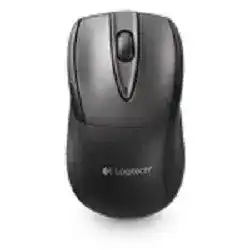
The Logitech M525-C Mouse is a compact wireless mouse that connects through a 2.4 GHz Logitech Unifying USB receiver. It is not a Bluetooth mouse, so the receiver must stay plugged into the computer for the pointer, scroll wheel, and button functions to work.
Windows can run the basic left click, right click, pointer movement, and scrolling with its built-in HID mouse driver. Logitech SetPoint or Logitech Options may add extra control for button assignments, tilt wheel actions, and battery status, depending on the operating system version.
This model uses two AA alkaline batteries and includes a scroll wheel, middle click, tilt wheel back and forward control, an on and off switch, a battery LED, and internal receiver storage. The software mainly helps when the receiver needs pairing or when the wheel buttons need custom behavior.
Logitech M525-C Windows Driver Download
| Driver Name | Description | Supported OS | File Size | Download |
|---|---|---|---|---|
| Logitech Unifying Software | Utility for pairing and managing compatible Logitech devices through a Unifying receiver on newer Windows systems. | Windows 11 32-bit/64-bit, Windows 10 32-bit/64-bit | 3.96 MB | |
| SetPoint Software 32-bit | Full offline SetPoint package for 32-bit Windows with mouse button settings, tracking speed, and device-specific controls. | Windows 11 32-bit, Windows 10 32-bit, Windows 8 32-bit, Windows 7 32-bit | 78.04 MB | |
| SetPoint Software 64-bit | Complete 64-bit SetPoint installer for offline setup with hot-key support, battery status, and Num Lock notifications. | Windows 11 64-bit, Windows 10 64-bit, Windows 8 64-bit, Windows 7 64-bit | 80.45 MB | |
| SetPoint Smart Installer | Small SetPoint web installer for mouse settings and status features; internet access is required during installation. | Windows 11 32-bit/64-bit, Windows 10 32-bit/64-bit, Windows 8 32-bit/64-bit, Windows 7 32-bit/64-bit | 4.61 MB | |
| Unifying Software for Windows | Windows pairing tool for connecting supported Logitech wireless devices to a Unifying USB receiver. | Windows 11 32-bit/64-bit, Windows 10 32-bit/64-bit, Windows 8 32-bit/64-bit, Windows 7 32-bit/64-bit | 3.95 MB |
Logitech M525-C Chrome OS Driver Download
| Driver Name | Description | Supported OS | File Size | Download |
|---|---|---|---|---|
| Unifying Software for Chrome OS | Chrome OS utility for setting up supported Logitech wireless devices with a compatible Unifying receiver. | Chrome OS | 52.58 KiB |
Getting the M525-C Receiver and Software Ready
Start with the receiver and power before changing software. A clean receiver connection fixes many M525-C setup failures faster than repeated driver installs, especially when Windows already detects normal USB mouse input.
Connect the Unifying receiver directly
Plug the Logitech Unifying receiver into a direct USB port on the computer. Avoid a USB hub during the first setup, because some hubs do not give the receiver a stable connection. If the pointer does not move, try another USB port before changing batteries or software.
Keep the receiver close to the mouse during setup. Rear desktop USB ports can sit behind metal, cables, and the computer case, which weakens the 2.4 GHz signal. A front USB port or short USB extension cable often gives the receiver a clearer path.
Use the right Logitech utility
Use Logitech Unifying Software when the M525-C needs pairing with a new or existing Unifying receiver. The mouse will not pair with a random non-Unifying receiver, even if the receiver came from another Logitech device. Look for the Unifying mark on the receiver before pairing.
For button behavior and wheel controls, use the Logitech mouse software that matches your Windows or Mac version. Older Windows setups often use SetPoint for this model. Newer systems may rely on Logitech Options where it still supports the device. Do not install several Logitech control apps at the same time.
Check power before testing controls
Install two fresh AA alkaline batteries in the correct direction. If the battery LED flashes red or does not stay green after power on, replace both batteries together. Mixing one old battery with one new battery can still cause weak pointer movement or random disconnection.
After the receiver and batteries are ready, restart the computer once. Then test movement, left click, right click, middle click, vertical scroll, and tilt wheel movement in a browser. If only the custom button actions fail, open the Logitech utility and adjust button assignments instead of repairing the receiver again.
M525-C Receiver, Pointer, Wheel, and Battery Behavior
When the M525-C acts strange, match the fix to the symptom. A missing pointer usually points to receiver, battery, or pairing trouble, while wrong button behavior usually needs software or app setting changes.
The pointer does not move after plugging in the receiver
Check the power switch first, then remove and reinstall both AA batteries. Make sure the battery ends follow the marks inside the compartment. If the LED does not flash green when the mouse turns on, use a fresh matching pair of alkaline batteries.
Next, move the receiver to another direct USB port. If Windows gives a USB sound but the pointer stays still, run Logitech Unifying Software and pair the mouse again. Turn the mouse off and on when the utility asks for it.
A replacement receiver does not recognize the mouse
The M525-C needs a Logitech Unifying receiver. A basic Logitech nano receiver, a receiver from a non-Unifying model, or a generic USB receiver will not pair with it. The receiver must support Unifying pairing before the software can add the mouse.
Open the pairing utility only after plugging in the Unifying receiver. Then follow the screen prompt and power-cycle the mouse. If another device already uses the receiver, that is fine, because one Unifying receiver can hold more than one compatible Logitech device.
The mouse works for a while and then stops
Short dropouts often come from weak battery power or a poor receiver position. Replace both AA batteries, then test the mouse close to the receiver. If it becomes stable nearby, the signal path needs improvement.
Move the receiver away from the rear of a desktop tower, USB 3.0 storage drives, docking stations, and thick metal surfaces. A short USB extension cable can place the receiver on the desk, where the M525-C gets a cleaner wireless connection.
Scrolling feels too fast, too slow, or jumpy
The M525-C has a precise scroll wheel, so some pages may move more sharply than expected. First adjust the scroll speed inside Windows or macOS mouse settings. Then test the wheel in a plain browser page and a document.
If the wheel jumps in every program, blow dry air around the wheel area and check for dust. If the problem started after installing Logitech software, reset the wheel settings in that utility or remove duplicate Logitech profiles.
Tilt wheel back and forward do not work
The wheel can tilt left and right for browser back and forward actions. Test it in a normal web browser first, because some apps do not read those commands. A document editor or settings window may not react even when the wheel works correctly.
If browser back and forward still fail, install or reopen the matching Logitech control software and check the wheel tilt assignments. Restore the default action first. After that, try custom actions only after the basic tilt commands work.
Middle click opens the wrong action
Middle click behavior depends on the app. In a browser, it may open a link in a new tab. In design or office software, it may pan, scroll, or do nothing unless the app has a middle-button setting.
Test the middle click on a browser link before changing the mouse setup. If it works there, adjust the setting inside the program that fails. If it fails everywhere, check the Logitech utility and make sure the wheel click has not been remapped.
Buttons work until Logitech software opens
Two Logitech utilities can fight over the same device. Remove old SetPoint or Options installs that you no longer need, restart the computer, and install only the package that matches the M525-C and your operating system.
Also check for app-specific profiles. A profile can make the wheel, middle click, or tilt action behave differently in one program. Delete the custom profile or reset it, then test the same button again in a browser.
The receiver works on one computer but not another
When the same receiver and mouse work on one computer, the mouse hardware probably works. On the failing computer, try a direct USB port and wait for the basic HID mouse driver to load. Windows may need a moment after the first plug-in.
If nothing changes, remove the receiver from Device Manager, unplug it, restart, and plug it back in. Avoid changing the mouse pairing until the computer can see the USB receiver normally.
The battery light flashes red or battery life seems short
A red battery LED means the M525-C sees low power. Replace both AA batteries with a fresh pair and avoid mixing brands, ages, or rechargeable cells with different charge levels. Check that the battery door closes without pressure on the cells.
If the warning returns soon, wipe the battery contacts with a dry cloth and check for corrosion or leakage. Store the mouse switched off when not in use for long periods, and remove the batteries before long storage.
The pointer skips on glossy or uneven surfaces
The M525-C uses laser-grade tracking, but reflective glass, mirror-like desks, deep cloth texture, and uneven surfaces can still confuse the sensor. Test it on plain paper or a simple mouse pad before changing software.
Look at the sensor opening on the bottom and remove dust with a soft dry cloth. If tracking improves on the mouse pad, keep using that surface. Software changes will not fix a surface that the sensor cannot read cleanly.
Clicks feel delayed or double-click by mistake
Start with the operating system double-click speed setting. If the speed sits too high or too low, normal clicks may feel like missed or double clicks. Adjust it, then test file selection and browser tabs.
If one button double-clicks on two different computers, the switch may have wear. If it happens only on one computer, remove conflicting Logitech software, restart, and test the mouse again with the default system settings.