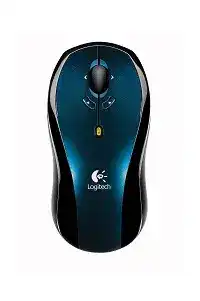
When ordinary clicking works but horizontal scrolling or the extra navigation controls do nothing, the Logitech LX7 Cordless Optical Mouse Driver adds the functions that standard Windows input support may leave unused. The LX7 is an older radio-frequency cordless model with an optical sensor, a dedicated USB receiver, a tilt wheel, forward and back controls, and two AA batteries. It does not use Bluetooth, a Unifying receiver, or Logi Bolt.
Windows can often move the pointer and recognize the main buttons without a separate package. That limited operation sometimes makes the device appear fully configured even though its additional controls remain unavailable. SetPoint is the Logitech software associated with this model. It handles control assignments and wheel behavior, although its age means some features may work differently on current Windows systems.
Logitech LX7 Cordless Mouse Windows Driver Download
| Driver Name | Description | Supported OS | File Size | Download |
|---|---|---|---|---|
| SetPoint Software 64-bit | Full offline package for configuring mouse buttons, tracking speed, device-specific settings, and battery status on 64-bit systems. | Windows 11, Windows 10 64-bit, Windows 8 64-bit, Windows 7 64-bit | 80.45 MB | |
| SetPoint Software 32-bit | Complete offline installer for adjusting mouse controls, pointer tracking, hot-keys, and supported device preferences on 32-bit Windows. | Windows 11, Windows 10 32-bit, Windows 8 32-bit, Windows 7 32-bit | 78.04 MB | |
| SetPoint Smart Installer | Compact installer for mouse button settings, tracking options, and device controls; an internet connection is required during installation. | Windows 11, Windows 10 32-bit/64-bit, Windows 8 32-bit/64-bit, Windows 7 32-bit/64-bit | 4.61 MB |
Logitech LX7 Cordless Mouse Mac OS Driver Download
| Driver Name | Description | Supported OS | File Size | Download |
|---|---|---|---|---|
| Logitech Control Center | Provides Mac customization for supported mouse buttons, scrolling behavior, pointer response, and device-specific controls. | macOS 11, macOS 10.15, macOS 10.14, macOS 10.13 | 17.76 MB | |
| Logitech Control Center | Enables button assignments, cursor adjustments, scrolling preferences, and compatible Logitech mouse settings on later Mac OS X releases. | Mac OS X 10.13, Mac OS X 10.12, Mac OS X 10.11 | 17.15 MB | |
| Logitech Control Center | Manages programmable controls, pointer movement, wheel functions, and model-specific mouse preferences on older Mac OS X systems. | Mac OS X 10.11, Mac OS X 10.10, Mac OS X 10.9, Mac OS X 10.8 | 17.06 MB |
The forward and back controls have no effect
Open SetPoint and inspect the assignments for the two navigation controls. Choose browser forward and browser back rather than an application-specific command, then save the change. Try both controls on a page where you have already followed several links. A newly opened tab has no browsing history, so either direction may appear inactive even when the assignment works.
When the controls respond in one browser but fail elsewhere, the hardware and cordless link are probably functioning. Check whether the affected program intercepts navigation shortcuts or runs with higher permissions than SetPoint. Closing both programs and reopening them at the same permission level can restore the command without changing the receiver or reinstalling the complete package.
The wheel scrolls vertically but not sideways
Horizontal movement requires both the LX7 tilt action and a window containing material beyond its visible width. Test it in a wide spreadsheet, a large image, or another document with a horizontal bar. Tilting the wheel on an ordinary page may produce no visible response because there is nowhere for the window to move.
SetPoint may assign wheel tilting to zoom or another command instead of sideways movement. Review both tilt directions and select horizontal scrolling when that is the intended action. If the choice disappears after every restart, remove duplicate SetPoint installations and install one complete release. Conflicting background components can restore an older profile during sign-in.
Tilting the wheel zooms instead of scrolling
This behavior usually comes from the stored control assignment rather than a sensor fault. Change the left-tilt and right-tilt actions inside SetPoint, then close the control panel normally so it writes the profile. Some programs also connect the Control key with wheel movement for zooming. Release any stuck modifier key and compare the result in another application.
The wheel becomes noisy, stiff, or inconsistent
Turn the mouse off before cleaning around the wheel. Rotate it slowly while using dry air or a soft brush to remove loose debris from the gaps. Avoid liquid cleaners and do not force the wheel sideways. A wheel that catches mechanically, rotates unevenly, or misses notches on several computers may have wear that software cannot correct.
Check the Windows wheel setting as well. An unusually high lines-per-notch value can make one movement jump through a document, while a value near zero can look like missed input. Compare the response with SetPoint closed. If the wheel changes immediately, its Logitech profile and the Windows value are competing for control.
SetPoint Detection and Logitech LX7 Cordless Optical Mouse Software
Install the Logitech LX7 Cordless Optical Mouse Driver only after the receiver appears as connected USB hardware. The software cannot restore a receiver that Windows never detects. Attach the dongle directly, wait for the operating system to finish identifying it, and then run the SetPoint installer. Restart once before deciding that the control panel cannot find the mouse.
SetPoint opens with an empty mouse panel
Exit the program from the notification area, unplug the receiver, and restart Windows. Connect the receiver again after reaching the desktop, then reopen SetPoint. This sequence refreshes both the USB input record and the Logitech background service. Merely closing the visible window may not reload the device because SetPoint often continues running behind it.
An empty panel can also follow an incomplete upgrade. Uninstall the current SetPoint package, restart, and remove no hardware entries unless Windows clearly marks them as failed. Install a single release that includes LX7 support. Adding Options Plus, Unifying Software, or Bolt software will not improve detection because those applications target different Logitech product generations.
Windows reports compatibility but SetPoint behaves badly
Logitech lists the LX7 model M-RBG112 as compatible with Windows 8 and Windows 10, yet SetPoint itself is now legacy software. Basic input may therefore remain functional while a particular control page closes, displays incorrectly, or forgets a custom action. Use Windows mouse controls for pointer speed, primary-button selection, wheel lines, and double-click timing whenever the old panel becomes unstable.
A compatibility mode may help an installer launch, but avoid stacking several changes at once. Start with the normal installation method and standard administrator approval. After restarting, test one custom control. Only then compare a suitable Windows compatibility setting. This makes it easier to identify whether the installer, SetPoint service, or saved profile caused the problem.
Custom assignments disappear after restarting
Save the assignment, close SetPoint, and reopen it before restarting the computer. If the change has already vanished, the profile was never written correctly. Check that the current Windows account can write to its own application data folders. Security cleanup tools and profile-restoration utilities may also replace the file at every sign-in.
Remove older Logitech keyboard or mouse packages when they load a second SetPoint component. Two releases can display the same device yet save changes in different profile locations. Keep the version that recognizes the LX7 and any other legacy Logitech hardware you still use. Recheck every button after removing the duplicate because prior assignments may not transfer.
Why the Cordless Link Drops Even Though the Receiver Remains Connected
The pointer freezes while the receiver stays visible
A recognized dongle only confirms that the computer can communicate with the USB side of the receiver. It does not prove that the radio link from the LX7 remains intact. Place the receiver where the mouse has a clearer path to it. A USB extension cable can bring the dongle away from a metal desktop case, crowded wiring, or other radio equipment.
Compare several USB positions rather than assuming that a particular front or back port is always best. Ports beside external drives, wireless adapters, and heavily used hubs may produce worse results. Connect the receiver by itself during testing. Once movement stays consistent, reconnect other equipment one item at a time and watch for the freeze returning.
A different Logitech receiver will not pair
The LX7 belongs to an earlier cordless system and does not carry Unifying or Bolt compatibility. Similar Logitech dongles are not automatically interchangeable. A replacement may appear normally in Windows while receiving nothing from this mouse. Confirm the exact receiver model and product-generation compatibility before treating software pairing as the answer.
Keep the original receiver labelled with the LX7 when storing the device. Modern pairing applications cannot convert an incompatible radio protocol. When the original dongle has failed or disappeared, obtaining a verified matching receiver is more useful than installing several unrelated Logitech utilities. Bluetooth discovery will never find this receiver-only model.
The connection fails after moving the computer
Relocating a desktop can place the dongle behind thicker metalwork, below a desk frame, or beside a bundle of power cables. Return it temporarily to an exposed USB position and compare the pointer. Also check whether the move loosened a hub connection. The receiver should fit firmly without rocking or disconnecting when its cable is touched.
If the mouse now works only at a very short distance, install two known-good AA batteries and clean the battery contacts with a dry cloth. Weak power can reduce usable range before the device stops completely. When new batteries make no difference, compare the LX7 and its receiver on another computer in a less crowded location.
The pointer jumps or changes speed unexpectedly
Test the optical sensor on a plain, matte surface. Clear glass, polished stone, glossy patterns, and reflective finishes can confuse optical tracking even when the cordless signal remains strong. Clean the sensor opening with dry air, then inspect it for hair or dust. Do not scrape the lens or push a swab into the opening.
Lower the Windows pointer speed temporarily and turn off enhanced pointer precision for comparison. Acceleration can make a small tracking error look like a large jump. If the pointer behaves normally after that change, raise the speed gradually. If jumps continue on several suitable surfaces, check the receiver position and batteries before blaming SetPoint.
Power, Wake-Up, and Click Faults on an Ageing LX7
The mouse takes too long to wake
The LX7 uses power-saving behavior to extend battery runtime, so the first movement after inactivity may not feel immediate. Move it once, pause briefly, and then try again. A long delay accompanied by USB disconnect sounds is not normal sleep behavior. That combination directs attention toward the receiver port or USB path rather than the optical sensor.
Switch the mouse fully off and back on if it never wakes. A worn power switch may rest between positions and cut power when the shell moves. Operate the switch several times and leave it firmly at the on mark. Continued failures after battery and receiver checks suggest ageing internal contacts or radio hardware.
Battery life is much shorter than expected
The LX7 uses two AA batteries and was marketed with extended battery operation, but old hardware, battery quality, storage conditions, and constant use all change the result. Install both cells from the same new pack. Mixing batteries with different charge levels can make the low cell limit the pair and trigger early interruptions.
Look for residue, dirt, or reduced spring pressure inside the compartment. Clean only with the device off and the batteries removed. Do not insert metal packing material or sharply bend the terminals. Switch the mouse off during long periods away from the computer, and remove the cells before storing it for several months.
One click becomes two clicks
Open the Windows double-click test and move the speed away from its fastest position. A timing value that is too strict can make normal actions feel inconsistent, although it usually does not create repeated clicks everywhere. Try the affected button in several programs, then test the LX7 on another computer without SetPoint custom assignments.
When the same physical button produces duplicate input across computers, the internal microswitch has probably worn. Reinstalling the Logitech LX7 Cordless Optical Mouse Driver will not repair that mechanical fault. Continue using the device only if the click remains predictable enough for your work; accidental double actions can become risky during file movement or confirmation dialogs.
Dragging releases before the button is lifted
First reduce the double-click speed and disable ClickLock in Windows if it was enabled accidentally. Then drag a desktop icon in a small circle while holding the button. Repeated releases during that simple test indicate unstable button contact. A cordless dropout usually interrupts movement as well, while switch wear may release the drag even though the pointer keeps moving.
A quick way to separate software from hardware failure
Connect the original receiver directly to a second computer and install two matching AA batteries. Test movement, vertical scrolling, both main clicks, wheel tilt, and the forward and back controls. Basic movement without SetPoint proves that the receiver and optical input still communicate. Missing extended actions alone point toward software or application compatibility.
If every function fails on both computers, focus on power and the original receiver. If movement works but SetPoint never retains assignments, concentrate on the legacy control package and Windows profile. If only one click, one tilt direction, or the wheel rotation fails everywhere, the fault sits more likely inside that physical control.
This staged test is more informative than reinstalling several utilities together. The Logitech LX7 Cordless Optical Mouse Driver belongs with SetPoint-era controls, while the radio link depends on compatible original-generation hardware. Treat the receiver, battery supply, optical tracking, and programmable functions as separate parts of the diagnosis, and each symptom becomes much easier to place.