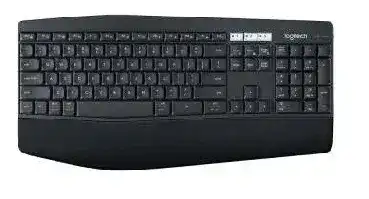
A flashing channel key, an inactive Bluetooth entry, or a keyboard that stays tied to the wrong computer can make the Logitech K850 Wireless Keyboard Driver seem missing. This full-size multi-device keyboard can connect through Bluetooth or a Logitech Unifying receiver. It also stores three Easy-Switch channels, so many connection failures begin with the selected channel rather than Windows keyboard support.
The K850 uses two AAA batteries and provides a number pad, dual Windows and Mac key markings, media controls, and three numbered device keys. Logitech Options was the customization software listed for the model when released. Basic typing may work without that application, but connection management and special-key behavior still depend on the chosen operating system, pairing method, and channel.
Logitech K850 Wireless Keyboard Windows Driver Download
| Driver Name | Description | Supported OS | File Size | Download |
|---|---|---|---|---|
| Logitech Options 64-bit | Full 64-bit package for offline setup, with controls for keyboard shortcuts and device-specific settings. | Windows 11, Windows 10 64-bit | 245.76 MB | |
| Logi Options+ | Customizes keyboard shortcuts, supported key functions, and connected device settings. | Windows 11, Windows 10 32-bit/64-bit | 43.21 MB |
Logitech K850 Wireless Keyboard Mac OS Driver Download
| Driver Name | Description | Supported OS | File Size | Download |
|---|---|---|---|---|
| Logi Options+ | Configures keyboard shortcuts and device behavior on current macOS releases. | macOS 26, macOS 15, macOS 14 | 19.56 MB | |
| Logitech Options | Provides shortcut customization and device controls across several supported macOS versions. | macOS 15, macOS 14, macOS 13, macOS 12, macOS 11 | 238.52 MB | |
| Logi Options+ | Manages keyboard functions, shortcuts, and model-specific preferences on macOS 13. | macOS 13 | 19 MB | |
| Logi Options+ for Monterey | Adjusts keyboard shortcuts and connected-device settings on macOS 12 Monterey. | macOS 12 Monterey | 18.65 MB | |
| Logi Options+ | Enables keyboard customization and device preference controls for macOS 11. | macOS 11 | 17.51 MB |
Only channel 1 works
Pressing an Easy-Switch key briefly selects its saved device. Holding that same key for about three seconds starts pairing and makes its light blink quickly. A short press will not replace the current connection. Select channel 2 or 3, hold it until the light changes to a rapid blink, and then begin Bluetooth or receiver pairing on that channel.
Do not pair every computer to channel 1. A new connection saved there replaces the device that previously used it. Keep one channel for each computer, tablet, or phone, then tap the appropriate number when moving between them.
The channel light never enters pairing mode
Switch the keyboard off, wait several seconds, and turn it on again. If the numbered keys still refuse to blink, reset the stored connections by pressing and releasing Esc and O, repeating Esc and O, and then pressing and releasing Esc and B. Release both keys after each combination. The channel indicators should flash before channel 1 begins blinking rapidly.
This reset removes the keyboard’s saved pairings, so each device must connect again. Use it after ordinary channel selection fails, not every time Bluetooth wakes slowly. If channels 2 and 3 remain dark after the reset while channel 1 works, the fault may lie in the keyboard rather than the computer.
Choose Bluetooth or the Unifying Receiver Deliberately
Bluetooth sees K850 but will not finish pairing
Remove the existing K850 entry from the computer’s Bluetooth list before starting again. Old records can leave the keyboard visible while blocking a fresh connection. Hold the chosen Easy-Switch key until it blinks rapidly, select the keyboard from the device list, and enter any pairing code on the K850 itself before pressing Enter.
Typing the displayed code into another keyboard or the on-screen field will not complete keyboard pairing. The code proves that the K850 is the device requesting access. If no code appears, turn Bluetooth off and on, restart discovery, and confirm that the selected channel continues blinking.
The keyboard reconnects to the wrong computer
Each Easy-Switch channel remembers one connection, but nearby computers may still show older Bluetooth records. Delete duplicate K850 entries from machines that no longer use that channel. Then pair each device one at a time and note which number belongs to it. This prevents a quick channel press from appearing to select the wrong system.
Keep Bluetooth and Unifying assignments separate while diagnosing the problem. For example, use channel 1 for the receiver and channels 2 and 3 for Bluetooth devices. A clear arrangement makes it easier to tell whether the failure follows one computer, one wireless method, or one physical channel key.
The Unifying receiver is connected but the keyboard is silent
Use Logitech Unifying Software to pair the K850 with a compatible Unifying receiver. Plugging in an unpaired receiver does not automatically create a connection. Open the utility, follow its device-addition process, and turn the keyboard off and on when prompted. Keep the intended Easy-Switch channel selected during the procedure.
Do not use a Logi Bolt receiver for this keyboard. Bolt and Unifying use different pairing systems even though both are small USB devices. The K850 officially supports the Unifying protocol, so the Logitech K850 Wireless Keyboard Driver connection process must use Bluetooth or a genuine compatible Unifying receiver.
The receiver works only in certain USB ports
Connect the receiver directly to the computer while testing. Busy hubs, docks, and ports surrounded by other wireless hardware can produce missed keystrokes or brief dropouts. Try another port and keep the receiver away from large metal surfaces. A short USB extension can improve placement when the desktop sits beneath a desk.
If the keyboard works through Bluetooth but not through the receiver, re-pair the Unifying connection before changing Windows keyboard entries. When neither method works, test the keyboard on another device. That comparison quickly separates a keyboard problem from one computer’s Bluetooth or USB configuration.
Wrong Keys, Number Pad Failures, and Shortcut Confusion
The number pad moves the pointer instead of entering numbers
Check Num Lock first. If the number pad still controls the pointer, Windows Mouse Keys may be active. Open the accessibility mouse settings and turn off the option that controls the mouse with the numeric keypad. Num Lock alone cannot restore normal number entry while that accessibility feature remains enabled.
Also confirm that Windows uses the intended keyboard language and regional layout. A mismatched layout can change punctuation and symbol positions even though the number pad itself works. Remove layouts you do not use when the input-language shortcut keeps switching them accidentally.
Function keys trigger media controls
The top row carries both F-key commands and shortcut functions. Press Fn with a top-row key when the computer receives the wrong action. Logitech Options may also change whether the row behaves as standard F1 through F12 keys or launches its printed shortcuts first.
Check the operating system before assuming the key labels are wrong. The K850 carries markings for Windows and Mac use, and the same physical key may perform a different command after the operating system identifies the keyboard. Test the row in more than one application because browsers, media players, and desktop tools interpret some shortcuts differently.
Print Screen or another marked shortcut does nothing
Some printed functions require Fn, while modern operating systems may assign a different screen-capture command. On Windows, test the keyboard’s Print Screen function and the built-in Windows capture shortcut separately. On macOS, use the system screenshot combinations because a Windows-style Print Screen label does not automatically replace Mac capture commands.
When only one special key fails, open Logitech Options and inspect its assignment. Restore the default action before creating a custom command. A missing target application or an outdated assignment can make a working key appear dead.
Letters produce unexpected symbols
Wrong characters usually point to the active software layout, not a damaged wireless connection. Compare the language shown in the taskbar with the physical legends on the keyboard. Switch back to the required layout and remove duplicate input methods that share similar names.
If the problem follows the K850 to another device, reset its Easy-Switch pairings and reconnect it. If it occurs on only one computer, correct that computer’s keyboard language. Reinstalling the Logitech K850 Wireless Keyboard Driver will not fix a layout that the operating system has intentionally selected.
Missed Keystrokes, Wake Delays, and Software Detection
Typing pauses after the keyboard sits idle
The K850 saves power while inactive and should wake after a key press. Give the first key a moment before entering a long password or sentence. If the keyboard wakes with repeated characters or a long delay, replace both AAA batteries together and reconnect the affected wireless channel.
Bluetooth power management on a computer can also slow the first response. Turn Bluetooth off and on, remove the old keyboard record, and pair again. When fast wake behavior matters more than keeping a USB port free, compare the Unifying connection with Bluetooth and retain the method that behaves better on that computer.
Keys lag or several characters appear at once
Change one part of the wireless path at a time. With a Unifying connection, try another USB position and remove the receiver from a crowded hub. With Bluetooth, reduce nearby wireless congestion and test at a shorter distance. Do not reset every channel until you know whether the lag affects one connection or all three.
Low batteries may still power the channel lights while producing unstable typing. Install two matching AAA alkaline batteries and inspect the contacts for dust or corrosion. If the problem remains on Bluetooth, Unifying, and a second computer, the keyboard itself needs closer inspection.
Logitech software cannot find the K850
Confirm that the keyboard already types through Bluetooth or Unifying before opening the customization application. Logitech Options does not create an ordinary Bluetooth connection by itself. Pair the keyboard at the operating-system level first, or add it through Unifying Software, and then reopen Options.
Close duplicate Logitech utilities left from older devices, restart the computer, and install the package that lists K850 support. Logi Options+ should not be assumed to replace Logitech Options for every older model. Use the download offered on the K850 support page for the operating system in use.
The keyboard vanishes after an update
Windows or macOS updates may preserve the visible device name while breaking the saved connection. Remove the keyboard from Bluetooth and pair the same channel again. For Unifying, reconnect the receiver directly and run the pairing utility instead of deleting every keyboard entry in the operating system.
After communication returns, open the Logitech application and check custom shortcut behavior. The Logitech K850 Wireless Keyboard Driver may not need a full reinstall when only the wireless record changed. Rebuild the connection first, then repair the software only if special controls remain unavailable.
Organize the Three Channels Around the Devices You Actually Use
A practical K850 arrangement prevents many repeat failures. Assign the Unifying receiver to one numbered key, reserve the other two for Bluetooth devices, and keep the same pattern for everyday use. Label the channels near your desk until the arrangement becomes familiar. This reduces accidental overwriting and makes a failed connection easier to isolate.
When a problem returns, watch the channel indicator before changing software. No light suggests power or keyboard trouble. A slow light shows channel selection, while rapid blinking signals pairing mode. A normal channel light with no typing directs attention to the Bluetooth record, Unifying pairing, or receiver position.
Finish by testing ordinary letters, the number pad, Fn commands, media keys, and all three Easy-Switch buttons. A keyboard that types correctly but misses one shortcut usually needs an assignment or operating-system change. A unit that loses every key on one channel needs that connection rebuilt. When all channels fail across several devices, software changes are unlikely to solve the underlying hardware fault.