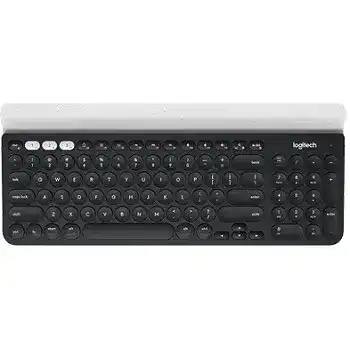
A channel that flashes but never opens its saved computer can make the Logitech K780 Multi Device Wireless Keyboard Driver seem missing. The K780 connects through Bluetooth Smart or a Logitech Unifying receiver and stores up to three device connections. Its Easy-Switch keys move typing between computers, tablets, and phones, while the operating system supplies ordinary keyboard input.
Logitech software adds function-key preferences, device information, and connection management on compatible systems. It cannot repair an expired Bluetooth record or pair the keyboard with an incompatible USB receiver. Start with the channel that fails, identify whether it uses Bluetooth or Unifying, and repair only that connection. The other two saved channels can remain untouched.
Logitech K780 Multi-Device Wireless Keyboard Windows Driver Download
| Driver Name | Description | Supported OS | File Size | Download |
|---|---|---|---|---|
| Logi Options+ Software | Customizes keyboard shortcuts, Easy-Switch controls, function keys, and device-specific settings. | Windows 11, Windows 10 32-bit/64-bit | 43.21 MB | |
| Logitech Options 64-bit Software | Provides a full 64-bit package for offline setup of keyboard shortcuts, function keys, and device controls. | Windows 11, Windows 10 64-bit | 245.76 MB |
Logitech K780 Multi-Device Wireless Keyboard Mac OS Driver Download
| Driver Name | Description | Supported OS | File Size | Download |
|---|---|---|---|---|
| Logi Options+ Software | Manages keyboard shortcuts, Easy-Switch assignments, function-row behavior, and connected-device preferences. | macOS 26, macOS 15, macOS 14 | 19.56 MB | |
| Logitech Options Software | Configures keyboard functions, application shortcuts, device settings, and supported workflow controls. | macOS 15, macOS 14, macOS 13, macOS 12, macOS 11 | 238.52 MB | |
| Logi Options+ for macOS 13 | Adjusts keyboard actions, custom shortcuts, function keys, and per-application assignments on macOS 13. | macOS 13 | 19 MB | |
| Logi Options+ for macOS 12 | Controls Easy-Switch behavior, keyboard commands, shortcut mappings, and application-specific actions on macOS 12. | macOS 12 | 18.65 MB | |
| Logi Options+ for macOS 11 | Sets function-key preferences, keyboard shortcuts, device switching options, and supported custom actions on macOS 11. | macOS 11 | 17.51 MB |
An Easy-Switch light blinks without connecting
A brief light usually means the keyboard is searching for the device already assigned to that channel. A fast, continuous blink means the channel has entered pairing mode. Press the channel once when its connection already exists. Hold it for about three seconds only when adding the keyboard again or replacing the previous pairing.
When a saved Bluetooth channel no longer reconnects, remove the old K780 entry from that computer’s Bluetooth list. Hold the matching Easy-Switch key until its light flashes rapidly, select the keyboard when it reappears, and enter any pairing code shown on the screen. Type the code on the K780 itself, then press Enter to finish.
The wrong computer receives the typing
Watch the light above keys 1, 2, and 3 before entering a password or message. The illuminated number identifies the active host. Press the required channel once and wait for its light to settle before typing. Rapidly pressing several channel keys can leave the keyboard searching for a device that is asleep, out of range, or no longer paired.
Give each channel a fixed purpose, such as a work computer on 1, a tablet on 2, and a home computer on 3. This removes guesswork after the keyboard wakes. The K780 does not send one keystroke to all three systems; it directs input only to the channel selected at that moment.
Repair Bluetooth and Unifying Connections Separately
The K780’s dual connectivity creates two different troubleshooting paths. Bluetooth pairings live in the host device’s wireless records. A Unifying connection lives in the small USB receiver. Removing a Bluetooth entry will not rebuild the receiver link, and changing USB ports will not correct a stale Bluetooth pairing. Match the fix to the connection used by the failing channel.
Bluetooth says connected but no keys appear
Disconnect the K780 from that device’s Bluetooth menu, turn the keyboard off, and restart Bluetooth on the computer, phone, or tablet. Turn the keyboard on again and create a new pairing on the same Easy-Switch channel. Do not merely click the old saved entry repeatedly. A fresh record often clears a connection that appears active while rejecting keyboard input.
Pair near the host device and temporarily disconnect other Bluetooth keyboards. When the screen displays a numeric code, enter it with the K780 number keys rather than the computer’s built-in keyboard. Press Enter on the K780 after the final digit. Missing that last action can leave the keyboard listed without completing authentication.
The Unifying receiver no longer finds the keyboard
Insert the receiver directly into a working USB port and switch the K780 off and on. If the receiver belongs to another Unifying product, pair this keyboard through Logitech’s current web-based receiver connection method or an applicable Logitech pairing utility. Confirm that both the keyboard and receiver carry the Unifying mark. A Bolt receiver or unrelated nano receiver cannot replace it.
Keep only the receiver being configured attached during pairing. Multiple Logitech receivers can make it unclear which one the utility has opened. After the K780 responds, reconnect other dongles. Should typing break up at distance, place the receiver in a less obstructed port or use a short USB extension to bring it out from behind a metal desktop case.
The receiver works before login but Bluetooth does not
Bluetooth availability can depend on the operating system, account session, encryption screen, or computer firmware. A Unifying receiver behaves like a direct USB keyboard and may respond earlier during startup. Use the receiver channel when the K780 must enter firmware menus, disk-unlock credentials, or login details before the computer has fully loaded Bluetooth services.
Wrong Symbols, Swapped Modifiers, and Function-Key Confusion
The Logitech K780 Multi Device Wireless Keyboard Driver may recognise the hardware while the selected operating-system layout remains wrong. The K780 uses dual-labelled keys because one keyboard can move among Windows, macOS, ChromeOS, Android, and iOS devices. A saved channel can therefore type normally yet place Command, Option, Alt, Start, or punctuation on unexpected keys.
Command and Option behave like Windows keys
Select the affected Mac channel, then hold Fn and O for about three seconds to set the keyboard’s Mac layout. For a Windows, Android, or ChromeOS channel, hold Fn and P instead. Make the change while the correct Easy-Switch channel is active because each host may need a different operating-system mode.
After changing modes, test Command, Option, Control, and several punctuation marks. Also check the input language selected by the operating system. The keyboard’s physical layout and the software language must agree. Choosing a US layout for a UK, German, French, or other regional keyboard can move symbols even when the Mac or Windows modifier mode is right.
Media controls appear instead of F1 to F12
The top row favours Easy-Switch and enhanced controls in its normal state. Hold Fn while pressing the required key when an application expects a standard F-key. Where Logi Options+ offers the keyboard preference, change the function-row behaviour so F1 through F12 work directly. This is useful for spreadsheets, development tools, remote desktops, and applications with established function-key commands.
Check the program before assuming the row has failed. A browser, media application, remote session, or firmware screen may interpret the same key differently. Logi Options+ detection is not required for basic typing, so reinstalling it repeatedly will not correct an application that captures or remaps a function key.
One key produces the wrong character
Open the host’s keyboard-language controls and confirm the active layout matches the legends printed on the K780. Remove layouts that switch accidentally through a shortcut. Then test the same character in a plain text field. When only one application shows the wrong symbol, inspect that program’s language, terminal, remote-session, or shortcut configuration.
When Logi Options+ Cannot See the K780
The keyboard may continue typing even when Logi Options+ does not display it. Standard Bluetooth and USB keyboard profiles handle ordinary input without a separate vendor package. The Logitech K780 Multi Device Wireless Keyboard Driver is most relevant for supported preferences and device management, not as a replacement for the operating system’s built-in keyboard service.
Update Logi Options+ before trying older Logitech programs. Previous Unifying Software and Connection Utility releases are no longer maintained, although an older pairing tool may still appear in archived instructions. Avoid running several Logitech utilities together. Close them, restart the system, and open only the program needed for the current connection task.
The keyboard types but remains absent from the app
Test another K780 channel or connect through the Unifying receiver when Bluetooth detection fails. Quit Logi Options+ completely, reconnect the keyboard, and reopen the application. On macOS, allow the Logitech software permissions requested for input monitoring, accessibility, and Bluetooth access. A denied permission can prevent customization while normal keystrokes continue through the system.
On a managed business computer, security controls may block background components or prevent the application from updating. Basic switching and typing should still work. Ask the administrator to approve the current Logitech package rather than disabling security tools or installing unofficial copies.
Options+ opens repeatedly or keeps loading
Remove the existing installation through the operating system, restart, and install the current release once. Do not leave an older Logitech Options process running beside Options+. If the application still loops, verify that its background service can start and that the user account can write to its normal application-data folders.
Delayed Letters, Repeated Keys, and Unexpected Sleep
A pause before the first character does not always indicate a damaged key. The K780 uses power-saving behaviour, and a sleeping host may also take time to restore Bluetooth. Press one harmless key, allow the active channel to reconnect, and then continue. If several letters arrive together later, investigate the wireless path rather than increasing the keyboard repeat rate.
Typing pauses or letters arrive in bursts
Compare Bluetooth with the Unifying receiver on the same computer. A stable receiver connection points toward the host’s Bluetooth adapter, power management, or wireless congestion. If both methods lag, replace the two AAA batteries as a matched pair and test the keyboard close to the computer. Avoid placing the receiver beside high-traffic USB equipment or behind a metal enclosure.
Turn off unused Bluetooth accessories temporarily and test again. Wireless headphones, hubs, storage devices, and crowded 2.4 GHz networks can make the symptom intermittent. Keep the keyboard within its normal working distance and avoid hiding the computer or receiver inside a closed cabinet.
A letter repeats without the key being held
Lower the operating system’s repeat rate and lengthen its repeat delay slightly. Test the suspect key in a basic text field. If repetition follows one physical key across all three devices, turn the keyboard off and remove loose debris around that key with dry air or a soft brush. Do not spray liquid beneath the keycaps.
When different letters repeat only on one host, the keyboard hardware is less likely to be responsible. Remove keyboard macro tools, text expanders, or accessibility features from the test, then reconnect that channel. A local software process can duplicate input even while the K780 behaves correctly with its other saved devices.
The keyboard will not return after idle time
Press the selected Easy-Switch key once and wait for its light. If nothing lights, switch the keyboard off and on and inspect the battery status. A red indicator after startup signals low power. Replace both AAA cells together, confirm their polarity, and wipe dirty contacts with a dry cloth.
When the light appears but the computer remains unreachable, wake the host with its own power button or built-in controls. Bluetooth may not resume until that device leaves deep sleep. For desktop systems that suspend USB hardware, test another direct port and review the host’s Bluetooth or USB power-saving policy.
Rebuild Only the Channel That Has Failed
A full reset removes working pairings, so reserve it for a keyboard whose channel behaviour, operating-system mode, or device detection remains confused after ordinary re-pairing. First record which computer belongs to each number. Then power-cycle the K780, press and release Esc plus O twice, followed by Esc plus B. The Easy-Switch lights should respond before the keyboard returns to pairing mode.
After a reset, add the most important computer to channel 1 and verify typing before continuing. Pair the next device on channel 2, then the final one on channel 3. Set the appropriate Mac or PC layout while each channel is active. This staged approach makes it obvious which host, wireless method, or layout change introduces a problem.
Complete the Logitech K780 Multi Device Wireless Keyboard Driver setup by testing device switching, number-pad input, modifier keys, media controls, and wake behaviour on every channel. Leave Bluetooth records alone once they reconnect consistently, and keep the Unifying receiver assigned to the computer that benefits most from pre-login access. The result should be three distinct connections rather than one repeatedly repaired pairing.