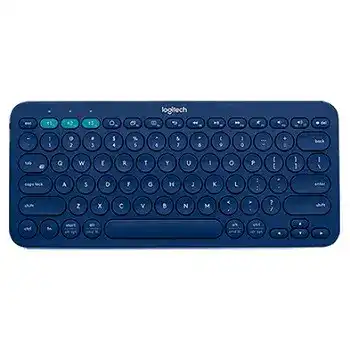
A channel light that blinks without completing the connection usually points to an unfinished Bluetooth pairing, not a failed keyboard. The Logitech K380 Multi Device Bluetooth Keyboard Driver page covers the control software and recovery steps for its three Easy-Switch channels. This compact keyboard connects directly through Bluetooth, so it does not use a USB receiver, Unifying receiver, or Bolt receiver.
The operating system supplies the standard keyboard connection needed for ordinary typing. Logi Options+ adds access to supported customization features, battery notifications, and function-key preferences on compatible Windows and macOS computers. Phones and tablets can use the keyboard without installing desktop software.
Logitech K380 Multi-Device Bluetooth Keyboard Windows Driver Download
| Driver Name | Description | Supported OS | File Size | Download |
|---|---|---|---|---|
| Logitech Options | Customizes keyboard shortcuts, function keys, and device-specific settings for the K380 keyboard. | Windows 11, Windows 10 32-bit/64-bit | 245.76 MB | |
| Logi Options+ | Manages supported shortcuts, key assignments, and connected-device preferences through the newer Logitech interface. | Windows 11, Windows 10 32-bit/64-bit | 43.21 MB |
Logitech K380 Multi-Device Bluetooth Keyboard Mac OS Driver Download
| Driver Name | Description | Supported OS | File Size | Download |
|---|---|---|---|---|
| Logi Options+ | Configures keyboard shortcuts, supported key functions, and device settings on newer macOS releases. | macOS 26, macOS 15, macOS 14 | 19.56 MB | |
| Logitech Options | Controls keyboard assignments, application shortcuts, and other compatible K380 preferences across several macOS versions. | macOS 15, macOS 14, macOS 13, macOS 12, macOS 11 | 238.52 MB | |
| Logi Options+ | Adjusts compatible keyboard actions and personalized device behavior for systems running macOS 13. | macOS 13 | 19 MB | |
| Logi Options+ | Sets up supported key commands and keyboard preferences for the K380 on macOS 12 computers. | macOS 12 | 18.65 MB | |
| Logi Options+ | Provides access to customizable shortcuts and compatible device controls for installations using macOS 11. | macOS 11 | 17.51 MB |
Put the selected channel into discovery mode
A quick press on F1, F2, or F3 only selects a saved device. It does not start a fresh pairing session. Choose the channel you want, then hold that Easy-Switch key until its status light flashes rapidly. The fast blink means the keyboard is discoverable and ready to appear in the Bluetooth list for about three minutes.
Open Bluetooth settings on the computer, tablet, or phone and select the K380 entry. Some systems display a numeric code during setup. Type that code on the K380 and press Enter rather than entering it with the computer’s built-in keyboard. A slower blink followed by a steady light indicates that the chosen channel has connected.
Remove a saved entry that will not reconnect
An old Bluetooth record can remain after an operating-system update, adapter change, or failed pairing attempt. Remove or forget the existing K380 entry from the host device, turn the keyboard off briefly, and then start discovery on the same Easy-Switch channel. Pair it as a new device instead of repeatedly selecting the stale record.
Windows may also show more than one similar entry after several attempts. Delete only the disconnected K380 records, restart Bluetooth, and pair again. On a laptop, confirm that airplane mode is off and that Bluetooth has not been disabled by a hardware key or power-saving control.
Recover a channel linked to another device
Each Easy-Switch key stores one host connection. A channel may seem unresponsive because it still belongs to a nearby phone, tablet, or computer. Hold that channel key until the light changes from a brief slow blink to rapid flashing. This action replaces the saved pairing on that channel without disturbing the other two channels.
Build a Three-Device Logitech K380 Setup
The keyboard can remember as many as three Bluetooth devices at once. Pair the first computer on F1, the second device on F2, and the third on F3. Afterward, use a short press to move between them. Holding a key starts pairing again, so avoid a long press when you only want to change screens.
Install the Logitech K380 Multi Device Bluetooth Keyboard Driver software on a supported desktop system when you need function-key preferences or battery information. Complete the Bluetooth connection first. The control app cannot discover a keyboard that has not already formed a working operating-system connection.
Switching takes longer than expected
A selected channel normally flashes slowly while it contacts its saved host. Keep the target device awake and leave Bluetooth enabled before pressing the channel key. A sleeping laptop, disabled adapter, or distant tablet can delay the change. Wait for the channel light to settle before typing, especially when moving between different operating systems.
If one channel repeatedly fails while the others work, erase and recreate only that pairing. There is no need to remove all three connections. This keeps the working device slots intact and narrows the fault to one host, one Bluetooth adapter, or one saved channel.
Keyboard layout changes between devices
The K380 uses OS-adaptive keys and labels shared functions for Windows, Android, macOS, and iOS. A modifier may therefore behave differently after switching hosts. Check the selected keyboard language and hardware layout inside each operating system. Choosing the wrong regional layout can swap punctuation, move symbols, or make a familiar shortcut appear broken.
Use the lower key labels for typical Apple functions and the upper labels for common Windows or Android functions. When a shortcut fails in only one program, test it in another application before changing the keyboard pairing. The program may reserve that combination or interpret it differently.
Logitech K380 Software for Function Keys and Shortcuts
The top row normally controls actions such as media, navigation, and device switching. Supported desktop software can change how compatible function keys behave, but it does not turn the K380 into a receiver-based keyboard. Keep the Bluetooth pairing active while opening the control app, and allow a few moments for the device panel to appear.
Logitech Options has reached the end of active support, while Logitech directs supported devices toward Logi Options+. Use the current compatible package for the operating system rather than keeping several generations of Logitech control software active together. The Logitech K380 Multi Device Bluetooth Keyboard Driver package should supplement the Bluetooth connection, not replace it.
Logi Options+ opens but cannot find the keyboard
First verify that the K380 types in an ordinary document. If it cannot type, repair the Bluetooth connection before troubleshooting the app. When typing works but the software remains empty, close the app, power-cycle the keyboard, and reopen the program after the selected Easy-Switch channel reconnects.
Security software, restricted work accounts, or damaged background services can stop the device panel from loading. Restart the computer after installation and run the latest installer again if the app never finishes launching. On a managed workplace computer, customization may remain unavailable even though standard typing continues normally.
Media keys work when F-keys are expected
The top row may favor shortcut actions rather than traditional F1 through F12 commands. Hold the Fn key when an application needs a standard function command, or change the supported preference in the Logitech control software. Check the program itself as well, since some applications assign their own actions to function keys.
Do not confuse the three yellow Easy-Switch keys with ordinary function-key customization. Their main job is selecting and pairing devices. Reassigning desktop shortcuts does not change which computer belongs to F1, F2, or F3.
macOS shortcuts or customization disappear
After a macOS upgrade, the control software may need renewed permissions to detect input and apply customized actions. Review the privacy and security panels for the Logitech application, enable the requested access, and restart the app. Keep the K380 connected on the intended channel while approving those permissions.
If normal typing works but a customized command does not, restore that key to its default action and test it again. Then recreate the assignment. This separates a software profile problem from a physical key fault or a shortcut already claimed by macOS.
Fix Repeated Letters, Delayed Input, and Missed Wake-Ups
Repeated characters and pauses often appear when the Bluetooth link becomes unstable. They can also occur when a computer wakes with an outdated connection state. Turn the keyboard off, wait several seconds, switch it on, and select the saved channel once. Avoid pressing keys continuously while the channel light is still searching.
Typing stutters near busy wireless equipment
Bluetooth shares crowded radio space with other devices. Test the keyboard closer to the computer and temporarily move it away from wireless hubs, external drive enclosures, docks, or heavily used adapters. On a desktop, a poor internal antenna position can cause more trouble than the keyboard itself.
Compare the same K380 channel on a phone or another computer. Clean typing on the second device points toward the first computer’s Bluetooth adapter, power management, or radio environment. Repeated letters across several nearby devices suggest checking batteries and the keyboard hardware next.
The first keystroke after sleep is missing
The K380 conserves power while idle and may need a moment to wake. Press one harmless key, pause briefly, and then begin typing. When wake failures become frequent, remove the saved Bluetooth entry and pair that channel again. Also update the computer’s Bluetooth components through its operating-system or hardware manufacturer.
Windows power management can suspend a Bluetooth adapter too aggressively. Installing current system updates and restarting often clears a stuck adapter state. Avoid disabling broad power controls without a clear need, since the exact option varies by computer and Bluetooth hardware.
One or more keys respond inconsistently
Test the affected key on another paired device before changing software. A key that fails everywhere may have debris around its edge or a worn internal mechanism. Turn the keyboard off and use gentle compressed air around the key. Do not pour cleaning liquid into the keyboard or pry off the round keycaps.
If the key works on another device, inspect the original computer’s keyboard language, accessibility options, shortcut assignments, and application controls. Features such as slow keys, filter keys, or key remapping can make a sound keyboard appear defective.
Power Checks That Preserve the Easy-Switch Pairings
The K380 runs on two AAA batteries and has an on/off switch plus a battery-status light. Low power can produce delayed reconnection, brief dropouts, or a keyboard that flashes but never completes pairing. Replace both batteries as a pair and match the polarity marks inside the compartment.
Inspect the battery contacts for dust or a battery that does not sit firmly. Wipe dry loose debris with the keyboard switched off. Avoid abrasive tools and liquids. After fitting the batteries, turn the keyboard on and give the selected channel a moment to reconnect before starting another pairing attempt.
Battery notifications disagree with keyboard behavior
A software estimate may update only after the K380 reconnects to the computer. Power-cycle the keyboard, select the correct channel, and reopen Logi Options+ before judging the reading. When typing becomes erratic despite a remaining percentage, test a matched pair of known-good AAA batteries.
The Logitech K380 Multi Device Bluetooth Keyboard Driver software can report battery information on compatible desktop systems, but the keyboard does not depend on that reading to operate. The physical status light, connection behavior, and a battery test provide better evidence when the displayed value appears stale.
Decide whether the fault follows the channel or keyboard
Use the three saved slots as a diagnostic tool. Connect the keyboard to a second host on another channel and type for several minutes. If only one computer drops characters, repair that host’s Bluetooth configuration. If every channel disconnects with new batteries and at close range, the keyboard may need hardware service or replacement.
Keep the final arrangement simple: one active Bluetooth record for each chosen channel, the current supported Logitech utility on desktop systems, and matched AAA batteries. That combination preserves quick switching while making future connection faults easier to isolate.