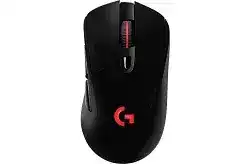
A sudden wireless disconnect can leave the pointer dead while cable mode still works, making the Logitech G703 LIGHTSPEED Wired/Wireless Gaming Mouse Driver central to checking the receiver, firmware, and software profile. The G703 uses a LIGHTSPEED USB receiver, a rechargeable battery, HERO sensor control, programmable buttons, LIGHTSYNC lighting, and optional POWERPLAY charging.
Do not begin by changing DPI or reinstalling several utilities. First decide whether the failure affects wired mode, wireless mode, or both. Connect the supplied data cable and test normal movement. A mouse that responds through the cable but not through LIGHTSPEED usually needs receiver, pairing, USB placement, or firmware work rather than sensor adjustment.
Logitech G703 LIGHTSPEED Wired/Wireless Gaming Mouse Windows Driver Download
| Driver Name | Description | Supported OS | File Size | Download |
|---|---|---|---|---|
| Logitech G HUB | Customizes mouse buttons, pointer behavior, sensitivity settings, lighting, profiles, shortcuts, and other device controls. | Windows 11, Windows 10 32-bit/64-bit | 67.08 MB | |
| Logitech Gaming Software 64-bit | Provides a full 64-bit package for configuring programmable controls, DPI levels, lighting, and game profiles offline. | Windows 11, Windows 10 64-bit | 119.96 MB | |
| Onboard Memory Manager | Manages profiles and assignments stored directly in the mouse onboard memory without installing the full G HUB application. | Windows 11, Windows 10 32-bit/64-bit | 12.45 MB |
Logitech G703 LIGHTSPEED Wired/Wireless Gaming Mouse Mac OS Driver Download
| Driver Name | Description | Supported OS | File Size | Download |
|---|---|---|---|---|
| Logitech G HUB | Adjusts mouse buttons, pointer sensitivity, scrolling behavior, shortcuts, lighting effects, profiles, and device settings on current Mac systems. | macOS 26, macOS 15, macOS 14 | 11.36 MB | |
| Logitech G HUB | Configures programmable commands, pointer response, game profiles, lighting preferences, and supported mouse functions on macOS 13. | macOS 13 | 10.43 MB | |
| Logitech G HUB | Controls button assignments, tracking sensitivity, profile switching, lighting options, and other compatible gaming mouse features. | macOS 11 | 5.02 MB | |
| Logitech G HUB | Supports mouse customization through adjustable buttons, pointer settings, shortcuts, lighting controls, and stored application profiles. | macOS 10.15 | 5.04 MB | |
| Logitech Gaming Software | Offers legacy configuration for programmable buttons, DPI settings, lighting, macros, and game-specific profiles on supported Mac versions. | macOS 10.15, macOS 10.14, macOS 10.13, macOS 10.12 | 204.99 MB |
G HUB shows the G703 as inactive
Switch the mouse on before launching G HUB, then connect both the receiver and charging cable. This gives the application two paths to identify the hardware. Close G HUB fully if its home screen remains blank. End its background processes, reopen the program, and wait for the G703 tile to finish loading before entering device settings.
If the application repeatedly hangs on its opening animation, restart Windows and launch G HUB without other Logitech configuration programs running. A damaged update may require removal and a fresh installation. After reinstalling, test the default profile first. Importing saved settings immediately can restore the same profile fault that made the device appear unavailable.
The mouse appears only while connected by cable
Keep the receiver inserted and open the Device Pairing Tool from the G HUB application settings. Confirm that the utility sees the receiver, choose the mouse pairing option, and follow the power-cycle prompt. Turn the G703 off and back on only when requested. Pairing too early may cause the scan to finish without finding the mouse.
Use the original G703 receiver or a verified compatible LIGHTSPEED replacement. A receiver from another Logitech gaming mouse may look identical yet remain paired to different hardware. Remove extra gaming receivers while troubleshooting. This prevents the utility from selecting the wrong dongle and makes the pairing result easier to judge.
Separate Receiver Failure From Desk-Side Interference
Movement freezes for a second during games
Place the receiver through the supplied USB extension adapter near the mouse pad instead of leaving it behind a metal computer case. Distance alone is not always the problem. External drives, wireless adapters, routers, and busy USB 3 connections can disturb the radio path when they sit close to the LIGHTSPEED receiver.
Try a direct USB port without a hub, dock, KVM switch, or monitor pass-through. Test one port at a time and keep the receiver apart from high-speed storage cables. Leave Windows pointer speed unchanged during this check. Otherwise, a sensitivity change may hide small pauses without fixing the underlying interruption.
Wireless operation stopped after an update
Connect the mouse by cable and leave its receiver attached before checking firmware. The mouse and receiver may need matching revisions. Complete every offered update without unplugging either component. Once G HUB returns to its home screen, restart the mouse and test LIGHTSPEED mode before restoring game profiles or lighting effects.
If the receiver no longer appears anywhere, inspect Windows Device Manager and try another computer. A receiver that fails on several machines may have a hardware fault. However, confirm that you are testing the matching dongle first. Confusing two similar LIGHTSPEED receivers can produce the same symptoms as a failed unit.
The pointer wakes late after sleep
Turn the G703 off for several seconds after the computer resumes, then switch it on again. Reconnect the receiver when the pointer still hesitates. Windows sometimes restores the USB controller before G HUB and its device services have completed startup, leaving the wireless link in a delayed state.
Check USB power management if this happens after nearly every sleep cycle. Temporarily stop Windows from suspending the receiver port and retest. Do not disable several power features at once. A single change makes it clearer whether USB suspension, software startup, or radio interference caused the late response.
Logitech G703 Software Profiles That Change Without Warning
The Logitech G703 LIGHTSPEED Wired/Wireless Gaming Mouse Driver works with G HUB to manage DPI stages, report rate, LIGHTSYNC effects, assignments, and onboard memory. Software mode can activate a profile for each game, while onboard mode uses a configuration stored inside the mouse. Settings may appear to reset when the wrong mode or profile becomes active.
DPI jumps when a game opens
Open the game profile and compare its DPI stages with the desktop profile. G HUB may change sensitivity automatically when it detects the game executable. Remove unwanted stages and set one preferred value when accidental switching causes inconsistent aim. Also check the top button because it may still carry a DPI-cycle assignment.
A persistent DPI Shift command can make the pointer feel normal until a particular control is pressed or held. Review the assignments for all six programmable buttons. Replace unwanted sensitivity commands with simple keystrokes during testing. This reveals whether the sensor changed behavior or the active profile sent a different DPI instruction.
The profile changes to Desktop during play
G HUB may lose track of a game when the executable path changes after an update or when the launcher hands control to another process. Add the actual game executable to the intended profile and confirm that automatic profile switching is enabled. Lock the profile only when you want the same assignments across every application.
Run G HUB with permission equal to the game. A game launched with administrator rights may ignore software-managed commands from a normally launched control app. Avoid assigning identical actions in both places because two layers can trigger a command twice or create an apparent input delay.
Saved controls disappear after G HUB closes
Software profiles rely on the G HUB background service. For simpler commands that must remain available on another computer, enable onboard memory and write the intended profile to the mouse. Test it after closing G HUB. Some advanced macros or application-specific actions may still require software mode and cannot behave identically from onboard storage.
When an onboard slot becomes confused, restore that slot to its default state and build the assignments again. Do not alternate between G HUB and Onboard Memory Manager while both remain open. Finish the profile in one utility, close it, restart the mouse, and then verify every stored control.
Clicks, Wheel Input, and Dragging Problems
A single press produces two clicks
Remove any macro or rapid-click assignment from the affected button before testing the switch. Open a basic click-testing page or a plain desktop window and compare wired and wireless operation. Double activation in both modes usually points away from receiver interference because the same physical switch produces the fault through either connection.
Lower the Windows double-click speed slightly, then retest on another computer. A software reinstall will not repair a worn switch. Use clean compressed air around the button gap after switching the mouse off, but do not add liquid or lubricant. Repeated double clicks across different systems may require warranty service or qualified switch replacement.
Dragging releases before the button is lifted
Broken file dragging or interrupted selection often accompanies a failing primary switch. Hold the button while drawing a selection box on the desktop. If the box repeatedly stops in wired and wireless modes, remove custom assignments and try another computer. The result distinguishes switch instability from a profile command or radio pause.
When the issue appears only wirelessly, return to receiver placement and firmware checks. A brief loss of communication can interrupt a held input even when ordinary pointer movement seems acceptable. Move the dongle closer through the extension adapter and retest before treating the click mechanism as defective.
The wheel moves in the opposite direction
First test several applications because one program may process wheel input differently. Remove any custom wheel assignment and restore normal scrolling in G HUB. Clear loose debris around the wheel with short bursts of compressed air. Do not spin the wheel aggressively while applying air, as that can push dirt deeper into the opening.
Erratic movement that continues on another computer usually indicates an encoder problem rather than a Windows preference. When scrolling behaves correctly in wired mode but fails through LIGHTSPEED, update firmware and check the receiver path. The wheel itself does not use a separate wireless channel, so connection loss can interrupt its reports alongside pointer input.
Battery Readings, Cable Charging, and POWERPLAY Behavior
The battery percentage falls unusually fast
Charge the G703 fully with a known data-capable USB cable and test it with LIGHTSYNC lighting reduced or disabled. Bright effects increase power use, but a battery that drops from full to empty within a few hours needs further checking. Update firmware and compare the displayed percentage after restarting G HUB.
Try another cable and USB power source before assuming that the internal battery has failed. A loose connector can stop charging even though the mouse continues working. Check that the front plug sits firmly and leave the device connected long enough to complete a normal charge rather than judging it from a brief percentage increase.
The cable provides power but no pointer control
Some Micro-USB cables carry charging current without data. Use the supplied cable or another cable confirmed for data transfer. Connect it directly to the computer rather than a wall charger when testing wired operation. G HUB should recognize the G703 through the cable and show its settings even if the LIGHTSPEED receiver has been removed.
If Windows reacts to the cable but the mouse remains absent, try another USB port and inspect the connector for lint. Do not insert metal objects into the charging socket. A cable that works with another data device provides a better test than one known only to charge a phone or accessory.
POWERPLAY does not maintain the charge
Confirm that the POWERCORE module sits correctly in the bottom compartment and that the POWERPLAY system has its own stable USB connection. G HUB should identify both devices. Apply any offered firmware updates, then restart the application. The charging system may maintain the battery within a range instead of forcing a constant 100 percent reading.
Test normal cable charging before blaming the charging surface. If the G703 charges by cable but loses power on POWERPLAY, reseat the module and change the POWERPLAY USB port. Remove unrelated wireless charging items nearby during the test. Continuous discharge after these checks may indicate a module, surface, or power-delivery fault.
Test the G703 From Sensor to Stored Profile
After installing the Logitech G703 LIGHTSPEED Wired/Wireless Gaming Mouse Driver, test the HERO sensor on a clean, consistent mouse surface with Windows acceleration and game sensitivity left unchanged. Check every programmable control, the wheel, DPI selection, lighting, battery reading, and onboard slot while the mouse uses its cable.
Repeat the same test through the matching LIGHTSPEED receiver. A fault that appears only wirelessly directs attention toward pairing, receiver position, firmware, or interference. The same failure in both connection modes points instead toward an assignment, cable-independent software problem, switch, wheel encoder, sensor surface, or internal hardware condition.
Finish by keeping one known profile in onboard memory and one clearly named software profile for games. That arrangement makes later diagnosis faster. You can tell whether G HUB switched profiles, whether the stored configuration loaded, or whether the physical input itself stopped responding without rebuilding every setting from the beginning.