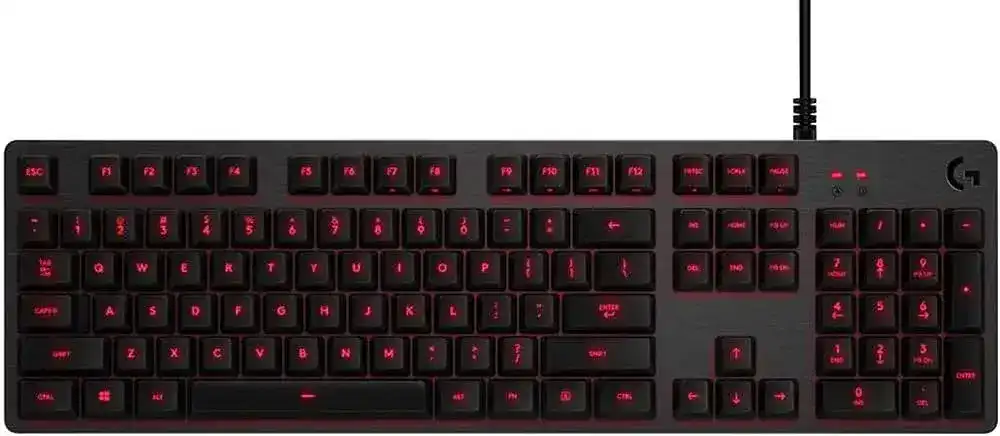
Repeated letters, dark key lighting, or a missing Windows key can make this wired board seem less predictable than it should be. The Logitech G413 Carbon Silver Mechanical Gaming Keyboard Driver gives Windows access to Logitech configuration and firmware functions beyond ordinary USB typing. The G413 uses Romer-G mechanical switches, single-colour key lighting, a Game Mode shortcut, programmable function-key actions, and a separate USB passthrough connection.
Logitech G413 Carbon Silver Mechanical Gaming Keyboard Windows Driver Download
| Driver Name | Description | Supported OS | File Size | Download |
|---|---|---|---|---|
| Logitech G HUB 64-bit | Configures keyboard lighting, function-key assignments, game profiles, macros, and other supported device settings. | Windows 11, Windows 10 64-bit | 67.08 MB | |
| Logitech Gaming Software 64-bit | Manages programmable keys, backlighting controls, command assignments, and saved gaming profiles through the full 64-bit package. | Windows 11, Windows 10 64-bit | 119.96 MB |
Logitech G413 Carbon Silver Mechanical Gaming Keyboard Mac OS Driver Download
| Driver Name | Description | Supported OS | File Size | Download |
|---|---|---|---|---|
| Logitech G HUB | Adjusts supported keyboard illumination, key commands, macros, and application-specific profiles on current macOS releases. | macOS 26, macOS 15, macOS 14 | 11.36 MB | |
| Logitech G HUB | Provides keyboard profile management, lighting configuration, and programmable command controls for macOS 13. | macOS 13 | 10.43 MB | |
| Logitech G HUB | Handles compatible key assignments, lighting effects, macros, and game profiles on macOS 11. | macOS 11 | 5.02 MB | |
| Logitech G HUB | Controls supported keyboard backlighting, programmable functions, and profile switching on macOS 10.15. | macOS 10.15 | 5.04 MB | |
| Logitech Gaming Software | Offers legacy configuration for keyboard lighting, programmable commands, macros, and gaming profiles on older macOS versions. | macOS 10.15, macOS 10.14, macOS 10.13, macOS 10.12 | 204.99 MB |
Logitech G413 Carbon Silver Mechanical Gaming Keyboard Driver for Repeated or Missed Keys
One press produces two or three letters
Key chatter is one of the most frequently discussed G413 faults. Affected keys may enter the same character twice, add an extra space, or behave normally for several minutes before repeating again. First close Logitech gaming software and test the keyboard in a plain text window. This separates a software conflict from a switch that sends more than one signal.
Disconnect the board before cleaning. Remove only the cap above the troublesome switch with a suitable keycap puller, then clear loose dust using gentle compressed air. Press the exposed switch several times and reconnect the keyboard for another test. Avoid oils, household sprays, and liquid cleaners inside the switch. They can leave residue or damage the electrical contacts.
Windows repeat controls may hide mild chatter but will not repair a failing switch. Increasing the repeat delay can help when characters appear only after a key remains held. When a quick tap still creates duplicate letters after cleaning and testing on another computer, the switch or its circuit likely needs warranty service or qualified hardware repair.
A key works only after several presses
Enter, Space, W, A, S, D, arrow keys, and other heavily used controls can begin missing occasional presses. Test the suspect key outside the game where the problem appeared. A keyboard-testing page or a blank document can show whether the failure follows the physical key or occurs only with one application’s control configuration.
Remove debris around the switch and inspect the cap while it is off. A damaged cap stem can feel loose or fail to press the Romer-G switch evenly. Refit an intact cap straight over the switch rather than forcing it at an angle. If pressing the bare switch still produces intermittent input, changing software will rarely solve the underlying fault.
Several keys fail together
A group of dead keys points to a different problem from one dirty switch. Connect the keyboard directly to another USB port and restart the computer. Bypass a monitor port, unpowered hub, KVM switch, or docking station during this test. If the same key group stays inactive on another computer, the fault probably lies within the board rather than Windows.
When Windows Sees a Keyboard but Logitech Software Does Not
Standard typing may work even when the control application shows no G413. Windows loads its normal USB keyboard support first, while Logitech software identifies the model for lighting, function-key commands, Game Mode choices, and firmware access. The Logitech G413 Carbon Silver Mechanical Gaming Keyboard Driver package should therefore be checked only after the direct USB connection works.
The G413 does not appear in the control application
The original G413 was released for Logitech Gaming Software, although later Logitech packages may recognise certain hardware revisions. Do not keep several Logitech control suites active merely to find the keyboard. Remove the failed installation, restart Windows, and install the package intended for this G413 generation. Launch it after connecting the keyboard directly to the computer.
When the application opens but displays no device, move the keyboard plug to another onboard USB port. Allow Windows to finish detecting it before reopening the utility. Security software, an incomplete update, or leftover Logitech services can also stop detection. A normal restart after reinstalling often matters more than repeatedly unplugging the cable while the application remains open.
Windows reports an unknown USB device
Unplug both G413 USB connectors, shut the computer down fully, and reconnect only the keyboard connector after startup. Test another port without an adapter. If Windows still reports an unknown device, open Device Manager and remove only the failed keyboard or unknown USB entry, then scan for hardware changes. Do not remove unrelated USB controllers when other devices work normally.
A cable fault can also produce repeated connection sounds or brief lighting flashes. Check the braided lead near the keyboard body and both USB plugs for visible strain. The cable is fixed to this model, so persistent disconnections on multiple computers require hardware inspection rather than a downloadable configuration change.
The board disconnects during a game
Power-saving behaviour on a USB hub can interrupt input under load. A direct motherboard connection provides a cleaner test. On a desktop computer, compare more than one port rather than assuming the first socket is sound. If the failure begins only after launching one game, close overlays and peripheral utilities temporarily to find whether another background program is interfering.
Backlight, Game Mode, and Function-Key Confusion
The key lighting turns off after startup
A brief flash during connection proves that the LEDs can receive power, but software may lower the lighting afterward. Use the G413 backlight shortcut to raise the brightness, then inspect its lighting controls in Logitech Gaming Software. Carbon and Silver versions use different single-colour illumination, so the software should adjust intensity rather than offer full per-key RGB colour selection.
If every key remains dark, close the control application and reconnect the board. Lighting that returns without the application suggests a stored software preference or damaged installation. Lighting that never returns on a second computer may indicate an LED, controller, or internal power fault. One dark key with the others illuminated usually points to that key’s LED rather than the driver package.
The Windows key has stopped responding
The G413 can disable the Windows key through Game Mode so an accidental press does not interrupt play. Press the Game Mode key combination again and test the Windows key from the desktop. Also inspect the Game Mode configuration in Logitech software, since the utility can control which keys become inactive while that mode is engaged.
Do not confuse Logitech Game Mode with the similarly named Windows gaming setting. Turning off Windows Game Mode will not necessarily restore a key disabled by the keyboard’s own control. Test both Windows keys where the layout includes them, then exit Logitech software and try again if the mode indicator and actual behaviour do not match.
F-keys trigger media controls instead
Function-key inversion changes whether F1 through F12 send their standard commands or their secondary actions without holding Fn. Open the keyboard page in Logitech Gaming Software and check the inversion option. This often explains why an application no longer recognises F5, F11, or another expected command after software preferences were reset.
Application-specific assignments can create similar confusion. Restore the affected F-key to its default action before testing it in several programs. A shortcut that fails in one game but works elsewhere may be reserved, changed, or blocked inside that game rather than lost at the keyboard level.
Use Both USB Plugs for the Correct Purpose
The passthrough port has no power
The G413 cable ends in two USB plugs because the keyboard and its built-in passthrough port use separate connections. Typing and lighting can work with the main keyboard plug alone, while the passthrough socket remains inactive. Connect the second plug to another USB port when you want to use the socket located on the keyboard.
The passthrough connection acts as a convenient extension for a mouse, flash drive, or another suitable USB device. It does not increase keyboard performance or provide extra software functions. When a device works directly on the computer but not through the keyboard, confirm that both plugs are attached before investigating Windows drivers.
A device repeatedly reconnects through passthrough
Test a simple low-power device first. External drives, charging devices, and other hardware with higher power demands may behave differently from a mouse or small flash drive. Move the second G413 plug to another computer port and avoid placing it through an unpowered hub. Persistent failure with several low-power devices suggests a problem in the passthrough cable or socket.
The keyboard works only when both plugs are connected
The main keyboard connector should handle typing and key lighting. If the board becomes active only when both plugs are inserted, identify the plugs carefully and test each computer port. Labels can be difficult to see around a crowded desk, and the passthrough connector may have been mistaken for the keyboard connector.
Connect the known keyboard plug by itself to a verified port. If Windows still cannot detect the board, repeat the test on another computer. Dependence on the second cable after those checks can indicate cable damage or an internal electrical issue rather than missing Logitech software.
Layout Errors, Loose Caps, and Problems That Software Cannot Correct
Keys enter the wrong symbols
When the number row or punctuation keys produce unexpected characters, check the active Windows keyboard language before removing caps. A change between US, UK, or another regional layout alters several symbols even though the physical board remains unchanged. Use the language indicator in the taskbar to select the layout printed on the keycaps.
If only one key sends a completely unrelated command, reset any custom function assignment in Logitech software and test again. Widespread letter substitutions can also come from an alternate input language activated by a keyboard shortcut. Driver replacement is unnecessary when Windows is interpreting the correct scan codes through the wrong regional map.
A keycap becomes loose or its stem breaks
Romer-G caps use a mounting design that differs from many standard cross-stem mechanical keycaps. Generic replacement sets may not fit the original G413 switches. Inspect a loose cap for broken mounting legs and avoid pressing fragments deeper into the switch. Obtain a replacement made specifically for the compatible Romer-G layout and key position.
Pull caps vertically and refit them with light, even pressure. Twisting during removal can stress the small mounting points. A new cap can solve a broken top, but it cannot correct a switch that double-types, misses input, or sits unevenly beneath the plate.
Decide whether the fault follows software or hardware
Finish the diagnosis with the Logitech G413 Carbon Silver Mechanical Gaming Keyboard Driver installed on one computer and ordinary USB keyboard support on another. A software-related fault usually changes when the Logitech utility closes, the configuration resets, or the operating system changes. A defective switch, LED, cable, or passthrough circuit tends to fail in the same way everywhere.
Record which keys fail, whether the lighting changes, and whether both USB functions remain active. That evidence makes a warranty request or repair assessment far clearer than a general description that the keyboard has stopped working. Repeated letters across several computers, dead LEDs beside working ones, or a cable that disconnects when moved all point beyond configuration.