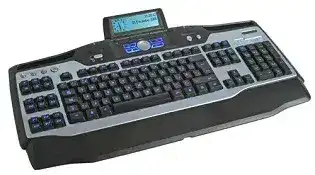
A lit display and working letter keys can hide a failed software connection. The Logitech G15 Gaming Keyboard Driver adds the profile editor, programmable G-key controls, LCD applets, quick-macro recording, and lighting options that Windows does not provide through its standard USB keyboard support. The G15 is a wired gaming keyboard, so Bluetooth pairing, wireless receivers, batteries, and charging utilities do not apply to this model.
Logitech G15 Gaming Keyboard Windows Driver Download
| Driver Name | Description | Supported OS | File Size | Download |
|---|---|---|---|---|
| Logitech Gaming Software 64-bit | Full 64-bit package for configuring G15 keyboard profiles, programmable keys, macros, and game-specific settings offline. | Windows 11, Windows 10 64-bit | 119.96 MB | |
| Logitech Gaming Software 64-bit | Complete 64-bit offline installer for managing keyboard commands, custom profiles, backlighting, and supported gaming controls. | Windows 10 64-bit, Windows 8 64-bit, Windows 7 64-bit | 120.04 MB | |
| Logitech Gaming Software 32-bit | Full 32-bit offline setup for assigning G-key functions, creating macros, switching profiles, and adjusting keyboard features. | Windows 10 32-bit, Windows 8 32-bit, Windows 7 32-bit | 109.04 MB |
Logitech G15 Gaming Keyboard Mac OS Driver Download
| Driver Name | Description | Supported OS | File Size | Download |
|---|---|---|---|---|
| Logitech Gaming Software | Mac software for setting up supported gaming keyboard profiles, programmable controls, macros, and device preferences. | macOS 10.15, macOS 10.14, macOS 10.13, macOS 10.12 | 204.99 MB | |
| Logitech Gaming Software | Legacy Mac package for customizing G-key assignments, application profiles, keyboard commands, and compatible gaming functions. | Mac OS X 10.11, Mac OS X 10.10, Mac OS X 10.9, Mac OS X 10.8 | 180.47 MB |
Logitech G15 Gaming Keyboard Driver When the LCD Stays Blank
The LCD is often the first part to reveal that Logitech Gaming Software did not load correctly. The keyboard may still type because Windows handles its ordinary keys through a standard HID service. Meanwhile, the display remains empty, shows only its startup screen, or stops cycling through applets because the separate Logitech LCD service is missing, stalled, or blocked by another display program.
The LCD backlight turns on without any text
Disconnect the G15 from the computer, close Logitech Gaming Software, and restart Windows. Connect the keyboard to a direct motherboard USB port after the desktop appears, then launch the Logitech utility. This sequence makes Windows rebuild the keyboard connection before the LCD service starts. A front-panel port or unpowered hub may provide enough current for lighting while failing to initialize every keyboard interface.
When the screen remains empty on another direct port, reinstall the compatible Logitech Gaming Software package. Remove the existing installation first and restart the computer before installing again. Keep saved profiles in a separate location if the utility offers an export function. Installing over a damaged copy may preserve the same broken LCD components and leave the display unchanged.
The display freezes on one applet
Close any third-party program that sends information to the G15 screen. Older monitoring, music, voice-chat, and game-statistics applets can stop responding while retaining control of the display. Once those programs are closed, restart Logitech Gaming Software and cycle through the enabled LCD pages again. Re-enable external applets separately until the screen freezes, which identifies the conflicting component without removing every profile.
An obsolete applet may continue loading at sign-in even after its main program has been updated. Disable that LCD entry inside the Logitech configuration area or remove the old plug-in from its parent application. Avoid deleting unknown system files. The safer repair is to update, disable, or uninstall only the program that supplied the non-working display module.
The LCD works only after reconnecting the keyboard
This symptom usually appears during startup or after sleep. Windows may initialize the keyboard interfaces in the wrong order, leaving normal typing and illumination active while the display service cannot reach the LCD. Try another built-in USB port and remove unnecessary USB devices during the test. Reconnect them after the G15 starts normally through several full shutdowns.
USB power management can also leave the display unavailable after wake. Open the power-management properties for the USB hub serving the keyboard and stop Windows from switching off that hub to conserve power. Change only the relevant hub, restart the computer, and test sleep again. Broad power changes across every USB controller are rarely necessary.
Profiles and G-Keys That Ignore Their Assignments
The G15 combines programmable G-keys with M1, M2, and M3 mode controls. The number and arrangement of G-keys differ between G15 revisions, but both designs rely on Logitech software for profile-based commands. When a G-key launches the wrong action or does nothing, first identify the active mode and application profile rather than rebuilding the whole software installation.
A macro works in one program but not another
Check the executable attached to the profile. A game update, new launcher, or installation-folder change can leave Logitech Gaming Software watching an outdated file path. Link the profile to the executable that actually runs during play. Launchers and games may use different processes, so assigning only the launcher can cause the keyboard to return to its default commands after the game opens.
Keep persistent-profile mode disabled when you expect automatic switching. A persistent profile deliberately overrides application detection and keeps one G-key layout active everywhere. Turn it on only when the same commands should remain available on the desktop and in every program. After changing this option, switch between two applications and watch the profile name on the LCD where that information is available.
The M1, M2, and M3 banks seem mixed up
Each mode key holds another set of assignments within the current profile. Select M1 before editing its commands, then repeat the process separately for M2 and M3. A G-key configured while M2 is active will not carry that action into M1. Testing one obvious command in each bank makes mode confusion easier to spot than checking a long group of similar shortcuts.
The mode lights should follow the selected bank. When a mode key changes its indicator but the commands remain identical, confirm that separate assignments were saved rather than copied across all three banks. Close the profile editor normally after saving. A forced shutdown can discard recent changes even though the commands appeared inside the editor during that session.
Quick recording captures the wrong timing
The MR key records on-the-fly macros, but the recording options determine whether delays between key presses are retained. A sequence may run too quickly when delay recording is disabled. It may feel unresponsive when accidental pauses were captured. Open the command in Logitech Gaming Software, inspect the individual key-down, key-up, and delay events, then remove only the unnecessary pauses.
Applications can also reject a macro when one modifier key never receives its release event. Expand the recorded sequence and check that Ctrl, Alt, Shift, or the Windows key has both a press and release. Re-record a short version manually when the sequence looks incomplete. Adding more delays will not correct a missing key-release action.
Logitech G15 Gaming Keyboard Software Detection After Startup
Some systems reach the desktop with the G15 illuminated and its USB ports active, yet none of the main keys respond until the cable is reinserted. The Logitech G15 Gaming Keyboard Driver cannot correct every motherboard startup fault, but changing the USB initialization path often prevents the keyboard from entering that half-started state.
Keys fail during boot but work after unplugging
Move the keyboard from a hub or front connector to a direct USB port. If the failure occurs before Windows begins loading, inspect the computer firmware settings for Legacy USB Support. Enabling that option can improve keyboard access during startup on older boards. Systems that attempt to boot from every attached USB device may also pause or mishandle complex keyboards, so remove unused USB boot choices where appropriate.
Make one firmware change at a time and record the original value. The relevant option names differ between motherboard manufacturers. Do not update the BIOS merely to test a keyboard unless the computer vendor documents a matching USB initialization fix. A port change is safer and often enough.
Logitech Gaming Software opens without showing the G15
Exit the program from the notification area instead of closing only its window. Reconnect the keyboard, wait for Windows to finish identifying its interfaces, and start the utility again. Check Device Manager for an error under keyboards or human-interface devices. Removing only the failed G15-related entry and restarting Windows can trigger fresh detection without disturbing unrelated USB equipment.
Use Logitech Gaming Software rather than assuming every Logitech G product belongs in G HUB. The G15 is a legacy model, and current software may not list it among supported devices. Running multiple generations of Logitech gaming utilities together can also produce competing background services. Retain the package that recognizes the keyboard and remove unused control software after exporting any profiles needed by other hardware.
Media Buttons, Backlighting, and the Built-In USB Ports
Volume and playback controls stop responding
Test the media controls while a standard audio player is active. Some games and full-screen programs capture keyboard input and ignore global play, stop, or volume commands. If the controls fail everywhere, reconnect the G15 directly and restart the Windows Human Interface Device service by restarting the computer. A USB hub can pass normal typing while mishandling the separate multimedia interface.
Also check whether another keyboard utility is intercepting media commands. Close remapping, streaming, overlay, and audio-control programs temporarily. Restore them one at a time after the buttons work. This approach separates a software conflict from a worn control without assigning unsupported functions inside the Logitech profile editor.
The key illumination changes or vanishes
Use the keyboard’s lighting control to cycle through its available brightness states. A press made while cleaning the keyboard can turn the illumination off even though the LCD and keys still function. If the light returns but disappears after sign-in, inspect the active Logitech profile for an illumination setting that replaces the keyboard’s startup level.
A profile may also permit a game to control illumination. Disable that option when the color or brightness changes only after a particular title opens. Then close and relaunch the game. If the lighting remains absent on another computer before Logitech software loads, the fault is more likely inside the keyboard than in a saved profile.
A device connected to the keyboard USB port drops out
The built-in USB ports suit low-power peripherals, but they should not be treated like a powered desktop hub. External drives, charging devices, and other demanding hardware may disconnect or fail to start. Attach those products directly to the computer or to a separately powered hub. Reserve the keyboard ports for suitable low-power equipment.
When even a simple device drops repeatedly, test the G15 through another direct computer port and remove any extension cable. A weak connection upstream affects the keyboard and everything attached to it. If typing remains steady while both pass-through ports fail on another computer, reinstalling Logitech software is unlikely to repair the physical hub section.
When One Key Repeats, Misses, or Feels Stuck
A single failing letter key usually points away from the Logitech G15 Gaming Keyboard Driver. Shut down the computer, disconnect the keyboard, and clear loose debris around the affected key with compressed air or a soft brush. Keep liquids and aggressive cleaners away from the key mechanism. Reconnect the keyboard and test the key in a plain text field before opening a game or macro utility.
Disable any macro assigned to that key combination and compare the result on another computer. Repetition that follows the keyboard indicates a switch or internal hardware problem. A fault that appears only in one program may come from that application’s repeat, accessibility, or input settings. This final comparison avoids erasing profiles for a problem that the software package did not create.