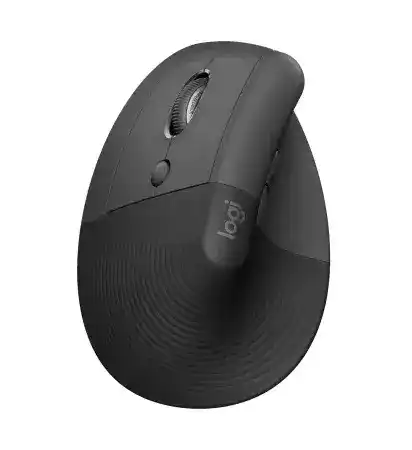
A sudden cursor-speed change, missing back and forward actions, or a wheel that behaves differently between programs can leave the mouse feeling incorrectly configured. The Logitech LIFT Vertical Ergonomic Mouse for Left Hands Driver adds the Logi Options+ controls needed for its SmartWheel, cursor-speed button, side controls, and application profiles. Normal pointing may continue even when those extra functions stop responding.
Logitech LIFT Vertical Ergonomic Mouse for Left Hands Windows Driver Download
| Driver Name | Description | Supported OS | File Size | Download |
|---|---|---|---|---|
| Logi Options+ Software | Customizes mouse buttons, pointer behavior, scrolling, shortcuts, gestures, and device settings. | Windows 11, Windows 10 32-bit/64-bit | 43.21 MB |
Logitech LIFT Vertical Ergonomic Mouse for Left Hands Mac OS Driver Download
| Driver Name | Description | Supported OS | File Size | Download |
|---|---|---|---|---|
| Logi Options+ Software | Configures mouse controls, scrolling behavior, application shortcuts, gestures, and other device preferences. | macOS 26, macOS 15, macOS 14 | 19.56 MB | |
| Logi Options+ Software | Provides access to button assignments, pointer adjustments, scrolling controls, and gesture-based actions. | macOS 13 | 19 MB | |
| Logi Options+ Software | Manages device-specific shortcuts, mouse button functions, pointer response, and scrolling preferences. | macOS 12 | 18.65 MB | |
| Logi Options+ Software | Enables personalized button commands, gesture controls, pointer settings, and scrolling options for the mouse. | macOS 11 | 17.51 MB |
Logitech LIFT Vertical Ergonomic Mouse for Left Hands Driver for Controls That Change Unexpectedly
This left-handed vertical model places the thumb controls on the right side of its body and uses a 57-degree grip angle. That layout changes how the hand reaches the back and forward buttons, especially during the first few days of use. Before changing assignments, rest the palm against the curved surface and move the device from the shoulder and forearm rather than twisting only the wrist.
The pointer suddenly becomes too fast or too slow
The small button below the SmartWheel changes cursor speed. It is easy to press while adjusting the hand position, so an unexpected speed jump does not always indicate a sensor fault. Press the button once and compare the movement. Open Logi Options+ when you need finer control, then set a speed that remains manageable across the full display.
Check the operating system’s pointer value as well. A high Windows or macOS speed combined with a high Logitech value can make small hand movements travel too far. Return one set of controls near its default value before tuning the other. Changing both at once makes it difficult to identify which setting caused the problem.
Back and forward actions run in the wrong direction
The left-hand edition reverses the physical side on which the thumb rests, but software assignments can still carry values from another Logitech device or an imported profile. Open the button section in Logi Options+ and verify each thumb control separately. Assign Back to the button that feels natural under the thumb and Forward to the other, then check them in a browser and a document window.
An application profile can override the general assignment. When the controls behave normally on the desktop but change inside one program, inspect that program’s profile instead of repeatedly editing the global configuration. Remove a profile that no longer serves a purpose, or rebuild it with only the commands required by that application.
A side button turns the wheel into horizontal scrolling
Holding one of the side controls while rotating the SmartWheel can activate horizontal movement. If pages begin travelling sideways, release both thumb buttons and press each one several times. A button may remain partly depressed because of hand pressure or debris around its edge. Switch the mouse off before wiping the gaps with a dry, soft brush.
Logi Options+ can disable or change the horizontal-scroll combination. This is useful when the command starts accidentally during ordinary navigation. Adjust that feature rather than removing every button assignment, since the back and forward functions can remain available without the wheel combination.
Separate Each Easy-Switch Channel Before Rebuilding the Connection
The mouse stores connections for as many as three devices. A short press of the Easy-Switch control underneath selects a numbered channel, while holding it places that channel into pairing mode. Many apparent detection failures occur because the computer and the mouse are using different stored channels. Look at the channel light before deleting software or changing adapters.
The mouse appears in Bluetooth but does not move
Delete the old LIFT entry from the Bluetooth list, restart the computer, and select the channel intended for that machine. Hold the Easy-Switch button until the channel light flashes quickly, then add the device again. This sequence creates a new pairing instead of reconnecting an incomplete record that may appear under an incorrect device category.
Do not press the channel button repeatedly during discovery. A brief press moves to another stored connection and stops the current pairing attempt. Keep the flashing channel selected until the computer completes the process, then test movement and clicking before opening the Logitech control app.
The supplied receiver is detected but the mouse remains inactive
This model uses a Logi Bolt USB receiver. It does not pair with Logitech Unifying receivers or unrelated nano receivers, even when those dongles look similar. Connect the supplied Bolt receiver directly to a USB-A port and select the channel that was paired with it. A replacement must also use Logi Bolt technology.
When the original channel no longer communicates with the receiver, open the Logi Bolt pairing function and place that channel into pairing mode. Keep the mouse close during the pairing exchange. Once it responds, return it to the normal work position and check whether nearby docks, drives, or cable clusters affect movement.
Switching computers leaves one machine unable to reconnect
Assign a different Easy-Switch number to each computer and keep that arrangement consistent. For example, one channel may use the Bolt receiver while the others use Bluetooth. Reusing the same channel for several machines replaces or confuses the stored relationship, which leads to repeated pairing requests when moving between systems.
The Logitech LIFT Vertical Ergonomic Mouse for Left Hands Driver can stay installed on every computer that needs customized controls. The software does not decide which machine receives the pointer. The selected Easy-Switch channel and its saved Bluetooth or Bolt connection control that part of the handoff.
Correct SmartWheel Problems Without Disturbing the Wireless Pairing
The SmartWheel changes its scrolling feel according to how the wheel moves. Slow turns provide controlled steps, while a faster flick travels through longer pages. This behaviour can feel like a fault when someone expects a fixed ratchet wheel. Test it in a long document before changing the connection, battery, or pointer configuration.
The page scrolls too far after a quick wheel movement
Reduce the scrolling value in Logi Options+ and compare it with the application’s own scroll preference. Browsers, spreadsheet tools, and document editors may interpret wheel input differently. A setting that feels restrained in one program can travel several screens in another, particularly after an application-specific profile changes the wheel action.
Remove the profile temporarily when the excessive movement happens in only one application. If the issue occurs everywhere, restore the general pointing and scrolling values to their defaults, close the app, and test again. This separates a software multiplier from the normal fast-scroll action of the SmartWheel.
The wheel moves a page in the opposite direction
First check the operating system’s natural-scrolling preference and the scroll-direction option inside Logi Options+. Avoid enabling opposite directions in both places. One control can reverse the other, and a Logitech application profile may introduce a third value for a particular program.
When the direction changes by itself only on macOS, confirm that Logi Options+ remains open and has the required permissions. If the app cannot load its profile, macOS may fall back to the system direction. Use one primary direction setting, then remove unnecessary per-program overrides.
Individual wheel steps jump or disappear
Power off the mouse and rotate the wheel while clearing loose dust with a dry brush or short bursts of clean compressed air. Do not drip cleaner into the wheel opening. Turn the mouse on and compare slow scrolling with a fast flick in several programs. A software issue usually changes by application; physical wheel trouble tends to follow the mouse everywhere.
Test another computer before assuming that the wheel mechanism has failed. If skipped or reversed steps continue through both Bluetooth and Logi Bolt connections with default settings, the wireless method is unlikely to be responsible. Persistent faults across machines may require hardware service rather than another software installation.
Restore Logi Options+ Detection and macOS Permissions
Install the current Logi Options+ release when the computer recognises the mouse but cannot change its controls. The Logitech LIFT Vertical Ergonomic Mouse for Left Hands Driver should expose pointer speed, scrolling behaviour, thumb-button actions, and program-specific assignments. Close older Logitech configuration utilities when they try to manage the same device at the same time.
Logi Options+ shows an inactive image
Confirm the numbered channel first. Then quit Logi Options+ completely, switch the mouse off for several seconds, turn it on, and reopen the app. Restart the computer if the background service does not recover. Reinstall only after the device works at the operating-system level but remains absent from the control utility.
A pointer that does not move at all points to the Bluetooth or Bolt connection rather than a missing customization package. Repair that link first. The app cannot configure a channel that belongs to another computer or a receiver that has lost its pairing.
macOS accepts clicks but ignores customized actions
Open Privacy & Security and allow Logi Options+ under Accessibility and Input Monitoring. Enable Bluetooth access when the mouse uses that connection or when the app needs to identify wireless devices. Quit and reopen the Logitech software after changing these permissions, because an already running process may keep the earlier restricted state.
If permission switches are already active, turn them off, restart the Mac, and enable them again. Then recreate one simple thumb-button assignment before restoring a larger profile. This small test shows whether macOS now accepts the command without introducing several profile variables at once.
Settings vanish after an application or system update
Open the general device profile and confirm that the mouse still appears under the same name. Updates may interrupt the background component or leave an older program profile unable to find its application. Delete only the affected profile and add the program again. Keep other working assignments intact.
On macOS, use the latest compatible Logi Options+ installer when the application itself fails to open or remains trapped during startup. An in-app updater cannot repair every damaged installation. A direct installation can replace the application components while preserving device profiles in many cases.
Resolve Wake Delays, Battery Warnings, and Uneven Tracking
LIFT uses one AA battery beneath its magnetic cover. When the mouse stops after sleep, switch it off, wait briefly, and turn it on again. Select the expected Easy-Switch channel before pairing anything. A channel mistake can resemble a flat battery because the indicator lights while the computer receives no movement.
The battery level falls faster than expected
Check that the AA cell sits firmly against both contacts and follows the polarity marks inside the compartment. Remove and reseat it when the level changes sharply after moving the mouse. Test a new, good-quality battery before blaming Bluetooth, the Bolt receiver, or Logi Options+ for repeated shutdowns.
Turn the device off during long periods of storage or travel. If a new battery drains rapidly while the mouse remains switched off, inspect the compartment for contamination or a contact that no longer grips the cell. Avoid scraping the contacts with metal objects.
The cursor wakes slowly after the computer resumes
Give the selected connection a moment to reconnect, then click once or move the mouse. When Bluetooth wake remains inconsistent, remove its saved pairing and create it again on the same channel. For Bolt use, try a direct USB port rather than a dock that powers down fully during sleep.
Windows may also switch off a Bluetooth adapter to conserve power. Inspect the adapter’s power-management options when the delay occurs only after extended idle periods. Change that setting only for the affected adapter, then compare several sleep and wake cycles.
Movement feels uneven on one part of the desk
Clean the sensor opening with a dry, lint-free cloth and test a plain, non-reflective surface. Glass, polished patterns, and highly reflective materials can alter tracking. The vertical grip also takes some adjustment, so reduce cursor speed while learning to move the device with the forearm rather than making tiny wrist corrections.
For Bolt operation, change the receiver’s position when movement worsens near a crowded dock or behind a metal computer case. Bluetooth users can compare another channel or computer to isolate an adapter issue. A fault that stays on one surface but disappears elsewhere usually does not require a driver reinstall.
Finish the repair with the Logitech LIFT Vertical Ergonomic Mouse for Left Hands Driver open on the channel used most often. Confirm the cursor-speed button, both thumb controls, SmartWheel movement, and battery reading. Then switch through the other saved channels individually. Keeping each channel tied to one known computer makes later wake and detection problems much easier to trace.