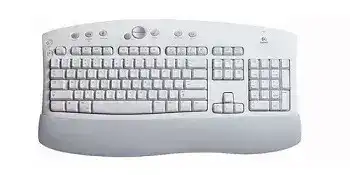
When ordinary typing works but the shortcut buttons remain silent, the Logitech Cordless Access Keyboard Driver restores the software layer used by this older multimedia keyboard. The model communicates through its dedicated radio-frequency receiver rather than Bluetooth, Unifying, or Logi Bolt. It originally shipped with Logitech iTouch software for the extra Internet, media, and application controls.
This full-size membrane keyboard uses two AA batteries and a separate receiver that can connect through USB or PS/2, depending on the supplied hardware. Because it predates modern universal Logitech receivers, the keyboard normally needs its matching legacy receiver. A current Unifying or Bolt dongle cannot replace it.
Logitech Cordless Access Keyboard Mac OS Driver Download
| Driver Name | Description | Supported OS | File Size | Download |
|---|---|---|---|---|
| Logitech Control Center | Provides keyboard customization, hot-key controls, and device-specific settings for supported Logitech hardware. | macOS 11, macOS 10.15, macOS 10.14, macOS 10.13 | 17.8 MB | |
| Logitech Control Center | Enables configurable keyboard commands and access to supported Logitech device preferences on compatible Mac systems. | macOS 10.14, macOS 10.13, macOS 10.12, macOS 10.11 | 16.89 MB | |
| Logitech Control Center | Adds support for assigning keyboard functions and managing compatible Logitech device controls in Mac OS X. | Mac OS X 10.11, Mac OS X 10.10, Mac OS X 10.9, Mac OS X 10.8 | 17.1 MB |
Letters work but the Internet buttons do not
Windows may recognize the standard keys through its built-in keyboard support while ignoring the additional controls. Install the compatible Logitech iTouch package when the web, email, search, media, or other special buttons no longer open their assigned functions. Restart the computer after installation so the background keyboard component can load with Windows.
Older iTouch releases were written for operating systems such as Windows 98, Windows Me, Windows 2000, and Windows XP. Newer Windows versions may still accept ordinary keystrokes without that package, but the original shortcut editor may fail to install or run. Compatibility mode can sometimes open the installer, although full hotkey support is not guaranteed on a modern system.
The wrong Logitech program finds nothing
Logi Options+, Unifying Software, and the Bolt application target later receiver families. They do not convert this keyboard into a newer product or detect its original radio receiver. Installing several Logitech utilities can also leave unnecessary startup processes without restoring the shortcut keys.
Use the software intended for the Cordless Access generation. If a previous attempt left multiple keyboard tools installed, remove the unrelated applications, restart Windows, and install only the legacy package. Standard typing should continue through the operating system even when the old customization panel cannot run.
Rebuild the Radio Link Before Changing Windows
The receiver and keyboard form their own wireless pair. The computer only sees the receiver’s USB or PS/2 connection, so Bluetooth menus cannot locate this model. When every key stops responding, reconnecting that radio link often matters more than reinstalling the Logitech Cordless Access Keyboard Driver.
The keyboard stopped after batteries were changed
Open the battery compartment and confirm that both AA cells follow the polarity marks. Use a matched pair rather than combining batteries of different ages or types. Remove them for a minute when the keyboard remains unresponsive, then reinstall them and try the receiver connection procedure again.
Battery terminals can develop a dull film after years of storage. Take the batteries out and wipe the metal contacts with a clean, dry cloth. Do not scrape the contacts aggressively or pour liquid into the compartment. Bent or heavily corroded terminals may prevent power from reaching the keyboard even when the batteries test well elsewhere.
The receiver has power but typing never begins
Locate the Connect control on the receiver and the corresponding connection control on the keyboard. Start the receiver’s connection mode, then activate the keyboard within the short period allowed by the hardware. Some versions use recessed buttons, so press them carefully with a non-sharp object rather than forcing the surrounding case.
The product was designed with selectable radio channels. If the connection succeeds only briefly, repeat the procedure on another available channel where the hardware provides that choice. This can separate the keyboard from another older cordless device operating nearby.
A replacement receiver looks similar but does not work
The matching problem cannot always be solved through software. Legacy Logitech receivers often belong to a particular product family, frequency, and connection method. A small receiver from a newer keyboard may fit the USB port yet use a completely different protocol.
Compare the part information on the receiver with the keyboard’s original documentation or label. This Cordless Access model does not use the orange Unifying system. Avoid purchasing a modern receiver merely because the seller describes it as universal; physical resemblance does not establish radio compatibility.
USB connection works but the PS/2 adapter does not
A PS/2 keyboard port usually detects hardware during startup rather than while Windows is already running. Shut the computer down before connecting the receiver through PS/2, then start it again. Do not repeatedly attach or remove a PS/2 plug while the machine remains powered.
When the receiver supports direct USB, that path is usually simpler on a newer computer. Remove unnecessary adapters and connect it to a built-in port. If USB works while PS/2 fails, continue with USB instead of changing keyboard software or assuming the transmitter has failed.
Missed Characters, Repeated Keys, and Short Wireless Range
Words appear with letters missing
Move the receiver into an open position where the keyboard has a clear radio path. A receiver hidden behind a metal computer case may struggle even when the desk is only a short distance away. Keep it away from dense cable bundles, large speakers, power supplies, and other older cordless equipment.
Test continuous typing in a plain document after changing its position. If the problem disappears, leave the software alone. Radio reception trouble can resemble a damaged key matrix because Windows receives only part of the transmitted sequence.
Characters arrive late or in a sudden burst
Delayed groups of letters may appear when the receiver temporarily loses contact and then resumes. Replace weak batteries first, even if the keyboard still responds intermittently. Low voltage can reduce useful transmission range before the device stops completely.
Connect the receiver directly to the computer instead of passing it through an unpowered hub. Also disconnect nearby cordless peripherals for a short test. If the delay clears, reconnect those devices one at a time and increase the spacing between their receivers.
One key types several times
Open Windows keyboard properties and lower the repeat rate for a quick comparison. If the key continues repeating with a slower setting, turn the keyboard over and gently clear loose debris from around that area. Use dry air in short bursts while the batteries are removed.
A problem limited to one letter usually points to the switch membrane or contamination rather than the wireless driver. Do not pull off large keys such as Space, Shift, or Enter without knowing the stabilizer arrangement. Their support parts can detach and create a second fault.
Several nearby keys fail together
A cluster of dead keys often indicates a keyboard-matrix problem. Test the keyboard on another computer with the same receiver before reinstalling anything. If the identical group remains inactive, Windows and the Logitech software are unlikely to be responsible.
Remove the batteries and inspect the keyboard for evidence of liquid entry or long-term storage damage. Surface cleaning may help with loose dirt, but internal membrane corrosion needs disassembly and careful repair. Replacing the keyboard is usually safer when numerous keys fail after a spill.
Restore the Multimedia Controls Without Breaking Basic Typing
The Logitech Cordless Access Keyboard Driver package mainly adds access to functions beyond ordinary text entry. Complete the radio connection first, verify the alphabet and number keys, and only then troubleshoot the upper shortcut row. This separation prevents a receiver fault from being mistaken for an iTouch configuration problem.
Volume keys respond in one program only
Check the Windows output device and volume mixer before changing the keyboard assignment. A media key can send its command correctly while a particular application remains muted or sends sound to another output. Test the controls with a locally stored audio file as well as a browser player.
Older media-key software may not understand every modern streaming application. When system volume changes but playback controls do nothing, the keyboard and receiver are probably functioning. Use the player’s own shortcuts or leave those legacy buttons unused rather than repeatedly reinstalling the package.
Email or web buttons open the wrong program
The original iTouch panel can store application paths for supported shortcut keys. A saved path may become invalid after a browser or email program is removed. Open the keyboard configuration panel and assign the button again where that option remains available.
On a newer Windows installation, default-app settings may override parts of the old Logitech configuration. Set the preferred browser or mail handler in Windows first, then retest the keyboard command. This often works better than pointing an old utility toward an application folder that changes after every update.
Caps Lock and Num Lock indicators behave strangely
Press each lock key once and check whether Windows actually changes its typing state. An indicator can lag or fail while the command itself still reaches the computer. Use an on-screen keyboard or a text document to confirm Caps Lock and Num Lock rather than judging only by a lamp.
When the lock state changes by itself, disconnect other keyboards and remote-control devices. Also check accessibility features such as Filter Keys and Sticky Keys. Those Windows options can alter keyboard response and create symptoms that no Logitech installer will correct.
The receiver disappears after sleep
Wake the computer fully, unplug the USB receiver, and reconnect it after the desktop appears. If that restores typing, open the USB hub properties in Device Manager and review its power-saving option. Windows may have suspended the port without restarting it correctly.
Try another direct USB socket before disabling power management permanently. Some hubs handle wake events better than others. When using PS/2, restart the computer instead, because unplugging that connection during operation can leave the keyboard unavailable until the next boot.
Match the Old Hardware to the Right Kind of Support
A useful Logitech Cordless Access Keyboard Driver installation does not require every modern Logitech application. Keep the dedicated RF receiver, two dependable AA batteries, and the original iTouch software together where possible. Those pieces belong to the same hardware generation and address different parts of the keyboard’s operation.
Begin with power and radio synchronization when no keys respond. Check USB or PS/2 detection when the receiver itself disappears. Turn to iTouch only after basic typing works and the multimedia controls remain absent. This order quickly separates a battery fault, an incompatible receiver, a damaged key membrane, and a legacy software limitation.
The keyboard can still provide ordinary input on many computers through standard operating-system support, even when its customization software has aged beyond the current platform. Preserve the matching receiver carefully. For this model, losing that part is often harder to solve than finding another software download.