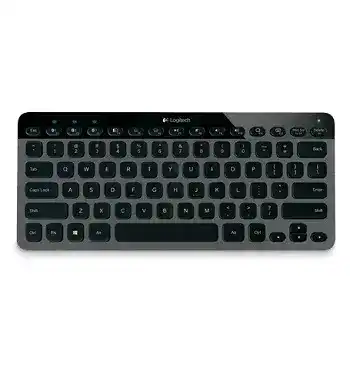
A blinking Bluetooth key followed by a failed PIN screen usually means the connection never finished, not that the keyboard has lost every pairing channel. The Logitech Bluetooth Illuminated Keyboard K810 Driver page mainly covers Bluetooth recovery, function-key control, backlight behaviour, charging, and switching among three paired devices. The K810 does not connect through a Logitech USB receiver.
Windows, macOS, iOS, and Android can use the keyboard through their own Bluetooth service. Logitech software was offered for Windows to adjust function-key behaviour and illumination preferences, but the operating system still handles the wireless connection. Start with pairing and battery checks before changing optional software.
Logitech Bluetooth Illuminated Keyboard K810 Windows Driver Download
| Driver Name | Description | Supported OS | File Size | Download |
|---|---|---|---|---|
| SetPoint 64-bit | Full offline package for configuring keyboard hot-keys, device-specific settings, battery status, and Caps Lock notifications. | Windows 11, Windows 10 64-bit, Windows 8 64-bit, Windows 7 64-bit | 80.45 MB | |
| SetPoint 32-bit | Complete offline installer for adjusting hot-keys, keyboard preferences, battery information, and Caps Lock status. | Windows 11, Windows 10 32-bit, Windows 8 32-bit, Windows 7 32-bit | 78.04 MB | |
| SetPoint Smart Installer | Small universal installer that downloads the required SetPoint components during setup, so an internet connection is required. | Windows 11, Windows 10 32-bit/64-bit, Windows 8 32-bit/64-bit, Windows 7 32-bit/64-bit | 4.61 MB |
The PIN appears but pairing fails
Enter the displayed code on the K810 itself, not through the computer’s on-screen keyboard. Use the number row above the letter keys, then press Enter on the K810. The final Enter press completes the security exchange and is easy to miss when the pairing window gives little guidance.
Restart the process when the code expires. Remove the unfinished Logitech K810 entry from the Bluetooth list, turn the keyboard off, and switch it on again. Press the Bluetooth connect button, choose one of the three Bluetooth keys, and wait for that key to blink before searching for the keyboard.
The keyboard never appears in the Bluetooth list
The K810 remains discoverable only for a limited period after pairing mode begins. Pressing Bluetooth key 1, 2, or 3 by itself may select an existing device rather than open a fresh pairing session. Press the connect button first, then choose the channel you want to assign.
Turn Bluetooth off and back on at the computer or mobile device when scanning shows nothing. Keep the keyboard close during the first connection and temporarily disconnect other Bluetooth peripherals if the adapter appears overloaded. Restarting the host device can also clear a Bluetooth service that has stopped scanning properly.
An old K810 entry blocks reconnection
A saved pairing record may remain after an operating-system update, Bluetooth adapter change, or failed connection attempt. Delete the existing K810 record from the host, restart Bluetooth, and pair the same channel again. Repeatedly selecting the stale entry rarely repairs its stored security information.
Three Bluetooth Keys Do Not Behave the Same Way
The K810 can remember three devices, but only one device receives typing at a time. Each numbered Bluetooth key stores a separate pairing. Pressing another number tells the keyboard to leave the current host and reconnect to the device assigned to that channel.
A channel flashes but never becomes solid
The light above a selected channel blinks while the keyboard searches for its saved device. It should become solid briefly after the connection succeeds. Endless blinking often means that the host has Bluetooth disabled, has removed the pairing, or is too far away to answer.
Open the Bluetooth page on that host and check whether Logitech K810 remains listed. When the entry exists but will not connect, remove it and assign the channel again. Re-pairing one channel does not require erasing the other two.
A new computer replaces the wrong device
Choose the intended Bluetooth number before completing a new pairing. Assigning another computer to a channel overwrites the device previously stored there. Check which host responds to each number first, then reserve the unused or unwanted channel for the new machine.
Switching takes several seconds
A brief pause is normal while the selected device wakes its Bluetooth connection. Longer delays can come from a sleeping computer, an unstable adapter, or the keyboard repeatedly searching for a pairing that no longer exists. Wake the target computer first, then press its assigned Bluetooth key once.
Do not hold or repeatedly tap several numbered keys while the light is blinking. That can send the keyboard toward a different saved host before the first connection finishes. Give the selected channel a few seconds, then troubleshoot that particular pairing if it never settles.
Repeated Letters, Missing Keystrokes, and Delayed Typing
A K810 that types long strings of one character may still appear connected. The interruption often happens when the Bluetooth link pauses while a key remains logically pressed. Low charge, radio congestion, an ageing Bluetooth adapter, or a damaged key can produce similar symptoms, so compare more than one device.
One letter repeats until another key is pressed
Charge the keyboard first and test it close to the computer. Then turn off nearby Bluetooth accessories that are not needed for the test. When the repeating stops with less wireless traffic, reconnect the other devices one at a time rather than changing keyboard software immediately.
Update or reinstall the computer’s Bluetooth adapter driver when several Bluetooth keyboards show delayed input. The Logitech Bluetooth Illuminated Keyboard K810 Driver cannot replace the host adapter’s own software. Windows must maintain the radio link before Logitech preferences can affect the function keys or lighting.
Only a few keys respond
Test the keyboard in a plain text field and on another paired device. A problem that follows the K810 across two hosts points toward the keyboard, while a fault limited to one computer may come from accessibility options, keyboard layout, or application shortcuts.
On Windows, inspect Filter Keys, Sticky Keys, and Toggle Keys when normal typing produces unusual results. Filter Keys can ignore brief presses or slow repeated input. Turn those options off for testing, then check the physical key again without opening any Logitech utility.
Typing stops after sleep
Press a normal key once and allow the K810 a moment to reconnect. If the selected Bluetooth light keeps blinking, turn the keyboard off and on. Persistent wake failures call for removing the saved pairing and creating it again on the same channel.
Computer power management can also suspend its Bluetooth radio. Check the Bluetooth adapter in Device Manager and review its power-saving option when Windows repeatedly loses the keyboard after sleep. A host-side radio problem often affects other Bluetooth devices at the same time.
Backlight Problems Are Often Battery Problems
The K810 uses illuminated keys with automatic light adjustment and hand-proximity sensing. The backlight may change with room brightness, recent activity, and battery state. A dark keyboard does not always indicate failed LEDs.
The keys no longer light up
Charge the internal battery when the status indicator flashes red. The K810 disables illumination at a critically low charge so that basic typing can continue. Connect the Micro-USB charging cable to a powered computer port and leave the keyboard charging before testing the light again.
Move your hands away for a moment, then bring them back toward the keys. The proximity sensing system should wake the lighting before you type. Test in a dim room because strong ambient light may reduce the visible illumination automatically.
The backlight turns off too quickly
The lighting goes dark after inactivity to reduce battery use. Touching a key or moving your hands close to the keyboard should wake it. A short timeout is therefore different from a total lighting failure.
Windows software originally provided access to function-key and backlight preferences for the K810. Install a compatible package only when those controls are missing and the keyboard already pairs and types normally. Current support pages may no longer offer a maintained download for this older model.
The brightness keys act like ordinary function keys
The top row combines media, system, and traditional F-key commands. Hold Fn while pressing the relevant key when the expected action does not occur. A Windows preference may reverse the default behaviour, making F1 through F12 primary instead of the printed special functions.
Check the active operating system too. Some Windows-oriented shortcuts do not map identically on Android, iOS, or macOS. A key that works on one paired device but not another may reflect the host platform rather than a failed keyboard switch.
Charging Without Mistaking the Cable for a Wired Connection
The Micro-USB socket charges the K810’s built-in battery. It does not turn the keyboard into a normal wired USB keyboard. Bluetooth must remain paired even while the charging cable is attached.
The battery light turns off during charging
The indicator does not stay illuminated continuously after charging finishes. It pulses green while the battery takes power and then goes out at completion. Connect the cable for one to three hours when the battery is low rather than judging the charge only by a constantly lit LED.
The keyboard works only while plugged in
Confirm that Bluetooth remains connected after removing the cable. When the keyboard shuts down immediately or shows no status light, try another known-good Micro-USB cable and powered USB port. Some cables supply inconsistent power, while others have worn plugs that no longer sit firmly in the charging socket.
An old internal battery may no longer hold useful charge even though the keyboard operates during charging. Test after a full charging period with the backlight reduced. Rapid shutdown across several paired devices points toward battery deterioration rather than a Windows configuration problem.
Charging causes missed input
Move the charging cable away from damaged connectors, loose hubs, or noisy power adapters. Charge from a computer port for comparison. The keyboard still sends keystrokes over Bluetooth, so a poor wireless connection can continue even when external power reaches the battery.
Function Keys and Illumination Software on Newer Windows Versions
The Logitech Bluetooth Illuminated Keyboard K810 Driver package is not required for letters, numbers, navigation, or ordinary Bluetooth pairing. Windows can load standard keyboard support after the connection completes. Optional Logitech software mainly matters when you want different function-key behaviour or access to supported illumination preferences.
A newer Logitech application should not be assumed to recognise the K810 merely because it supports current keyboards. The product is from an earlier software generation, and present support listings may show no active download. Avoid installing receiver tools, Bolt software, or Unifying utilities because the K810 has no compatible Logitech receiver mode.
Logitech software cannot find the keyboard
Verify that Windows already lists the K810 as connected and that typing works. Close duplicate Logitech utilities before opening the package intended for this keyboard. Two control applications may compete for device access while neither adds anything to Bluetooth pairing.
Remove obsolete software only after recording any custom function-key preference. Restart Windows, reconnect the keyboard through Bluetooth, and then install one compatible utility. If the application still does not recognise the K810, keep the standard Windows connection rather than repeatedly disturbing a working pairing.
Media shortcuts work in one application only
Play, volume, app switching, and other special keys rely on the active operating system and program. Test volume controls at the system level before changing the keyboard configuration. When only one media player ignores a key, inspect that application’s shortcut handling.
Give Each Device Its Own Stable K810 Channel
The Logitech Bluetooth Illuminated Keyboard K810 Driver cannot correct a channel assigned to the wrong host, an expired pairing code, or a battery that no longer holds charge. Keep one known pairing on each numbered key, remove abandoned Bluetooth records, and complete every new PIN by typing it on the K810 and pressing Enter.
When delayed typing or repeated letters appear, compare another Bluetooth channel and another host before blaming the key mechanism. Finish by checking battery status, Bluetooth adapter behaviour, and the active function-key mode. Those checks match how this three-device illuminated keyboard actually connects and works.